• Home
  • About Tracy
  • Contact Me

Using Time Wisely

Organized to save money, energy, and time

  • Email
  • Facebook
  • Pinterest
  • RSS
  • Twitter
  • YouTube
  • Document Organization
    • Overview
    • Box 1
      • Credit Report/Cards
        • Credit Reports
          • Credit Updates
          • Credit Scores
        • Credit Cards
      • Personal
      • Home Ownership
      • Vehicles
    • Box 2
      • Life Insurance
      • Major Medical
      • Tax-Favored Programs
      • Prescriptions
      • Dental & Vision
      • Special Health Policies
      • Short-term Disability
      • Long-term Disability
      • Personal Insurance
    • Box 3
      • Social Security Documents
      • Retirement
      • Investments
      • Estate Planning
      • Tax Records
  • Household
    • Cleaning
    • Maintaining
    • Organizing
    • Scheduling
      • Laundry
  • Event Planning
    • Assisting
    • Attending
    • Coordinating
      • Birthday Party
      • Christmas
      • Dinner Party
      • Fall Festival
      • Field Trip
      • Lemonade Stand
      • Thanksgiving
    • Learning
    • Preparing
    • Serving
  • Miscellaneous
    • Communication
      • Customer Service
      • E-mail
      • RSS Feed Reader
    • Goals
    • Organization
    • Time Management
      • To Do List
  • Food
    • Food Prep
    • Grocery Shopping
      • Lists
      • Pricing
    • Menu Planning
    • Recipes
    • Stockpile
  • Family Activities
    • Going Out
      • Free Outings
      • Inexpensive Outings
      • Summer
    • Rewards
      • Good Grades
      • Reading
      • Summer Reading
    • Staying at Home
  • Stretching Your Dollars
    • Daily Deals
      • Groupon
      • LivingSocial
    • Drugstores
      • CVS
    • Gas Prices
    • Gifts
    • On-line Shopping
    • Pictures
    • Products
    • Restaurants
    • School Items
    • Tips
You are here: Home / 2011 / Archives for September 2011

Archives for September 2011

Home Depot: Fire Rescue Helicopter

September 30, 2011 by Tracy

Photograph Credit: The Home Depot

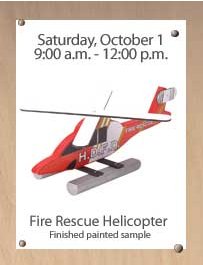
Mark your calendar for the next Kids Workshop at Home Depot:

Saturday, October 1

9:00 a.m. to 12:00 p.m.

The Home Depot

Kids Workshop making a fire rescue helicopter

      • FREE family activity
      • Designed for children ages 5-12
      • All children will get to keep their craft
      • All children will receive a FREE Kids Workshop apron, commemorative pin, and certificate of achievement

Hope you all have a great weekend! Come share what activities you plan to accomplish this weekend on the Using Time Wisely’s Facebook page. I look forward to chatting with you there.

Filed Under: Going Out, Free Outings, Family Activities Tagged With: Home Depot

Grocery Shopping: Gathering your Savings – Overview

September 29, 2011 by Tracy

Photograph Credit: Flickr (Terra Nova)

As I approached the checkout station at Bi-Lo last week, I chose a short line where the customer ahead was getting ready to pay for her groceries. As I began unloading my cart, the cashier announced her total of $186. Without a visual response, the customer paid the cashier and was on her way.

I watched as she pushed her little-more-than-half-full cart out the door. Wow! I remember making the same type of purchase a few years ago. Back then, I thought I was shopping well. I chose the least expensive store, generic items, and used the occasional coupon.

Having learned the sales cycles, I now cannot imagine paying more than half price to feed my family. You, too, can have great savings success stories. I am sharing all my tips and tricks in my food cycle (for lack of a better title) series.

Thus far, I have taken you through my menu planning process, and we are still covering “the method to my madness” in grocery shopping. To help you see where we have been and where we are headed, here is a sequential overview:

My Menu Planning Process

Step One: Choosing a menu plan

Step Two: Adding meals to your plan from the food you have on hand

Step Three: Continuing to add meals

My Grocery Shopping Process

Step Four: Creating grocery lists

    • Part 1 – Identify needed items
    • Part 2 – Select sale items
    • Part 3 – Compile a list for each store

Beginning next week . . .

Step Five: Gathering your savings

    • Part 1 – Entering the store
    • Part 2 – Shopping your list
    • Part 3 – Checking out with confidence

The next set of posts in this series will focus on the shopping experience. I will share my current system, so feel free to share what works for you. I am always interested in your comments, suggestions, and victories. As you plan and shop to feed your family, I trust you are aiming to increase your savings, lower your budget, and stock your shelves. Happy savings!

Question: What additional topics would you like to see addressed? Please add your answer to the comments. I will do my best to answer your questions.

Filed Under: Grocery Shopping, Food Tagged With: grocery shopping

Krispy Kreme: National Coffee Day – September 29, 2011

September 29, 2011 by Tracy

Need a pick-me-up today? Celebrate National Coffee Day at a participating Krispy Kreme Doughnut location. If you are a coffee drinker, then enjoy!

Photograph Credit: Krispy Kreme

Question: How often do you drink coffee?

Filed Under: Going Out, Free Outings, Family Activities Tagged With: family activity

Free App: Kindle for PC

September 28, 2011 by Tracy

Photograph Credit: Amazon.com

With e-books all the rage, it seems that many bloggers have authored, are writing, or plan to compose an e-book in the near future (myself included). In case you are wondering, “what is an e-book?,” you are in good company. I first heard this term about 6 months ago and headed to Swagbucks to find the answer. Per Wikipedia, an e-book is defined as:

An electronic book (also e-book, ebook, electronic book, digital book) is a book-length publication in digital form, consisting of text, images, or both, and produced on, published through, and readable on computers or other electronic devices.

Many e-books originate in electronic form without a print version. Going to a bookstore to purchase an e-book would be a waste of time since the transaction would need to be electronic (via the Internet).

These books have become popular since they can be purchased and read immediately. If you have a Kindle or Kindle app for your phone, then you can download e-books for Kindle to your device.

Since I do not own a Kindle, I can still take advantage of e-books for Kindle by downloading and reading them on my computer and/or laptop with the free Kindle for PC app provided by Amazon.com. If you want to read e-books for Kindle on your computer or laptop, then you will need this app installed on each machine. Here’s how to download it:

1. Click on this link.

2. Select the “Download Now” blue button.

3. Follow the directions to run the application.

4. Your Kindle for PC will begin once it is installed.

Now when you find a free to inexpensive e-book, you can download that publication and open it in your Kindle for PC application. 🙂

Next week, I will share some free to inexpensive e-books you might find interesting. In the meantime, relax a little and enjoy your Hump Day!

Question: How many e-books have you downloaded? Please add your answer to the comments.

Filed Under: Miscellaneous Tagged With: Kindle, e-book

Event Planning: Changing my Focus

September 27, 2011 by Tracy

Photograph Credit: Flickr (Craig Jewell)

In My Upcoming 2011-2012 Events‘ post, I shared my involvement with the Kid’s Zone for our Fall Festival. Preparations are underway with the event occurring in about 3 weeks. Yikes!

As I continued working through the details, I got distracted. In making a list of all the vendors, I discovered that I also needed a supply list. As I began another list of the supplies, I realized that I needed a map to know how far away the vendors will be from the power source for extension cords, mats, etc.

By this time I had worked for about 10 minutes without finishing one list. I was no closer to a solution than when I began. Does this happen to you? My brain wanted to plan all the details, but I had no framework for those details.

I. had. to. STOP!

Before getting overwhelmed and quitting, I needed to be using time wisely by changing my focus.

Develop a Framework

Before mastering the details, I needed a framework. Therefore, I went back to my initial list of vendors and finished it. Knowing all the vendors that needed to fit in that space, I sketched an initial map. This rough draft helps me see the big picture when adjustments are needed.

Consider the Sections

With the big picture in place and a tentative map, I then considered which vendors needed power. Identifying where the power sources would be and pairing vendors together, I assigned vendors to sections of the framework.  Working through the different options within my framework keeps my momentum going with forward progress.

TIP: When I am brainstorming, I keep all my sketches. If a plan changes, I can go back to tweak a former sketch. Only when the plan is set will I discard my less-than-stellar sketches.

Work on the details

With a tentative map and sections determined, I concentrated on the details. Returning to the supply list, I then addressed where trash cans needed to be placed, the number of extension cords needed, etc.

By refocusing my scattered brain, that was working miles ahead of where I needed to start, I developed a framework, considered the sections, and worked on the details. In using time wisely, I accomplished the task at hand without frustration once I set a plan. As you can see from this example, I get overwhelmed. But by organizing my thoughts and writing down the ideas and options, I can accomplish much while using time wisely.

Question: What do you do to refocus when you get overwhelmed? Please let me know that I’m not the only one who struggles here. 🙂 Feel free to add your comments and suggestions.

Filed Under: Event Planning, Preparing Tagged With: planning

Next Page »

Welcome to Using Time Wisely!


Presenting organizational tips and tricks to save you money, energy, and time.

To access 5 Ways to Using Time Wisely Today, click "like" on my facebook page and join in on the journey of Using Time Wisely.

Looking for something?

Email Newsletter

Sign up to receive email updates and to hear what's going on with us!

Copyright © 2026 · Lifestyle Pro Theme on Genesis Framework · WordPress · Log in