
• Home
  • About Tracy
  • Contact Me

Using Time Wisely

Organized to save money, energy, and time

  • Email
  • Facebook
  • Pinterest
  • RSS
  • Twitter
  • YouTube
  • Document Organization
    • Overview
    • Box 1
      • Credit Report/Cards
        • Credit Reports
          • Credit Updates
          • Credit Scores
        • Credit Cards
      • Personal
      • Home Ownership
      • Vehicles
    • Box 2
      • Life Insurance
      • Major Medical
      • Tax-Favored Programs
      • Prescriptions
      • Dental & Vision
      • Special Health Policies
      • Short-term Disability
      • Long-term Disability
      • Personal Insurance
    • Box 3
      • Social Security Documents
      • Retirement
      • Investments
      • Estate Planning
      • Tax Records
  • Household
    • Cleaning
    • Maintaining
    • Organizing
    • Scheduling
      • Laundry
  • Event Planning
    • Assisting
    • Attending
    • Coordinating
      • Birthday Party
      • Christmas
      • Dinner Party
      • Fall Festival
      • Field Trip
      • Lemonade Stand
      • Thanksgiving
    • Learning
    • Preparing
    • Serving
  • Miscellaneous
    • Communication
      • Customer Service
      • E-mail
      • RSS Feed Reader
    • Goals
    • Organization
    • Time Management
      • To Do List
  • Food
    • Food Prep
    • Grocery Shopping
      • Lists
      • Pricing
    • Menu Planning
    • Recipes
    • Stockpile
  • Family Activities
    • Going Out
      • Free Outings
      • Inexpensive Outings
      • Summer
    • Rewards
      • Good Grades
      • Reading
      • Summer Reading
    • Staying at Home
  • Stretching Your Dollars
    • Daily Deals
      • Groupon
      • LivingSocial
    • Drugstores
      • CVS
    • Gas Prices
    • Gifts
    • On-line Shopping
    • Pictures
    • Products
    • Restaurants
    • School Items
    • Tips
You are here: Home / Archives for Stretching Your Dollars / Daily Deals

Daily Deal Site: LivingSocial – Part 1 of 2

September 10, 2011 by Tracy

Photograph Credit: LivingSocial

I love daily deal sites! As the name suggests, these types of web sites offer a fantastic deal each day at a 50-90% discount to local attractions, restaurants, performances, and more. (See why I like these sites? :-))

One of these daily deal sites is www.LivingSocial.com.

Disclosure: The LivingSocial link in this post is Using Time Wisely’s affiliate link. When you register (for free) through my link and make a purchase, then LivingSocial compensates me.

Though you can access your free registration through the LivingSocial web site, your support of Using Time Wisely is greatly appreciated. Here’s my full disclosure policy.

My LivingSocial Account

Current Vouchers

    • $12 to spend at Stevi B’s Pizza (paid $6 = 50% savings)
    • 2 tickets to a dramatic production (deal cost $16 = 50% savings)

Used Vouchers

    • Admission for 4 to a local water park – toddler was free (paid $16 = 60% savings)

We used our voucher on a day Paul was off work, our friends could join us, and everyone was well. Though the park was busy, it was a nice family activity. If the deal comes back, I will definitely purchase it again.

Getting a LivingSocial account

Want to stretch your dollars by getting vouchers at 50-90% discount? Come sign up for a free LivingSocial account. Need some help? Let me show you the way:

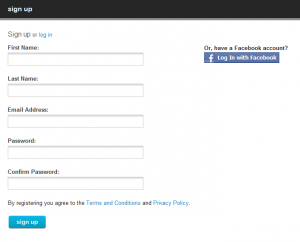
Sign up

1. Go to www.livingsocial.com

2. In the top right corner, click “sign up”

3. Add your name, e-mail address, and password with confirmation
Photograph Credit: LivingSocial

4. Click “sign up”

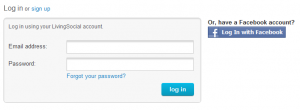
Log In

1. Back on the Home page (click on the LivingSocial logo), select “log in” in the top right corner
Photograph Credit: LivingSocial

2. Enter your e-mail and password

3. Click “log in”

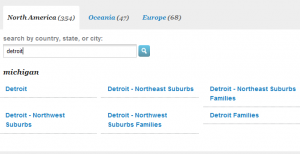
Change the Deal City

1. On the left sidebar, select the bottom option, “more cities”

Photograph Credit: LivingSocial

2. In the search box, enter your location and click enter (i.e., Detroit, Michigan)
Photograph Credit: LivingSocial

3. Click on the location of your choice (i.e., Detroit – Northeast suburbs)

4. The deal of the day changes to that location’s offer

Subscribe to your City’s Daily Deal

In using time wisely, refrain from from visiting LivingSocial’s web site each day. Just have the deals delivered to your e-mail inbox. The subscription process is very simple.

1. In the top right hand corner under your name, select “subscribe”

2. Confirmation of your subscription is “subscription successful”

You will now get an e-mail each day from LivingSocial with the daily deal. You can then choose to purchase or by-pass the deal without visiting the web site. (Love these options to help me save money, energy, and time.)

To use LivingSocial in stretching your dollars, you need to sign up, log in, change to your local city, and subscribe to your city’s daily deal. You will then be on your way to finding great local deals.

Our family enjoys trying new activities. By saving at least 50% on these adventures, I can plan more activities without breaking the bank. Next week, I will cover how to purchase a deal, locate your voucher, and redeem your voucher. In the meantime, keep using time wisely as you stretch your dollars!

Question: What is your favorite daily deal site? Please add your answer to the comments.

Filed Under: Daily Deals, LivingSocial, Stretching Your Dollars Tagged With: LivingSocial

Daily Deal Site: LivingSocial – Part 2 of 2

September 17, 2011 by Tracy

Photograph Credit: LivingSocial

Stretching your dollars is possible with daily deal sites like LivingSocial. If you subscribed to your city’s daily deal (instructions given in last week’s post), then you might have seen the Whole Foods deal earlier this week. The deal included many cities that contain a Whole Foods grocery store. During those few hours the deal was live, one could purchase a $20 voucher for $10. These 50% savings for groceries helps in stretching those dollars and maximizing savings.

By having the deals delivered to my personal e-mail account, I can evaluate the deal and make a decision before the vouchers sell out or the deal expires. In case you are confused about the deals or need more information, here’s how to purchase a deal, locate your voucher, and redeem your voucher.

Purchase a Deal

1. Read the fine print. All the deals are a little different, so you want to be sure that you are purchasing a voucher you can use. If you are purchasing a Christmas gift, then you want to be sure that the expiration date is in 2012. I recently found a voucher that was due to expire by the end of September. Knowing our family could not use the voucher, we gave it to relatives who were thrilled with the gift.

2. Press the “Buy Now” button. When you are satisfied with the fine print guidelines and price for the deal, press the “buy now” button.

3. Adjust your options. On this page you can change the quantity, add gifts, change your payment options (when you are signed in), and view your purchase total.

4. Select “Purchase my deal” button. When you have adjusted your options, select “purchase my deal” button. Your payment will be processed. Please do not select this button if you are not sure you want the deal. Once you press “purchase my deal,” the deal is yours.

Locate your Voucher

Via E-mail

1. Check your e-mail account. Once you purchase the deal, you will receive an e-mail confirming your purchase and giving you instructions regarding when your voucher will be available.

2. Watch your e-mail account. Another e-mail will be sent when your voucher is available to print. When you receive this e-mail, a link will be included to direct you to your voucher.

3. Click the link in your e-mail message. When you click the link, you will be directed to your LivingSocial My Vouchers page. All your available vouchers will be listed.

4. Click “view voucher.” To print your voucher, click the “view voucher” button. A .pdf of your voucher will load, and you can print it for use.

Via LivingSocial

1. Check your LivingSocial account. After purchasing the deal, LivingSocial will place the voucher in your account after processing your payment. This process can take minutes to a day depending on the popularity of the deal. To access your LivingSocial account, go to www.livingsocial.com.

2. Log in. Enter your e-mail address and password to log in.

3. Go to “my vouchers.” In the upper right hand corner, click on the “my vouchers” tab. All your available vouchers will be listed.

4. Click “view voucher.” To print your voucher, click the “view voucher” button. A .pdf of your voucher will load, and you can print it for use.

Redeem your Voucher

1. Read the fine print. One of our deals required a reservation. Therefore, I called prior to the date we planned to use the voucher, and the establishment honored our reservation. The fine print will give you the information you need for unusual circumstances.

2. Take your printed voucher to establishment. When I used our water park voucher, I took the printout up to the box office.

3. Present your voucher. When the cashier greeted me, I presented the LivingSocial voucher. We were then given our arm bands and thanked for making the purchase. Most establishments are aware of the LivingSocial deals, and they welcome your redemption of the voucher.

As you partner with LivingSocial, purchase your deals, locate your vouchers, and redeem your vouchers, you will be able to stretch your dollars. To make the deals better, you can subscribe to LivingSocial to have the deals delivered to your e-mail inbox which helps in using time wisely.

Though you may not be a fan of daily deal sites, as you see the savings to be had, you might change your mind. I post on Using Time Wisely’s Facebook page my daily deal purchases. Come “like” Using Time Wisely and add your favorite deals.

Question: How many vouchers do you have your account? Come add your answer to the comments.

Filed Under: Daily Deals, LivingSocial, Stretching Your Dollars Tagged With: LivingSocial

Daily Deal Site: Groupon.com

October 1, 2011 by Tracy

Photograph Credit: Groupon

As the cooler air wafts through my home, I have been feeling more energized as I complete some of those maintenance items around the house. Besides the seasonal yard work, my house needs to be pressure washed. Thankfully, Groupon, one of my favorite daily deal sites, recently offered a great deal on pressure washing from a local company.

Instead of paying the usual $250 price, I purchased a Groupon voucher for $129! This awesome deal was offered at 53% off the company’s regular price!

Using daily deal sites to purchase items our family needs helps stretch our dollars. Though the deals are daily, I only purchase items we need, will use, or will give as gifts to others.

To help you in using time wisely to view the daily deal from Groupon in your city, I have placed an affiliate link on the right sidebar. By visiting www.usingtimewisely.com each day, you can view your city’s daily deal.

Disclosure: The Groupon link in this post is Using Time Wisely’s affiliate link. When you make a purchase (with no additional fee) through my link, then Groupon compensates me.

Though you can access your city’s daily deal through the Groupon web site, your support of Using Time Wisely is greatly appreciated. Here’s my full disclosure policy.

As you view deals that are 50-90% off the regular price, be sure to read the fine print. I always check the location, expiration date, and restrictions. If I find these guidelines doable, then I will consider purchasing.

I routinely bypass great sales to stay within my budget. For me, purchasing a great deal only to go over budget is not worth the thrill of the deal. As I evaluate the daily deals from sites like Groupon and LivingSocial, I ask myself these questions:

  • Does the recipient need this voucher?
  • Would the recipient use the voucher?
  • Would the recipient love the voucher?
  • Do I have room in my budget for this purchase?
  • Do I want to spend money on this voucher?

There have been deals that I have foregone just because I did not want to spend any money. The recipient would have used and loved the voucher, and I had the available funds. But at that time, I chose not to spend the money. Looking back, I have no regrets. Deals come and go, and I have lots of opportunities to stretch our dollars.

On those days when I find awesome deals that we need, I enjoy snagging them at a deep discount. Daily deal sites, like Groupon, help save money, energy, and time. Whether you are looking for restaurants, family activities, or pressure washing, continue using time wisely as you stretch your dollars.

Question: What additional questions do you consider before making a purchase? Please add your answer to the comments.

$29 for Oil Change, Tire Rotation, and Winter Inspection or $75 for Three Oil Changes with Tire Rotation and Inspections at The Wrench-It Center.

Filed Under: Daily Deals, Groupon, Stretching Your Dollars Tagged With: Groupon

Understanding Daily Deal Sites

October 15, 2011 by Tracy

After posting about the LivingSocial and Groupon daily deal sites, I received some additional questions regarding how these sites work. To help you in stretching your dollars, I gladly want to address these three questions.

How do Daily Deal sites work?

Each day these sites offer one local deal that is deeply discounted – between 50-90% off the regular price. The deal is usually good for the day, and then the offer expires. Then tomorrow will have another local deal.

These deals range from restaurants, sporting events, theatre performances, oil changes, massages, and vacations. The Groupon.com advertisement on my sidebar shows you the current daily deals for your area. You can click the “view side deal” to see another offer in your area.

NOTE: The advertisements on my blog are my affiliate links. This means that Using Time Wisely applied to the affiliate programs for those sites and was accepted. Each program is a little different, but Using Time Wisely gets compensated with money, credits, or points when a reader clicks on the link and makes a purchase.

The prices are the same through these sites if you click through my link or just go through the company’s web site. These companies offer affiliate links because they want the advertising and continued support from bloggers, like myself. As you click through my link, you are supporting Using Time Wisely. Thank you!

How do you buy the voucher?

If you see a deal you want, just click the “purchase” or “buy it” button. If you have an account, then your purchase will be applied to your saved credit card and processed. If you do not have an account, then you will need to create one.

Your account will hold your vouchers, so you need an account. Setting up your account is free with no added costs. It is just a holding space for your vouchers.

Will the voucher be mailed to me?

No. After your payment processes, the company will send a confirmation to the e-mail address used at registration. (I use my junk e-mail account for most of the daily deal sites.) In the confirmation e-mail will be a link to your account. When you click on the link, you will be directed to your voucher’s page where all your available vouchers will be listed. You can then print the voucher to be used on your next visit to the establishment.

Using daily deal sites to purchase items you need or enjoy is a great way to stretch your hard-earned dollars. Thank you for asking questions. If you have additional questions or concerns regarding this post or any other information, please leave a comment, contact me, or post on the Using Time Wisely Facebook wall. My goal is to help you stay organized to save money, energy, and time.

Question: What is your favorite Daily Deal site? Feel free to start the conversation by leaving a comment. I will be sure to join you.

Filed Under: Daily Deals, Stretching Your Dollars Tagged With: daily deal sites

Swag Bucks: Intermediate Guide

January 21, 2012 by Tracy

Photograph Credit: Swag Bucks

Photograph Credit: Swag Bucks

Having had opportunities this week to chat about the benefits of Swag Bucks, I enjoy sharing more ways you can earn Swag Bucks to help in stretching your dollars.

For registration instructions, please visit Swag Bucks: Beginner’s Guide. After registering and conducting basic searches, you can increase your Swag Bucks by doing the following:

1. Download the Swag Bucks Toolbar

NOTE: The toolbar is only available for Internet Explorer, Mozilla Firefox, and Safari browser users. Chrome toolbar is coming soon. I use the toolbar through Firefox on my desktop while waiting patiently for the release of the Chrome toolbar for my laptop.

The Swag Bucks toolbar includes a search field. Anytime I need to search a topic, I open up a new tab and type the topic into the Swag Bucks toolbar. By skipping the step of searching for Swag Bucks and then my topic, I save time by using the toolbar.

Another feature I find helpful is the mail notices. Periodically Swag Bucks releases codes for free Swag Bucks. You will get a red envelope notice on the toolbar with instructions for redeeming that code.

Redeeming your Swag Bucks is quick when selected from the toolbar.

NOTE: Adding toolbars on your computer may cause your computer to slow down. My husband, the computer tech, informs me each time I mention waiting on my computer to process that my two toolbars are slowing me down. However, I choose to keep Swag Bucks since the benefits are worth a little extra time.

2. Bookmark Frequently Used Pages

If you visit your web site or e-mail account each day, then setup a bookmark to that account through a Swag Bucks search.

    • Go to Swagbucks.com
    • Type in your web site (i.e., Using Time Wisely)
    • Click “Search”
    • Verify that the site you want appears in the search results
    • Bookmark that page (click on the star in the address bar)

When you need to go to that site, click on your bookmark and Swag Bucks will re-search those words. You can save precious time using your bookmark while searching through Swag Bucks.

3. Print Coupons

After compiling your grocery lists, check Swag Bucks for more coupons. If you plan to use the coupons offered, then print them out and redeem them. For each coupon you print AND redeem, you will earn 10 Swag Bucks. This perk is nice, but it does take up to 3 months to see those Swag Bucks deposited into your account.

If you do not plan to use the coupon, then save your printer ink and bypass that coupon. You will not get any Swag Bucks for printing the coupon. You must print and redeem to get the Swag Bucks.

4. Search on Fridays

Fridays are Mega Swag Bucks Days. Extra Swag Bucks are given throughout the day. You have a good chance of winning 20 or more Swag Bucks for your searches on Mega days. Though there is no guarantee that you will win, Swag Bucks gives higher value Swag Bucks every Friday.

5. Purchase Groupons

Groupons.com is a daily deal site offering a new deal each day. The widget on my sidebar indicates the Groupon of the day. If I choose to buy that Groupon, I can also earn Swag Bucks. The process is a bit complicated, but worth the time to earn those gift cards.

Because Christina at Centsible Savings wrote a great explanation in a guest post on moneysavingmom.com, I recommend following these guidelines. If this process is too tedious, you can buy your deal through the link on Using Time Wisely. Using Swag Bucks is just another way to earn those rewards to stretch your dollars.

In using time wisely, the toolbar setup occurs once, the bookmarks used daily, coupons checked weekly, Friday searches weekly, and Groupons purchased periodically. Though there are many more ways to earn Swag Bucks (coming in next week’s post), I choose these five options to increase my Swag Bucks while using time wisely.

Note: Affiliate links included in this post where Using Time Wisely receives compensation by Swag Bucks for those registering through these links.

Question:  What is your favorite way to earn Swag Bucks? Please add your answer to the comments.

More Swag Bucks Posts:

  • Swag Bucks: Beginner’s Guide
  • Swag Bucks: Intermediate Guide
  • Swag Bucks: Advanced Guide

Filed Under: Groupon, Stretching Your Dollars Tagged With: Swag Bucks

Next Page »

Welcome to Using Time Wisely!


Presenting organizational tips and tricks to save you money, energy, and time. Enjoy the journey of Using Time Wisely.

Looking for something?

Copyright © 2026 · Lifestyle Pro Theme on Genesis Framework · WordPress · Log in