• Home
  • About Tracy
  • Contact Me

Using Time Wisely

Organized to save money, energy, and time

  • Email
  • Facebook
  • Pinterest
  • RSS
  • Twitter
  • YouTube
  • Document Organization
    • Overview
    • Box 1
      • Credit Report/Cards
        • Credit Reports
          • Credit Updates
          • Credit Scores
        • Credit Cards
      • Personal
      • Home Ownership
      • Vehicles
    • Box 2
      • Life Insurance
      • Major Medical
      • Tax-Favored Programs
      • Prescriptions
      • Dental & Vision
      • Special Health Policies
      • Short-term Disability
      • Long-term Disability
      • Personal Insurance
    • Box 3
      • Social Security Documents
      • Retirement
      • Investments
      • Estate Planning
      • Tax Records
  • Household
    • Cleaning
    • Maintaining
    • Organizing
    • Scheduling
      • Laundry
  • Event Planning
    • Assisting
    • Attending
    • Coordinating
      • Birthday Party
      • Christmas
      • Dinner Party
      • Fall Festival
      • Field Trip
      • Lemonade Stand
      • Thanksgiving
    • Learning
    • Preparing
    • Serving
  • Miscellaneous
    • Communication
      • Customer Service
      • E-mail
      • RSS Feed Reader
    • Goals
    • Organization
    • Time Management
      • To Do List
  • Food
    • Food Prep
    • Grocery Shopping
      • Lists
      • Pricing
    • Menu Planning
    • Recipes
    • Stockpile
  • Family Activities
    • Going Out
      • Free Outings
      • Inexpensive Outings
      • Summer
    • Rewards
      • Good Grades
      • Reading
      • Summer Reading
    • Staying at Home
  • Stretching Your Dollars
    • Daily Deals
      • Groupon
      • LivingSocial
    • Drugstores
      • CVS
    • Gas Prices
    • Gifts
    • On-line Shopping
    • Pictures
    • Products
    • Restaurants
    • School Items
    • Tips
You are here: Home / Archives for Document Organization / Box 3

Overview: File Box 3

August 12, 2012 by Tracy

Overview of File Box 3Creating spaces for all your important documents clears the piles and clutter keeping you from making progress. I know it is easier said than done. I get it. But the freedom from rising above the paper clutter feels like a heavy weight lifted from your shoulders. Want that freedom? Then, let’s organize.

Maintaining a workable filing system requires trial and error. The key is workable, and what works for me will not necessarily work for you. Just keep in mind that making adjustments to better serve your needs is always better than following my system exactly.

In our document organization journey thus far, we have designated a home for personal and current items in Box 1, our insurance paperwork in Box 2, and now focus on retirement and investment records in Box 3. The filing system I have chosen houses our records in 3 blue accordion files.

Having written overviews for Box 1 and Box 2, I wanted to continue this series with an overview of Box 3. This third accordion file consists of 12 file openings. The following list indicates the categories and the number of file openings dedicated to each category in my file:

File Box 3

  • Social Security Documents (1)
  • Retirement Plan Documents (2)
  • Investment Documents (2)
  • Estate Planning Documents (5)
  • Tax Records Documents (1)

Using the labels provided with my accordion file, I simply write the category on the label and attach to first file opening of each category. To give you a visual image of this file box organization, I will post a show and tell of file box 3 next week.

As you continue organizing your important documents focus on a system that works for you. If the system looks great but remains disorganized or difficult to manage, then that system is not helping you in using time wisely. A workable system will save you time and energy as you organize. In using time wisely, get your system in place, and then go organize.

Keep going. If you are still working through Box 1 or Box 2, then take a break as you need it. Then come back and keep filing your important documents into your workable system. I just want to help you find a system that works for you, keeps your documents safe, and offers you freedom from your paper clutter while using time wisely. Happy organizing!

Question: How does your important document organization differ from my accordion filing system?

Filed Under: Box 3, Document Organization, Overview Tagged With: Overview

Show and Tell: File Box 3

August 19, 2012 by Tracy

Overview of File Box 3Similar to shopping for the ingredients, finding a recipe, and gathering the pans, bowls, and utensils, preparing your filing system before adding documents gives you the tools to finish the project.

If last week’s file box 3 overview parallels preparing to cook a dish, then this week’s show and tell is like greasing the baking dish.

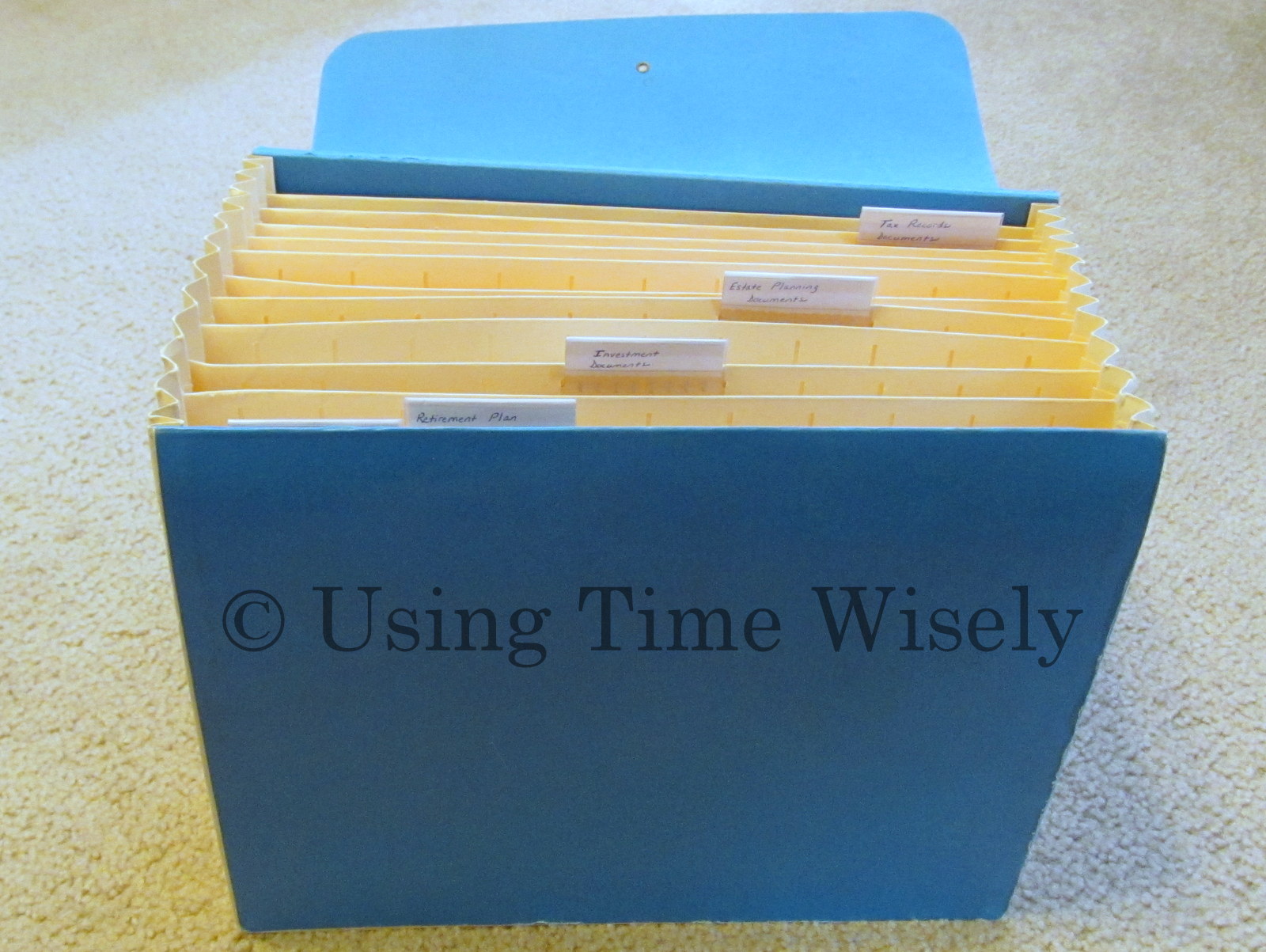
This file box 3, organized in the same fashion as file box 1 and file box 2, has multiple categories. As a sample of a way to setup this file, I present a pictorial show and tell of File Box 3 of my accordion filing system.

The closed accordion file box. Imagine this, file box 3 is missing its string. Yep, all three of my file boxes operate just fine without the string. When the strings were used, they got caught on other files until they finally snapped. Without the strings, I can access these files without getting caught on other boxes which saves time and energy. Though this accordion file is different now than when first purchased, I adapted the file to fit my style.

Show and Tell File Box 3

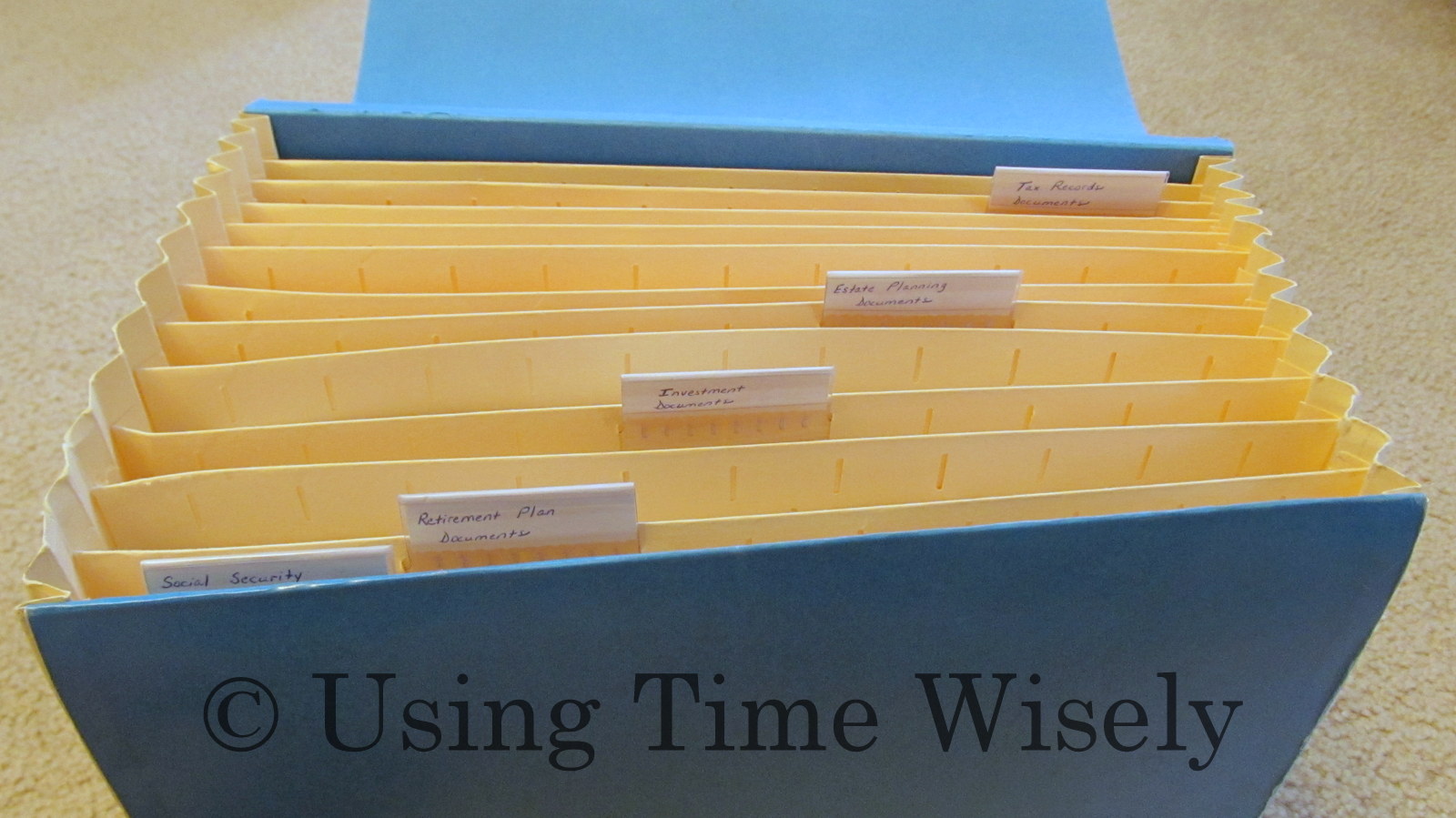
The opened accordion file box. In using time wisely, I choose not to label each of the 12 file slots. For me, more is not always better. To stay organized, I choose to only label the categories. I used the plastic inserts that came with the accordion file to write the category title, one category per label. Some categories expand into 2 or more file openings while others only use one slot. If you prefer to label each slot, then adjust these guidelines to fit your needs.

Show and tell File Box 3

Close-up look at the file tabs. In this file, I have used five tabs to identify the five categories in this retirement and investment file. To make the tabs easy to read, I have placed them in a row from left to right. The five categories identified in this box are:

      • Social Security Documents
      • Retirement Plan Documents
      • Investment Documents
      • Estate Planning Documents
      • Tax Records Documents

Show and tell File Box 3

Finding a system that works for you will aid in using time wisely. My file may contain more or less documents than you possess. I share my filing system to give you an organizational system framework from which to start. Please adjust this file to meet your needs.

As I cover each category, I will explain the retirement and investments Paul and I have chosen for our family. These are our choices. I am not a financial advisor, nor am I suggesting that you follow in our footsteps. My goal is to assist you in organizing your important documents.

This pictorial overview is the framework for all our important retirement and investment documents. Next week, I will begin working through file box 3 one category at a time. Come join me as we get these documents organized. Feel free to use this visual image to setup your own accordion filing system. Happy organizing!

Question: What object have you adapted to better meet your style?

Filed Under: Box 3, Document Organization, Overview Tagged With: Overview

Social Security: Getting Your Annual Statement

August 26, 2012 by Tracy

Overview of File Box 3In organizing our important documents, we have worked through Box 1 (personal documents) and Box 2 (insurance documents).

With an overview and a show-and-tell of Box 3 complete, I will begin sharing the contents of my file box 3 (retirement and investment documents) starting with the first category – Social Security Documents.

The Social Security Documents category contains the following documents which you may or may not have:

Social Security Documents

      • Annual Statements
      • Identification Cards
      • Photocopies of Identification Cards
      • Copies of checks for paid self-insurance tax

Getting your Annual Statement

If you are 25 years old or older and not receiving Social Security benefits, you should receive your annual statement via the U.S. Postal Service. Per the Social Security Administration’s website, the annual statements are mailed 3 months prior to the worker’s birth month.

Not sure of the accuracy of that information because I receive my Social Security Annual Statement about a month after my birthday. If my statement is mailed 3 months prior to my birth month, then the processing takes a long time, or Pony Express is still alive and well. 🙂

If you have not received your Social Security Annual Statement, you can access it online. Follow this link to the Social Security website. You will need to create an account to verify your identity.

To get your important documents organized to save money, energy, and time, start. You can begin at Box 1, Box 2, or right here as we tackle Box 3 week by week. To guide you along this journey, I will present a project each week to get your important documents organized, accurate, and complete. Are you ready to get organized?

Weekly Project: Get your Social Security Annual Statement.

Find it in your paperwork or obtain it on-line.

Next week, we will continue this journey reviewing your annual statement for accuracy. Keep organizing. I know your schedule is busy, school is back in session, and the paperwork pile remains.

In using time wisely to get your important documents organized you will save money (from paying for documents you already have), energy (searching for documents in a thick pile), and time (moving documents to find the right one). Start where you are, complete the weekly project, and happy organizing!

Question: Which box/file are you organizing? 

Filed Under: Social Security Documents, Box 3, Document Organization Tagged With: social security

Social Security: Reviewing Your Annual Statement

September 2, 2012 by Tracy

Overview of File Box 3As I pulled out a Social Security Annual Statement to write this post, I looked at the date. Yikes!

I have Paul’s 2011 statement but not this year’s statement. I checked the date on my record and found 2010’s statement but missing 2011 and 2012.

Guess I did not complete last week’s project. Oops! I’ll have to get on that this week. 😉

If you completed last week’s project, then you are ready to review your Social Security Annual Statement for accuracy.

Reviewing Your Annual Statement

Though your statement consists of 4 pages, only pages 1 through 3 contain information you can verify. The last page offers facts and extra help getting information. To review your annual statement, check the following information for accuracy:

Page 1

1. Your name listed after “Prepared especially for”

2. Your name and address under the bar code

Page 2

1. Your date of birth – the third line from the bottom of the first section

2. Your social security number or the last 4 digits

Page 3

Match your W-2 Wage and Tax Statements for each year with the listed amount under Your Earnings Record. You should find Your Taxed Social Security Earnings in Box 1 and Your Taxed Medicare Earnings in Box 3 of your W-2 form.

If you find discrepancies between your records and the numbers listed on your Social Security Annual Statement, then note those differences and set aside your documentation.

Weekly Project: Review your Social Security Annual Statement.

Though this step is time-consuming, you are the only one who can verify this information. If you cannot find your W-2 forms, work with what you have. Keep searching for those tax records because your Social Security Annual Statement determines your future benefits.

In using time wisely, review your annual statement and note all incorrect information. Next week, I will share the process I undertook to correct the discrepancies in my record. Keep organizing. I’m working along with you updating and verifying our information. Happy reviewing!

Question: How do you like the weekly project? 

Filed Under: Box 3, Social Security Documents, Document Organization Tagged With: social security

Social Security: Correcting Your Annual Statement

September 9, 2012 by Tracy

Insurance File - Box 2 of Important DocumentsWith your Social Security Annual Statement obtained and reviewed, you may find some inaccuracies.

Though I only had about 10 years of work experience when I first reviewed my statement, I found incorrect information.

Armed with documentation to prove the validity of my challenge, I took these steps to correct my Social Security Annual Statement.

Correcting my Social Security Annual Statement

Upon reviewing my Social Security annual statement, I found two amounts on Page 3 that failed to record my full Taxed Social Security Earnings from Box 1 on my W-2 statements. Armed with my Social Security card, my annual statement, and W-2 Wage and Tax Statements, I went to my local Social Security office.

When I arrived, I waited in a short line before seeing a representative at the counter. Upon showing the clerk the discrepancies, she took my forms to a back office. She then came back with my documents and said I would see the changes on my next annual statement.

Though I really wanted verification, which she could not provide, I left the office. The next year, I received a corrected Social Security Annual Statement.

During my interaction, the Social Security office did not accept phone calls, so I had to visit the office. Also, the information was not computerized, so copies were taken of my documentation and sent to headquarters for processing. Hopefully, the process for you will prove easier.

Correcting your Social Security Annual Statement

When you find a discrepancy on your annual statement, the Social Security Administration invites you to contact them via telephone or mail:

Call us right away at 1-800-772-1213 (7 a.m.–7 p.m. your local time) if any earnings for years before last year are shown incorrectly. Please have your W-2 or tax return for those years available.

If you are deaf or hard of hearing, you may call our TTY number, 1-800-325-0778.

If you have questions about your personal information, you must provide your complete Social Security number.

If you are in the United States, you also may write to the Social Security Administration, Office of Earnings Operations, P.O. Box 33026, Baltimore, MD 21290-3026.

If you are outside the United States, please write to the Office of International Operations, P.O. Box 17769, Baltimore, MD 21235-7769, USA.

In using time wisely to correct your Social Security Annual Statement press on. Gather your documents, make the call, and proceed until your annual statement is accurate. Keep plugging along. Once completed, review your statement annually.

Hang in there! Your future benefits depend on you using time wisely now. Working along with you!

Question: Do you keep all your W-2 forms from your first job to the present?

Filed Under: Box 3, Social Security Documents, Document Organization Tagged With: social security

Next Page »

Welcome to Using Time Wisely!


Presenting organizational tips and tricks to save you money, energy, and time. Enjoy the journey of Using Time Wisely.

Looking for something?

Copyright © 2026 · Lifestyle Pro Theme on Genesis Framework · WordPress · Log in