
• Home
  • About Tracy
  • Contact Me

Using Time Wisely

Organized to save money, energy, and time

  • Email
  • Facebook
  • Pinterest
  • RSS
  • Twitter
  • YouTube
  • Document Organization
    • Overview
    • Box 1
      • Credit Report/Cards
        • Credit Reports
          • Credit Updates
          • Credit Scores
        • Credit Cards
      • Personal
      • Home Ownership
      • Vehicles
    • Box 2
      • Life Insurance
      • Major Medical
      • Tax-Favored Programs
      • Prescriptions
      • Dental & Vision
      • Special Health Policies
      • Short-term Disability
      • Long-term Disability
      • Personal Insurance
    • Box 3
      • Social Security Documents
      • Retirement
      • Investments
      • Estate Planning
      • Tax Records
  • Household
    • Cleaning
    • Maintaining
    • Organizing
    • Scheduling
      • Laundry
  • Event Planning
    • Assisting
    • Attending
    • Coordinating
      • Birthday Party
      • Christmas
      • Dinner Party
      • Fall Festival
      • Field Trip
      • Lemonade Stand
      • Thanksgiving
    • Learning
    • Preparing
    • Serving
  • Miscellaneous
    • Communication
      • Customer Service
      • E-mail
      • RSS Feed Reader
    • Goals
    • Organization
    • Time Management
      • To Do List
  • Food
    • Food Prep
    • Grocery Shopping
      • Lists
      • Pricing
    • Menu Planning
    • Recipes
    • Stockpile
  • Family Activities
    • Going Out
      • Free Outings
      • Inexpensive Outings
      • Summer
    • Rewards
      • Good Grades
      • Reading
      • Summer Reading
    • Staying at Home
  • Stretching Your Dollars
    • Daily Deals
      • Groupon
      • LivingSocial
    • Drugstores
      • CVS
    • Gas Prices
    • Gifts
    • On-line Shopping
    • Pictures
    • Products
    • Restaurants
    • School Items
    • Tips
You are here: Home / 2012 / Archives for May 2012

Archives for May 2012

Register Review: May 29, 2012 Edition

May 31, 2012 by Tracy

Time to check one or more receipts for savings strategies and combinations to feed our families while spending less and saving more.

For earlier editions of the Register Review, please click on these links for more examples:

                  • February 7, 2012
                  • February 21, 2012
                  • March 26, 2012
                  • April 3, 2012

In this edition, I will share my three shopping trips for the week.

In keeping our grocery budget to $80 per week, this week’s shopping trips totaled $75.44, but I will need to get another gallon of milk later in the week.
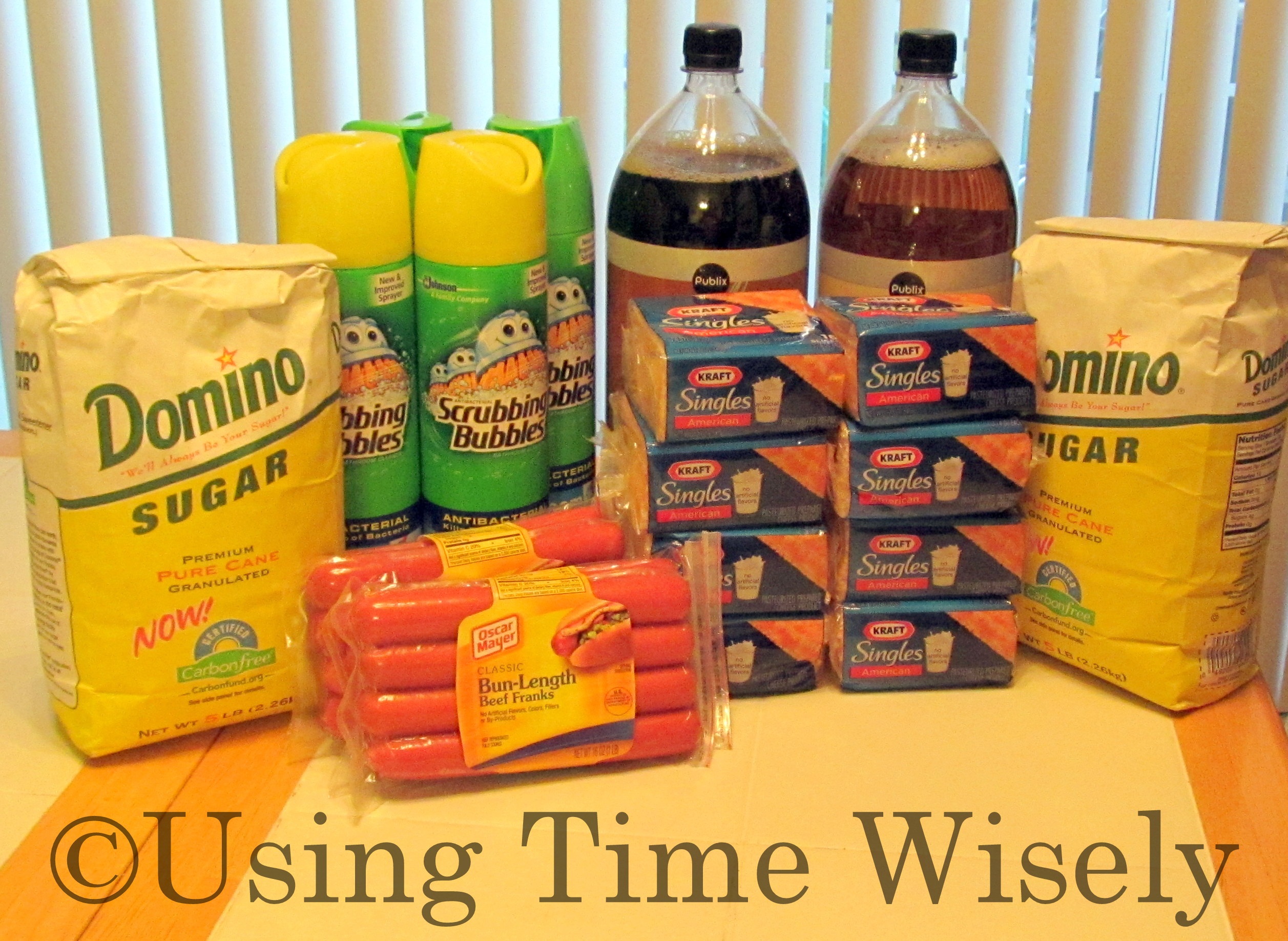
Publix

2 – Oscar Mayer Beef Franks

$5.19 each, on sale buy one, get one free

Paid – $2.60 and $2.59

2 – Domino Premium Pure Cane Sugar, 5 lb.

$3.19, on sale $2.99

Used Publix coupon for $1 off 2

Paid – $2.49 and $2.49

2 – Publix Soft Drinks, 2-liter – Root Beer and Cream Soda

$1.49, on sale 2 for $1

Paid – $.50 and $.50

8 – Kraft American Singles, 12 oz.

$3.29, on sale 2 for $4

Paid – $2, $2, $2, $2, $2, $2, $2, and $2

4 – Scrubbing Bubbles Bathroom Cleaner, 22 or 24 oz.

$3.49, on sale 2 for $5

Used 2 manufacturer coupons for $2 off 2

Paid – $1.50, $1.50, $1.50, and $1.50

Subtotal: $33.17

Tax: $.60

Total: $33.77

In using 3 coupons and purchasing buy one, get one free items and sale items, I purchased $61.01 worth of groceries for $33.77 which is a savings of 45.6%. My goal is 50% savings, but Kraft Singles for $2 per package is a stock up price for me. This shopping trip restocked my cheese and cleaning supplies while staying within our food budget.
Bi-Lo

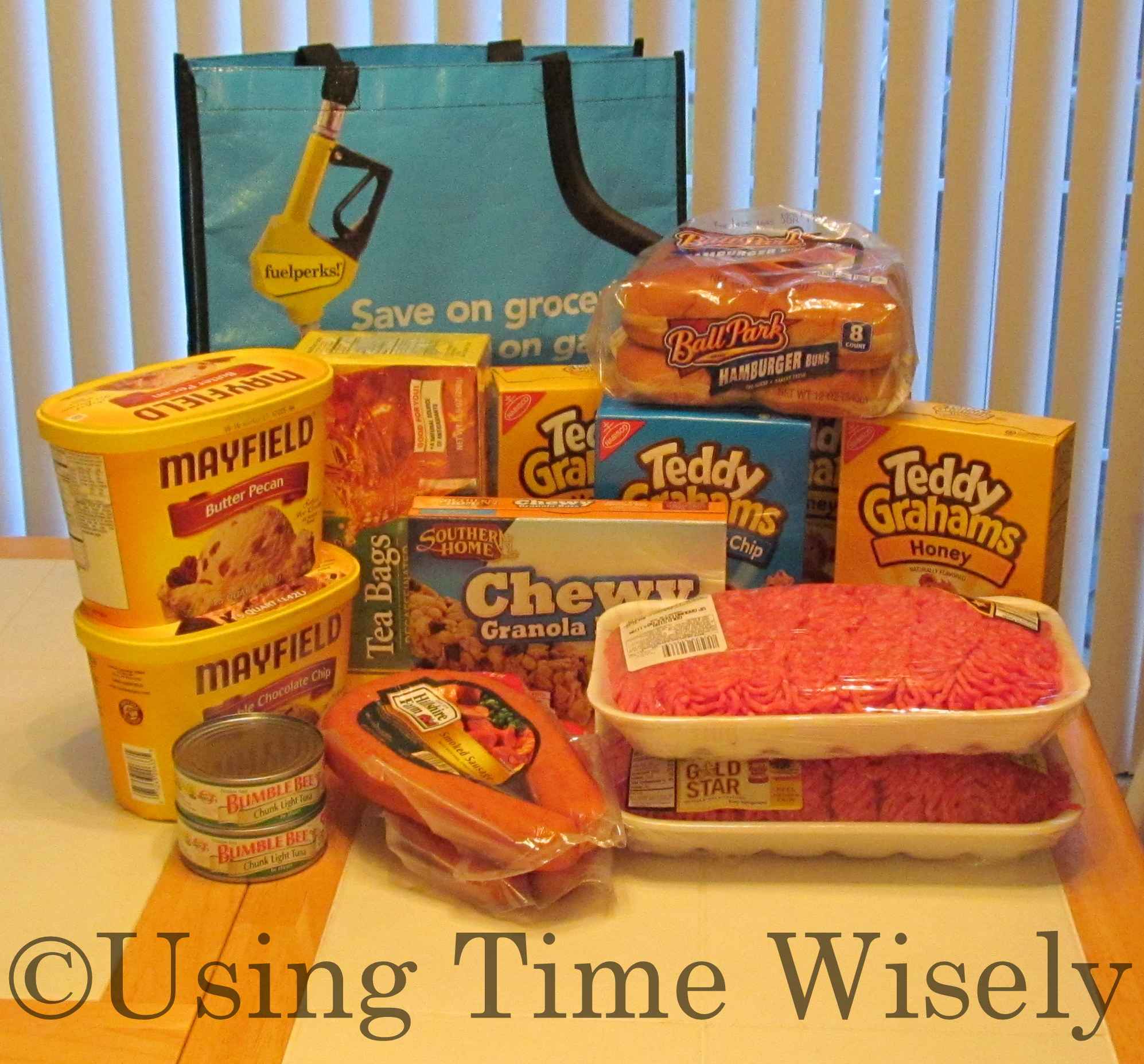
2 – Hillshire Farm Smoked Sausage, 14 oz.

$4.59, on sale 2 for $5

Used 2 manufacturer’s coupons for $.55 off which doubled to $1.10 off each

Paid – $1.40 and $1.40

2 – Mayfield Ice Cream, 48 oz. – butter pecan and double chocolate chip

$5.99, on sale buy one, get one free for $2.99

Used 2 manufacturer’s coupons for $1 off

Paid – $1.99 and $1.99

Ball Park Hot Dog Buns, 8 ct.

$2.49, on sale buy one, get one free for $1.24

Used manufacturer’s coupon for $.55 off which doubled to $1.10 off

Paid – $.24

2 – Ground chuck value pack, $2.49 lb.

$13.74 for 3.41 lb. and $13.33 for 3.26 lb., on sale

Paid – $8.59 and $8.12

4 – Nabisco Teddy Grahams, 8-10 oz.

$3.19, on sale $2.50

Used 2 manufacturer’s coupons for $1 off 2

Used Bi-Lo e-coupon for $.51 off 1

Paid – $1.87, $1.87, $1.87, and $1.88

Southern Home Chewy Granola Bars, 10 ct.

$2.19, on sale for $2

Used Bi-Lo e-coupon for $.51 off 1

Paid – $1.49

2 – Bumble Bee Chunk Light Tuna, 5 oz.

$1.05, on sale for $.89

Used Bi-Lo e-coupon for $.30 off 1

Paid – $.74 and $.74

Southern Home Decaffeinated Tea Bags, 48 ct.

$5.39, on sale for $4.99

Paid – $4.99

Total: $39.18

Tax: $0

Bag Credit: $.15

Total: $39.03

By combining manufacturer coupons, e-coupons, buy one, get one free deals, and sales, I purchased $73.36 in merchandise for $39.03 which is a 46.7% savings. Still not up to 50%, but I have hamburger, tea bags, and snacks to last at least a week. 🙂

Rite Aid

3 dozen eggs

$1.49, on sale for $.88 each

Paid: $.88, $.88, and $.88

Total: $2.64 – no tax

My total for the week came to $75.44: Publix – $33.77, Bi-Lo – $39.03, and Rite Aid – $2.64. I still have a little wiggle room for another gallon of milk. Though I do not use cash when I shop, I keep a running total from my grocery list and calculating as I go to stay within our $80 per week budget.

This system works for me. Hoping that by sharing these examples, you can see that savings are possible with and without coupons. In using time wisely, I aim to save 50% or more on each shopping trip.

Though I could have purchase items with deeper discounts, I chose to purchase items that fit my family’s needs. Just knowing that I stayed within our budget and did not pay full price is reward enough for me. Happy savings!

Question: What deep discount did you find this week? 

Filed Under: Register Review, Food Tagged With: register review

How to Organize Your Daily Deal Vouchers

May 30, 2012 by Tracy

Photograph Credit: Couptivate

As a subscriber to multiple daily deal sites, I love the deals available. When I purchase one, the voucher gets deposited into that daily deal site’s account. When I want to use that voucher, I access my account, print, and redeem.

If I only had one account, then I would just access that daily deal site. However, I purchase deals from multiple daily deal sites: Groupon, LivingSocial, and Plum District.

The Problem

With multiple deal sites, I must keep track of when deals expire and which accounts holds which purchase. When stretching your dollars and using daily deals sites for great deals, you may spend more time staying organized than you want.

For example, I planned an outing to a bounce house place for which I had a voucher. I went to Groupon, logged in, viewed my vouchers, and found that the bounce house deal was not purchased through Groupon. So, I logged out, signed into LivingSocial, viewed my vouchers, found the right one, printed, and then logged out.

This process involved lots of steps and wasted time to find the voucher I needed. I knew there had to be a better way to using time wisely.

A Solution

In looking for a solution without creating a spreadsheet to keep up, I read about Couptivate, a site that captures all your daily deal vouchers and holds them in one account. After taking the tour on their site, reading about their encrypted security, and verifying free registration, I signed up.

Upon creating a new account using my name, e-mail, and password, I landed on the My Accounts page listing all the available daily deal sites.

As of the writing of this post, Couptivate includes the following 13 daily deal sites:

Photograph Credit: Couptivate

  • Groupon
  • LivingSocial
  • Bloomspot
  • Lifebooker
  • HomeRun
  • KGB Deals
  • EverSave
  • Tippr
  • Plum District
  • Travel Zoo
  • Yelp
  • Gilt City
  • BuyWithMe

I selected Groupon and entered my Groupon user name and password. Couptivate accessed my Groupon account and added my vouchers. I then selected LivingSocial and entered my LivingSocial user name and password. After a moment of verification, Couptivate added those vouchers.

Now I can log in to my Couptivate account to view and print all my daily deal vouchers in one place. As I purchase more deals, I only need to log in to my Couptivate account, and Couptivate captures new vouchers before loading the MY DEALS page.

TIP: If you do not see a newly purchased voucher, you can select IMPORT MORE DEALS to refresh the page.

Benefits to this Solution

Couptivate allows you to sort your vouchers by expiration date, deal site, or category. In your account settings, you can choose one or both e-mail notifications:

1. A monthly voucher summary and/or

2. Expiration date reminder of your choice of 1, 2, 3, 4, 5, 6, 7, or 20 days before the deadline.

SIDE NOTE: If you use multiple e-mail addresses (i.e., personal, junk, business, etc.) and have more than one account for Groupon or LivingSocial, then you will need a separate Couptivate account for each e-mail address.

For example, if you have a Groupon and a LivingSocial account with your personal e-mail address and another Groupon account and LivingSocial account with your junk e-mail address, and a Groupon account for your business, then you will need three Couptivate accounts: personal (1), junk (2), and business (3). At this time, Couptivate only allows access to one account per daily deal sites.

In using time wisely and stretching our dollars via daily deal sites, I keep my vouchers organized through the free service of Couptivate. Taking the fear out of forgetting to use a voucher, Couptivate offers e-mail notifications and holds all my vouchers for my e-mail address in one place. With many daily deal vouchers and accounts, Couptivate saves me time and energy while using time wisely.

Question: How do you organize your daily deal vouchers? 

Filed Under: Organization, Time Management, Miscellaneous Tagged With: daily deal sites

Concluding My 2011-2012 Events

May 29, 2012 by Tracy

Photograph Credit: Microsoft Images

The 2011-2012 school year came to a close last week. The last days were bittersweet as students excitedly received recognition for their work and then tearfully said goodbye.

As with most years, we had our challenges, but overall, it was a fantastic year.

At the beginning of the school year, I shared my upcoming 2011-2012 events: Fall Festival, Christmas Program, and Spring Play.

Having posted the results of the Fall Festival and the Christmas Program, I will share some details of the last event.

Planned Events

Science Fair

Like most schools, we host a science fair and a history fair for the students. The science fair includes stations where the students display their experiments.

During a time of exploration, students share with those who visit their display how they used the scientific method to come to their conclusion.  This event gets organized by a science teacher and occurs during one school day morning.

History Fair

In past years, our history fair was also a morning program. Based on a theme (i.e., architecture, food, etc.), the students work together as a class to create a display and short presentation.

Usually coordinated by a teacher, the history fair program included a formal time for the class presentations and then time to investigate each station with friends.

Event Change

To broaden the students’ experiences with the history fair, the school officials chose to substitute a live history fair for the spring play this year. This decision occurred before investing money, energy, and time into the spring play. Honored to be part of the planning, I stepped in to coordinate.

Upon volunteering to change from directing a spring play to coordinating a live history fair, I had to get a grasp of the concept. In next week’s post, I will begin sharing my journey through learning, gathering, organizing, delegating, presenting, and executing our live history fair. Until next week, happy planning!

Question: What events have you executed this year?

Filed Under: History Fair, Event Planning, Coordinating Tagged With: History Fair

2012: Happy Memorial Day!

May 28, 2012 by Tracy

Photograph Credit: Microsoft Images

To all our former and current military warriors:

Thank you for sacrificing your time and energy to serve my family and the citizens of the United States at home and abroad. Thank you for protecting our freedoms and giving of yourself.

To all former and current military families:

Thank you for your sacrifice through deployments and moves. Your loyalty and unselfishness granted your soldier the freedom to defend our country.

Thank you to all those families whose soldier made the ultimate sacrifice leaving behind heartache and pain. Thank you for loving your soldier while he or she defended the freedoms my family has today.

Saluting all military families on this day of honor and remembrance.

Happy Memorial Day!


Filed Under: Holidays, Uncategorized Tagged With: Memorial Day

2012: Spring Yard Work – Part 2 of 3

May 28, 2012 by Tracy

Our yard work is underway. Last week, I shared how Paul cleaned out all the weeds, grass, and old mulch from our 4 beds in the front yard. Starting with a clean bed, we chose to prepare and treat the beds before adding the mulch.

Prepare the Beds

After removing all the debris, Paul laid down a thick layer of newspaper on top of the dirt bed. The newspaper helps prevent weeds and grass from seeping up through the mulch and edgers.

To keep the newspaper in place, Paul laid the edgers on the newspaper at the edge of the bed. Hopefully, the newspaper will keep the weeds from popping up between the stones.

Treat the Beds

With a liquid mixture, Paul attached the bottle to the hose and sprayed weed killer over the beds, including the newspaper. With the double protection of the newspaper and weed killer, we hope to lessen the amount of work needed in our yard this summer and fall. 🙂

To get our yard looking presentable again after removing the weeds and former mulch, we prepared and treated our beds to deter the weeds. Our yard is looking better after some tender loving care. Next week, I will end this series with pictures of the finished product. Stay tuned . . .

Question: What yard projects keep you busy?

Filed Under: Household, Maintaining Tagged With: yard work

Next Page »

Welcome to Using Time Wisely!


Presenting organizational tips and tricks to save you money, energy, and time.

To access 5 Ways to Using Time Wisely Today, click "like" on my facebook page and join in on the journey of Using Time Wisely.

Looking for something?

Email Newsletter

Sign up to receive email updates and to hear what's going on with us!

Copyright © 2026 · Lifestyle Pro Theme on Genesis Framework · WordPress · Log in