• Home
  • About Tracy
  • Contact Me

Using Time Wisely

Organized to save money, energy, and time

  • Email
  • Facebook
  • Pinterest
  • RSS
  • Twitter
  • YouTube
  • Document Organization
    • Overview
    • Box 1
      • Credit Report/Cards
        • Credit Reports
          • Credit Updates
          • Credit Scores
        • Credit Cards
      • Personal
      • Home Ownership
      • Vehicles
    • Box 2
      • Life Insurance
      • Major Medical
      • Tax-Favored Programs
      • Prescriptions
      • Dental & Vision
      • Special Health Policies
      • Short-term Disability
      • Long-term Disability
      • Personal Insurance
    • Box 3
      • Social Security Documents
      • Retirement
      • Investments
      • Estate Planning
      • Tax Records
  • Household
    • Cleaning
    • Maintaining
    • Organizing
    • Scheduling
      • Laundry
  • Event Planning
    • Assisting
    • Attending
    • Coordinating
      • Birthday Party
      • Christmas
      • Dinner Party
      • Fall Festival
      • Field Trip
      • Lemonade Stand
      • Thanksgiving
    • Learning
    • Preparing
    • Serving
  • Miscellaneous
    • Communication
      • Customer Service
      • E-mail
      • RSS Feed Reader
    • Goals
    • Organization
    • Time Management
      • To Do List
  • Food
    • Food Prep
    • Grocery Shopping
      • Lists
      • Pricing
    • Menu Planning
    • Recipes
    • Stockpile
  • Family Activities
    • Going Out
      • Free Outings
      • Inexpensive Outings
      • Summer
    • Rewards
      • Good Grades
      • Reading
      • Summer Reading
    • Staying at Home
  • Stretching Your Dollars
    • Daily Deals
      • Groupon
      • LivingSocial
    • Drugstores
      • CVS
    • Gas Prices
    • Gifts
    • On-line Shopping
    • Pictures
    • Products
    • Restaurants
    • School Items
    • Tips
You are here: Home / 2011 / Archives for March 2011

Archives for March 2011

A Clutter-Free Inbox – Step 2 of 4

March 16, 2011 by Tracy

Is your unread inbox count shrinking, yet? You can click on STEP ONE if need to review or if you missed last week’s tip. Sorting through will take time. Just keep working through those e-mails to delete unwanted items. As you scan through those e-mails, are you finding any companies or individuals that keep repeating? If so, your e-mail address may be on a mailing list. If so, here is what you can do:

STEP TWO:

Unsubscribe to mailing lists.

I have found that after placing an on-line order with a company, I may be added to their monthly, or sometimes weekly, newsletter and sales. When I find that I am getting e-mails from the same company repeatedly, i.e. Toys R Us, Amazon, etc., I open up one of the messages and scroll to the bottom. Somewhere in the last few paragraphs should be a link to “unsubscribe.” I click on the link, verify my e-mail address to be removed, and send the message. Depending on the site, I may get messages up to a week later. But once my e-mail address has been removed, those e-mails are no longer cluttering my inbox.

Managing your inbox may take some time. As you work to unsubscribe, you may find the clutter disappearing. Next week, I will try to help you manage SPAM in your inbox. What about you, do you have any tips for ridding our inboxes of unwanted items?
Filed Under: E-mail, Miscellaneous Tagged With: Inbox, clutter-free, unsubscribe, mailing, list

My Beverage Service Mistake

March 15, 2011 by Tracy

This morning I had the privilege of helping with a luncheon. For the setup, the coordinator had assigned tasks to each helper. As we each fulfilled our designated responsibilities, I noticed how well everyone worked together. No one was standing around waiting to help. When one helper finished her task, she found someone who was still working and helped complete that responsibility.

One of my tasks was filling up the beverage containers. I understood that each table would get a water pitcher and an iced tea pitcher. I also understood that a cart with 9 pitchers was in the kitchen next to the ice machine. However, I did not remember that there were only 4 tables. So, I filled each of the containers with iced tea. Yeah, I did not realize the error until I began placing the tea on the tables and heard another helper ask where the water pitchers were. I then froze. I had filled too many pitchers, so there were none left for the water.

Another kind helper came to my rescue. She finished her task and came to assist me. We poured the tea from the 4 “extra” pitchers into containers. We then filled the empty containers with ice water. We had the tables set and ready to go before the event, but I learned these lessons:

  1. Check the number of tables when asked to put something on them.
  2. Don’t be afraid to admit you were wrong.
  3. Be willing to offer a solution and be part of it.
  4. Accept help when it is offered.
  5. Laugh about it, and remember to count next time.

By learning these lessons, I hope to be a better helper in the future. Event planning coordinators need lots of assistance. I am willing to help, but I do make mistakes. Thankfully, my mistake did not cause damage or loss of property. However, I did lose time because I had to correct my mistake. As I learn, I hope to save time by paying attention and planning before I act.

Filed Under: Event Planning, Learning Tagged With: event, luncheon, coordinator, tea, pitcher, lesson

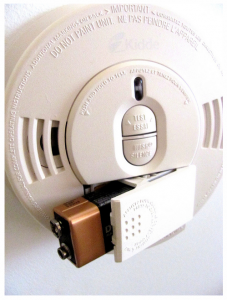
Changing the Smoke Detectors Batteries

March 14, 2011 by Tracy

Photograph Credit: Flickr (Suzie Ridler)

Now that some of us have sprung ahead an hour, it’s time to change the smoke detector batteries.

I was reminded of this fact during my son’s field trip to the fire department. Since the recommendation for smoke detectors is replacing the batteries twice a year, the fire department personnel suggests changing the batteries as we set our clocks forward and back during Daylight Savings.

Having set our clocks ahead an hour, I am due to get more batteries, so hubby can update our batteries in our smoke detectors.

Will you be joining us in changing your smoke detector batteries? Do you perform any other maintenance on your home around Daylight Savings time?

Filed Under: Maintaining, Household Tagged With: Smoke, batteries

Credit Score: Free Experian

March 13, 2011 by Tracy

Photograph Credit: Microsoft Images

Did you request your free credit report(s)? If you requested by phone, then you may still be waiting for those reports to be delivered. While you’re waiting, you can view your credit score for free.

According to My FICO, the three types of FICO (which stands for Fair Isaac Corporation – the company that creates the software for the credit bureaus) credit scores from the three credit bureaus are: the Experian/Fair Isaac Risk Model score from Experian, the EMPIRICA score from TransUnion, and the BEACON score from Equifax. I will share today how I get our Experian score for free.

What is a credit score? Your credit score is calculated based on the information in your credit report. Having an accurate credit report with Experian, Equifax, and TransUnion will give you accurate credit scores.

This score is determined from your past and current accounts to help lenders make a decision on extending credit to you.  If you needed to open a credit card, line of credit, car loan, etc., then the company with which you desire to borrow money will ask to pull your credit score. Usually companies have a predetermined number to which they will extend credit.

Your score will increase and decrease in point value based on a number of items:

1. How many times your credit is checked? You can check it as often as you like without affecting your score. But each time there is a hard pull from a possible lender, you can lose up to 3 points. If you are looking for a lender, then only allow businesses you are seriously considering to pull your credit. This same principle applies to credit cards. Be sure you will use that Sears card before allowing the employee to pull your credit during the credit card application.

2. How many times you were late with a payment? Having a delinquent account will hinder your score. If you find errors on your credit report, then address them immediately with the creditor.

3. How long your oldest account has been active? Creditors like to see that you have accounts in good standing for long periods of time. Over ten years is a great goal. If you find that your oldest account is just lying around and not being used, then put it away safely. DO NOT CLOSE THAT ACCOUNT. You want to keep your oldest account open, active, and in good standing.

4. The debt owed to available credit ratio. Your score will increase if you have more available credit through your credit limits than you have debt. If you are considering closing an account that has a $10,000 credit limit, you might want to consider how closing that account will influence your credit score.

Though I am not an expert in this field, I have researched to find how to keep my finances in check. I am just sharing what I have learned along the way. My goal is to make sure my credit reports are accurate and that my credit score is in good, very good, or excellent status. In the event I need to refinance my home, I am already in a good financial position to move forward.

OK, enough about what the credit score is and why it is important . . . let’s get your credit score for free!

If you are following the schedule I use, then you may have requested an Experian report. Since I choose to request via telephone, I have to wait 2-3 weeks before the report is delivered to my mailbox. If you live in a neighborhood with mail theft, dislike paperwork, or prefer the immediate on-line version, then you could download your Experian annual credit report and credit score at the same time from www.Quizzle.com.

NEW INFORMATION ADDED on April 22, 2012: This Update on Quizzle article gives the most current information regarding requesting your free Experian score through Quizzle.

TIP: If you have already requested your report from www.AnnualCreditReport.com, then don’t request your credit report from www.Quizzle.com. You will be charged a fee since you already have one free report for the year.

SIDE NOTE: I am extremely careful with our social security numbers. So, I do not make a practice of giving out our numbers on-line or over the phone. However, if I have to give it, then I prefer over the phone. At a later time, I will share how I put passwords on our accounts to circumvent using our social security numbers for identification. Currently Quizzle is advertising no social security number required. You can make your own decision how to proceed. I am just passing along the information I have gained along the way.

What is Quizzle? Besides a funny sounding name, it is a free service to help you manage your money. In addition to providing your free Experian credit report and Experian credit score, you can also view a snapshot of your financial situation. I find it useful to see how we are doing and where we can improve.

Unlike your credit report, your credit score can be checked as often as you like. After you register with Quizzle, you will only need to log-in to check your score and overview of your accounts. This service is useful if you have already pulled your credit report for the year, and you closed an account.

You can see that your account was closed by pulling your credit report from a different agency (i.e. Equifax or TransUnion). Then you can see how your credit score was affected by logging into your Quizzle account. I really like the checks and balances that Quizzle helps me keep with our finances.

I first heard of Quizzle from Moolanomy’s post here. He gives a good explanation of the free service. I have registered with Quizzle, and I do get e-mail reminders and advertisements.  (Remember, it is free).

How do I use Quizzle? I wait to use Quizzle until I have Paul’s Experian credit report in hand, and I review it for errors. When I am sure all the information is correct, then I log-in to Quizzle and choose “get my credit score.” The score will be generated immediately, and then I view, scan, and print it. I also review our big picture to see how we are doing.

ANOTHER SIDE NOTE: Experian uses a 360-840 scale rather than the usual 300-850 scale. Most individuals will rank between 650 to 750, where 700 is good, 750 is very good, and everything above 800 is excellent.

Once I print the credit score and the overview, I staple them together, and place it behind Paul’s current Experian credit report. I then place both the credit report and the score paperwork into File Box #1, the front pocket labeled Credit Reports/Card documents. I then put the file away until the next credit report arrives.

Next week, I will share how I get our TransUnion credit scores for free as well!

Filed Under: Document Organization, Credit Scores, Credit Report/Cards Tagged With: Experian, Equifax, TransUnion, credit score, FICO

Using your CVS Extra Care Card

March 12, 2011 by Tracy

Last week I shared my 94% savings at CVS, including the spend $20 on Excedrin products and receive $10 in Extra Bucks. If you are asking what are Extra Bucks, then let me explain. Extra Bucks (EB) are store credit coupon(s). If you look through a CVS sales ad, you will find deals for Extra Bucks (i.e. spend $20 on Excedrin products and receive $10 in Extra Bucks). I’m going to use the Excedrin deal for an example, but this deal is not currently available. So, please do not try to work this deal at CVS today because it will not work. The point here is to see how the sales and promotions work at CVS. Let’s begin:

1.       Go to CVS with your Extra Care Card. Don’t have a CVS Extra Care Card? No worries. Just ask the cashier when you arrive. You will fill out a short form and be given your card to use immediately. (NOTE: I give a junk e-mail account that I check often. CVS will e-mail you often with internet savings, store sales, and money saving coupons that you can only get via e-mail. I usually only want the coupons. I use the junk e-mail, so my regular account is not bogged down with sales notices.)

WHY DO YOU WANT AN EXTRA CARE CARD? Your card will give you the sales prices and generate your Extra Bucks. Each EB deal has a limit. Your card will keep track of your purchases. So, if the store you are in only has 2 more Excedrin products, then you could purchase them here. Then go to the next CVS store and purchase the remaining 1-3 products needed to get your total to $20. Once your total amount spent on Excedrin products reaches $20, then your $10 EB coupon will print. You do not need to purchase all the required items in one transaction. Knowing this information is a great tip to saving money!

2.       Scan your CVS Extra Care card at the Coupon Center. The Coupon Center is red machine usually located at the front of the store. The machine is also a price checker. I have found the machine at the front register, at the front of one of the aisles, and in the middle of the floor between the front registers and the aisles. If you scan the area and do not know what you are looking for, then just ask one of the cashiers.

SIDE NOTE: Get to know your cashiers. They are great! Most of them want to help you save money and get great deals. They want you to come back. At my local CVS, I know the employees by name, and I do not hesitate to ask for help when needed.

3.       Look at the coupons that printed on the side of the Coupon Center. Some people have found that they can scan their card twice with additional coupons printing. I have tried, but I always get “You have printed your coupons for today. Please come back tomorrow.” I still try to scan it a second time. Who knows . . . maybe you will get a special card.

4.       See if you can use any of the coupons with your current Excedrin deal. These coupons that print are store coupons. You can use a store coupon and a manufacturer coupon on each item purchased. Let’s say, that one of the coupons that printed was $3 off when you purchase $10 of pain relief medication. Then you could use this store coupon with your Excedrin deal. However, if the coupons that print do not work with the planned deal (i.e. Excedrin), then I just place the printed coupons in the back of my CVS labeled envelop.

5.       Go to the pain reliever aisle, and find the Excedrin. Make sure the total amount will be at least $20. Then proceed to the checkout counter.

6.       Hand the cashier your Extra Care card. She/He will scan it. This action will cause your EB to print at the end of your transaction. The cashier will then ring up your Excedrin products. If you have manufacturer coupons, then hand those to the cashier. She/He will scan them to deduct those amounts. You will then pay the remainder of the balance.

7.       The cashier will then hand you a receipt. At the end of your receipt, you will find a coupon for $10 Extra Bucks. You can then spend that coupon on just about anything in the store. You cannot use EB on prescriptions, alcohol, gift cards, lottery, money-orders, postage stamps, and tobacco products.

8.       You will now have $10 in store credit to either save for next week or apply to transaction #2.

If this system seems confusing, then just take it slow. The drugstore game is complicated. Each store plays by different rules. Once you get to know the rules, the game becomes strategic. I will share my strategies with you and hope you can also pay little to nothing for items you need.

Filed Under: CVS, Stretching Your Dollars Tagged With: Card, care, CVS, savings, Extra

« Previous Page
Next Page »

Welcome to Using Time Wisely!


Presenting organizational tips and tricks to save you money, energy, and time.

To access 5 Ways to Using Time Wisely Today, click "like" on my facebook page and join in on the journey of Using Time Wisely.

Looking for something?

Email Newsletter

Sign up to receive email updates and to hear what's going on with us!

Copyright © 2026 · Lifestyle Pro Theme on Genesis Framework · WordPress · Log in