• Home
  • About Tracy
  • Contact Me

Using Time Wisely

Organized to save money, energy, and time

  • Email
  • Facebook
  • Pinterest
  • RSS
  • Twitter
  • YouTube
  • Document Organization
    • Overview
    • Box 1
      • Credit Report/Cards
        • Credit Reports
          • Credit Updates
          • Credit Scores
        • Credit Cards
      • Personal
      • Home Ownership
      • Vehicles
    • Box 2
      • Life Insurance
      • Major Medical
      • Tax-Favored Programs
      • Prescriptions
      • Dental & Vision
      • Special Health Policies
      • Short-term Disability
      • Long-term Disability
      • Personal Insurance
    • Box 3
      • Social Security Documents
      • Retirement
      • Investments
      • Estate Planning
      • Tax Records
  • Household
    • Cleaning
    • Maintaining
    • Organizing
    • Scheduling
      • Laundry
  • Event Planning
    • Assisting
    • Attending
    • Coordinating
      • Birthday Party
      • Christmas
      • Dinner Party
      • Fall Festival
      • Field Trip
      • Lemonade Stand
      • Thanksgiving
    • Learning
    • Preparing
    • Serving
  • Miscellaneous
    • Communication
      • Customer Service
      • E-mail
      • RSS Feed Reader
    • Goals
    • Organization
    • Time Management
      • To Do List
  • Food
    • Food Prep
    • Grocery Shopping
      • Lists
      • Pricing
    • Menu Planning
    • Recipes
    • Stockpile
  • Family Activities
    • Going Out
      • Free Outings
      • Inexpensive Outings
      • Summer
    • Rewards
      • Good Grades
      • Reading
      • Summer Reading
    • Staying at Home
  • Stretching Your Dollars
    • Daily Deals
      • Groupon
      • LivingSocial
    • Drugstores
      • CVS
    • Gas Prices
    • Gifts
    • On-line Shopping
    • Pictures
    • Products
    • Restaurants
    • School Items
    • Tips
You are here: Home / 2011 / Archives for March 2011

Archives for March 2011

Credit Report: Schedule

March 6, 2011 by Tracy

Photograph Credit: Microsoft Images

Last Sunday’s post covered the “how” I receive our free credit reports. Today, I will share “when” I request the reports.

I use the telephone option to request our reports. During that call, I am given the option to order one, two, or all three of my credit reports. I choose to only request one report for my husband and a different report for myself. (If you are requesting for yourself, then just follow the schedule for Paul.)

Every four months, I repeat the requests with different reports. At the end of the year, I will have requested a report from each of the 3 credit bureaus for Paul and myself for a total of 6 reports: 2 Experian, 2 Equifax, and 2 TransUnion. My schedule is as follows:

FEBRUARY

  • Paul – Experian
  • Tracy – TransUnion

JUNE

  • Paul – Equifax
  • Tracy – Experian

OCTOBER

  • Paul – TransUnion
  • Tracy – Equifax

On my calendar I have noted the date that I need to request our credit reports. Since you can request one report per year, I make sure that the date I choose to request is PAST the date the current report was prepared.

If you were to follow my schedule, then you would have a March, July, and November schedule. Before you request the first one, I would check to see if you have any credit reports. If you don’t find any, then I would just start with this schedule. If you find one or more, then look at the date prepared. If it is more than a year old, then I would start over with this schedule. But if you find that you did request your reports last year, then start after the date those reports were prepared. You don’t want to be charged for your reports when you can get them for free!

Next week, I will share how I get our credit scores for free!
Filed Under: Document Organization, Credit Reports, Credit Report/Cards Tagged With: credit reports, scheduling

CVS: My 94% Savings

March 5, 2011 by Tracy

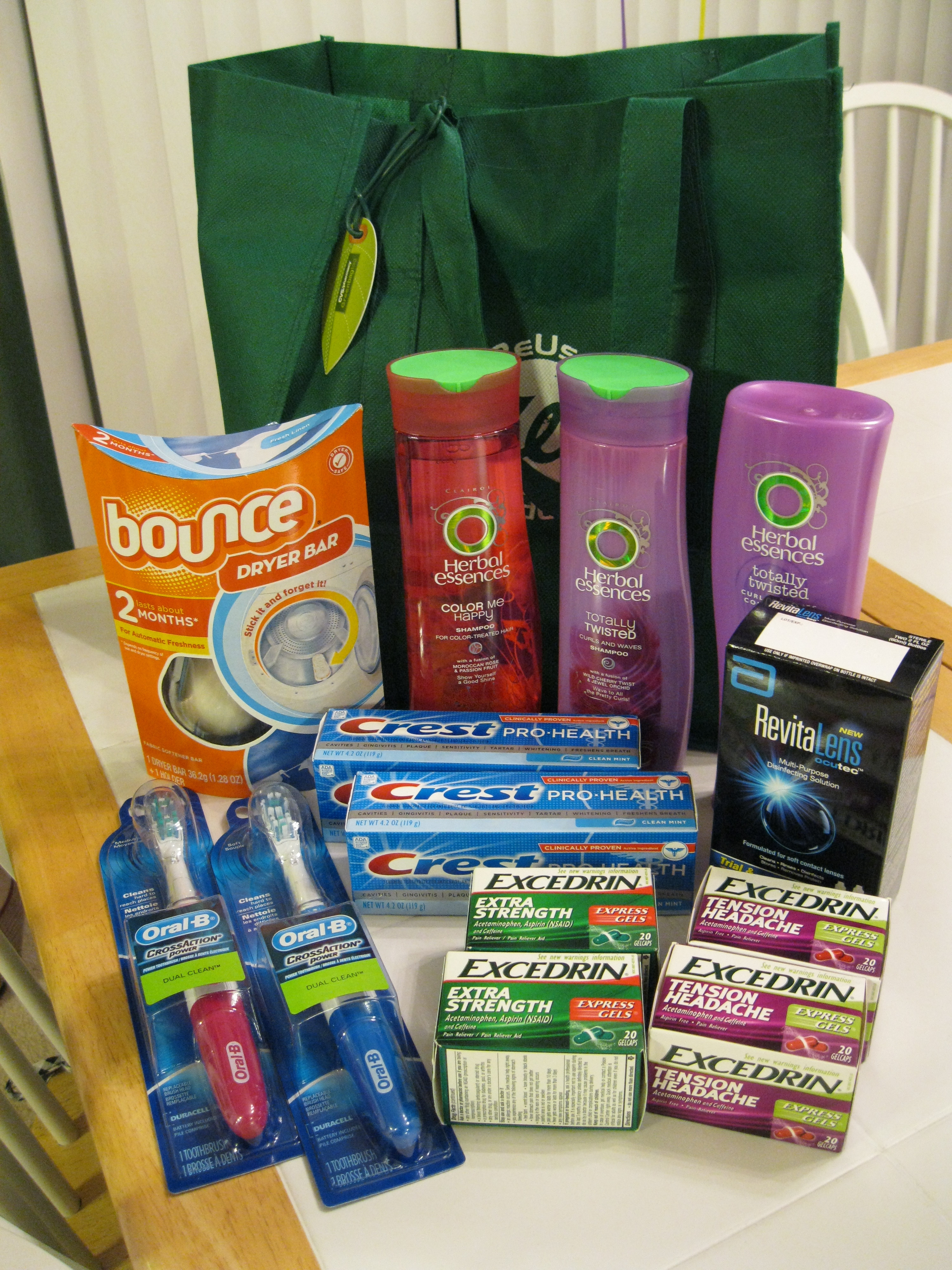
Today I am going to share my CVS adventure from this week. These sales and deals are available through the end of today. However, I had been holding some very valuable coupons that I was able to use to my advantage this week. If you were to take my list to CVS this afternoon, you probably will not see the same amount of savings. You would still save, but remember, I’ve been playing the drugstore game for a couple of years. I will be sharing all my tips and tricks with you, but I recommend starting small. My list is not starting small. But I hope that when you see the possible savings, you will get excited about purchasing items without paying full price.

Before working on any deals this week, I knew I needed to shop at CVS. I had $2 in Extra Bucks (store credit) that was to expire on Tuesday. Since I do not make a habit of throwing away money, I was looking for a way to spend that $2 for what I needed. I found a number of items to purchase, and I broke it up into 3 transactions. In the up-coming weeks, I will explain the “rules” to the CVS game, but for today, I will just share the transactions and savings.

TRANSACTION #1:

  • 2 Oral-B Cross Action Power Toothbrushes

(DEAL: $3 Extra Bucks when you purchase 1 Cross Action Power Toothbrush at $6 each) Limit 2

(EXPLANATION: Purchase 2 for $12 and get back $6 in Extra Bucks (store credit))

(COUPONS:   1 – Buy One Get One Free Oral-B Cross Action Power Toothbrush (from the 1/30 Proctor and Gamble insert in the newspaper)

1 – $3 off Oral-B battery toothbrush (from the 2/27 Proctor and Gamble insert in the newspaper)

(BREAKDOWN: $12 – $6 – $3 = $3 + $6 EB)


  • 2 Extra Strength Excedrin and 2 Tension Headache Excedrin products

(DEAL: $10 Extra Bucks when you purchase $20 any Excedrin starting at $4.79) Limit 1

(EXPLANATION: Purchase 4 at $5.89 each for $23.56 and get back $10 in Extra Bucks)

(COUPONS:    2 – free bottles of Extra Strength Excedrin up to $5.99 (registered on-line for coupon to be mailed. I used two computers to get 2 coupons. Not sure when I requested these coupons. I’ve been saving them for a great deal.)

2 – free bottles of Tension Headache Excedrin up to $5.99 (registered on-line for coupon to be mailed. I used two computers to get 2 coupons. Not sure when I requested these coupons. I’ve been saving them for a great deal.)

(BREAKDOWN: $23.56 – $11.78 – $11.78 = $0 + $10 EB)

SUBTOTAL: $3 – $2 in Extra Bucks (EB) from previous week (due to expire) = $1

TAX: $2.13 (Yeah, paid more in tax than the subtotal.)

TOTAL: $3.13 which I paid on a CVS gift card. I then received $6 EB (toothbrushes) and $10 EB (Excedrin).


TRANSACTION #2:

  • 2 Crest Pro-Health toothpastes

(DEAL: $3.29 EB when you buy Crest Pro-Health Toothpaste, 4.2 oz., at $3.29 each) Limit 2

(EXPLANATION: Purchase toothpaste for $6.58 and get an EB for $6.58)

(COUPONS:     $1 off Crest Pro-Health in the Proctor and Gamble 1/30 insert

$1 off Crest toothpaste 4 oz. or larger in the Proctor and Gamble 2/27 insert

(BREAKDOWN: $6.58 – 1 – 1 = $4.58 + $6.58 EB)


  • RevitaLens Multi-purpose Solution (for contacts)

(DEAL: $5.99 EB when you buy RevitaLens, 4 oz. at $5.99 each) Limit 1

(EXPLANATION: Purchase the solution for $5.99 and get a $5.99 EB)

(COUPONS:       None)

(BREAKDOWN: $5.99 + $5.99 EB)

SUBTOTAL: $10.57 – $10 EB from transaction #1 = $0.57

TAX: $0.75

TOTAL: $1.32 which I paid on a CVS gift card. I then received $6.58 EB (toothpastes) and $5.99 EB (contact solution).


TRANSACTION #3:

  • Bounce Dryer Ball refill

(DEAL: Bounce Dryer Ball refill on sale $3.99 each)

(EXPLANATION: Buy one for $3.99)

(COUPONS: $.50 off from newspaper)

(BREAKDOWN: $3.99 – $.50 = $3.49 + I will also submit a Bounce rebate for $5.)


  • 3 Herbal Essences Hair Care

(DEAL: $2 EB when you buy any 2 Herbal Essences Hair Care products. I also used a rain check from a previous deal which was $2 EB when you purchase any Herbal Essences Hair Care product at $2.99 each – Limit 3)

(EXPLANATION: Purchase 3 Herbal Essence Hair products at $2.99 each = $8.97 and receive $2 EB from current deal and $6 EB from rain check.

(COUPONS: 3 – $1 off coupons from coupon booklet received in the mail)

(BREAKDOWN: $8.97 – 1 – 1 – 1 = $5.97 + $2 EB + $6 EB)

SUBTOTAL: $9.46 – $6.58 EB from transaction #2 = $2.88

TAX: $.78

TOTAL: $3.66 which I paid on a CVS gift card. I then received $2 EB, $2 EB, and $4 EB (The cashier forgot that I purchased 3 from the rain check, so she gave me 2 separate EB coupons ($2 and $4) rather than combining them together into one $6.)


CVS Savings on February 28, 2011

RECAP: I purchased $69.97 worth of products, paid $8.11 ($4.45 + $3.66 tax) with gift card, and saved $65.52 (determined from subtotal – $69.97 –$ 4.45 = $65.52) which is a savings of 94%.  Plus, I will get $5 from the Bounce rebate and have $19.99 Extra Bucks to spend before March 31 on what my family needs. Therefore, I made $9.88 ($19.99 EB remaining – $8.11 spent – $2 EB started with) today by purchasing 2 toothbrushes, 2 toothpastes, 4 Excedrin, 1 contact solution, 1 dryer bar, and 3 shampoos!

Learning the drugstore game took me a good 6 months to a year. However, the time spent learning has been worth it, especially when I see the savings stack up week after week!

Filed Under: CVS, Stretching Your Dollars Tagged With: CVS, drugstore, game, savings

Pizza Hut’s Book It Program

March 4, 2011 by Tracy

Pizza Hut - Book It
Pizza Hut's Book It Program

Photograph Credit: Pizza Hut

My son’s class participates in Pizza Hut’s Book It Program. His teacher assigns an amount of reading time to be completed during the month (i.e. 300 minutes).

Each day I log the amount of time Hubby and I have read to him. At the end of the month, I add up the minutes and submit my son’s reading log back to his teacher.

When we meet the set goal (i.e. 300 minutes), his teacher sends home a Book It coupon. We can then take the coupon to any Pizza Hut and receive a free one-topping personal pan pizza during that month.

Not only does my son enjoy his pizza, he also sees the rewards of reading. My daughter is also excited about joining the reading program because she would really like to have her own pizza.

I usually hang on to the coupon and use it on a day we need to stay at school.  When that day arrives, I will redeem the Book It coupon at our local Pizza Hut. My son will eat his own personal pan pizza, and I will purchase a $6 full pizza pie for the girls and me to share.

This arrangement is a win-win situation. My kids enjoy eating lunch at school with their friends, and I enjoy a meal with my kids without breaking the family budget.

Filed Under: Rewards, Reading, Family Activities Tagged With: reading, Pizza Hut, Book It, program

My Savings on Vegetables and Mentos

March 3, 2011 by Tracy

After sharing last week about Knowing your Grocery Store’s Sales Dates, I followed my usual pattern and hit the stores on Tuesday morning. In my area, our sales run from Wednesday to Tuesday, so I was shopping on the last day of the sale. The following deals are no longer available in my area, but I want to share how I scored lots of vegetables for my family without breaking the bank.

Yesterday when I went shopping, here is what I had in my PUBLIX envelope:

  • GROCERY LIST:
    • 8 Green Giant Valley Fresh Steamers Vegetables 11-12oz. at $2.39 on sale Buy One Get One Free (BOGOF), so $1.19 each.
    • 3 Mentos at 50₵
    • 1 Huggies Diapers, 48-96ct. at $19.99
  • COUPONS:
    • 4 printable – 50₵ off 2 bags of Green Giant Valley Fresh Steamers Vegetables
    • 3 – 50₵ off any one Mentos products from the Smart Source insert in the 2/6/11 newspaper
    • 1 – $3.00 off Huggies diapers (Publix coupon from weekly ad)
    • 1 – $3.50 off Huggies manufacturer coupon

*NOTE ABOUT COUPONS: At Publix, you can use one store coupon and one manufacturer coupon per item. Also, Publix doubles coupons up to 50₵.

At the store with my children, I stopped by the bakery for the kids’ free cookies. (They like the treat, and I enjoy some quiet while they’re eating them.) Then I discovered that our Publix was out of Huggies diapers. Not a big deal, I made a note on my grocery list. Then to the frozen foods section where I chose 4 bags of corn, 2 bags of broccoli, and 2 bags of snow peas. Then up to the checkout lanes to find the Mentos. After procuring my items, I checked out with my coupons.

  • 4 bags of vegetables – $1.20 each
  • 4 bags of vegetables – $1.19 each
  • 3 Mentos – 50₵ each

SUBTOTAL: 11.06

  • Minus 4 – 50₵ vegetable coupons that doubled = $4.00
  • Minus 3 – 50₵ Mentos coupons that doubled = $3.00 (Yeah, I made $1.50 by purchasing these items with coupons.)

TOTAL: $4.06

After paying my $4.06, I went to customer service where I received a rain check for the Huggies diapers. So, to recap, I spent $4.06 and saved $17.39 with sales prices and coupons resulting in a savings of 81%.

There are so many deals to be had. One of the keys to saving big is knowing how to match coupons with store sales. It took me some time to distinguish a good sale from a great store sale. During the great store sale, I try to stock up and use all the coupons I have for that product. It takes time and lots of trial and error. Even in my mistakes, I always know I am saving money. I’m here to keep on saving with you!

Filed Under: Grocery Shopping, Food Tagged With: coupons, match, Publix

Waiting or Working?

March 2, 2011 by Tracy

When my hubby arrived home and played with the kids, I took the opportunity to work on dinner alone. I put the pot on the stove and had some time to wait for the water to boil. During this time, I would have sat down to rest, if needed. But on this day, I needed to get my kitchen in order. Here is what I was able to accomplish while making dinner:

  1. Unloaded the dishwasher,
  2. Reloaded the dishwasher,
  3. Wiped down the counters,
  4. Finished my menu plan for the week, and
  5. Wrote out my grocery list.

At the end of the 25-30 minutes, I had a clean kitchen, menu plan, grocery list, and dinner made. After dinner, I was able to play with the kids while hubby graciously cleaned up the kitchen. Using the little chunks of time during the day to accomplish small tasks adds up to extra time spent doing what I enjoy – playing with my kids. What can you accomplish while waiting for water to boil?

Filed Under: Miscellaneous Tagged With: time, dinner, menu, grocery, dishwasher, kitchen, list

« Previous Page
Next Page »

Welcome to Using Time Wisely!


Presenting organizational tips and tricks to save you money, energy, and time.

To access 5 Ways to Using Time Wisely Today, click "like" on my facebook page and join in on the journey of Using Time Wisely.

Looking for something?

Email Newsletter

Sign up to receive email updates and to hear what's going on with us!

Copyright © 2026 · Lifestyle Pro Theme on Genesis Framework · WordPress · Log in