• Home
  • About Tracy
  • Contact Me

Using Time Wisely

Organized to save money, energy, and time

  • Email
  • Facebook
  • Pinterest
  • RSS
  • Twitter
  • YouTube
  • Document Organization
    • Overview
    • Box 1
      • Credit Report/Cards
        • Credit Reports
          • Credit Updates
          • Credit Scores
        • Credit Cards
      • Personal
      • Home Ownership
      • Vehicles
    • Box 2
      • Life Insurance
      • Major Medical
      • Tax-Favored Programs
      • Prescriptions
      • Dental & Vision
      • Special Health Policies
      • Short-term Disability
      • Long-term Disability
      • Personal Insurance
    • Box 3
      • Social Security Documents
      • Retirement
      • Investments
      • Estate Planning
      • Tax Records
  • Household
    • Cleaning
    • Maintaining
    • Organizing
    • Scheduling
      • Laundry
  • Event Planning
    • Assisting
    • Attending
    • Coordinating
      • Birthday Party
      • Christmas
      • Dinner Party
      • Fall Festival
      • Field Trip
      • Lemonade Stand
      • Thanksgiving
    • Learning
    • Preparing
    • Serving
  • Miscellaneous
    • Communication
      • Customer Service
      • E-mail
      • RSS Feed Reader
    • Goals
    • Organization
    • Time Management
      • To Do List
  • Food
    • Food Prep
    • Grocery Shopping
      • Lists
      • Pricing
    • Menu Planning
    • Recipes
    • Stockpile
  • Family Activities
    • Going Out
      • Free Outings
      • Inexpensive Outings
      • Summer
    • Rewards
      • Good Grades
      • Reading
      • Summer Reading
    • Staying at Home
  • Stretching Your Dollars
    • Daily Deals
      • Groupon
      • LivingSocial
    • Drugstores
      • CVS
    • Gas Prices
    • Gifts
    • On-line Shopping
    • Pictures
    • Products
    • Restaurants
    • School Items
    • Tips
You are here: Home / 2011 / Archives for September 2011

Archives for September 2011

Vehicles: Car #1 – Insurance Documents

September 11, 2011 by Tracy

Last week, I shared the checklist of items housed in the vehicles category of our important documents. Since our family owns 2 vehicles, 0 recreational vehicles, and 0 boats, I have our documents housed in 3 file slots.

                  1. Car #1
                  2. Car #2
                  3. Miscellaneous vehicle documents

If you have numerous cars, recreational vehicles, and boats, then you might consider a slot per item or per type of item. Depending on your preference, you might need another file or larger file to hold these documents.

Whatever system you choose, be sure to label. You will then be using time wisely as you quickly retrieve your documents. 🙂

Having filled the first nine slots in our accordion filing system, I will now concentrate on the tenth file opening which houses documents for our newest vehicle. The first set of documents includes:

1. Current Insurance Receipt

In case there is a discrepancy, I keep a copy of our receipt showing payment for the current policy.

2. Current Insurance Policy

This document shows our dates of coverage and lists our limits and the premiums.

3. Current Declarations Page

My page actually consists of 4 pages. This record itemizes the coverage limits and explains what is covered under each premium section. This document will be needed if a claim needs to be made against this policy.

4. Previous Insurance Receipt

Since I pay semiannually, I choose to keep one year’s worth of documentation in my file for proof of continuous coverage.  I can also compare the renewal notice with the last two receipts to identify any changes.

5. Previous Insurance Policy

To verify that our coverage remains the same, I keep the previous 6-month notice for comparison.

6. Previous Declarations Page

Sometimes the details change at the time of renewal, so I like to have a reference of the current policy vs. the change.

7. Guaranteed Renewable Policy letter

Having been with the same insurance company for over 10 years (actually around 17 years), I have earned the following discounts:

    • A 10-year accident-free discount. This discount amounts to a 20% discount on at least one of our vehicles.
    • Guaranteed Renewable Policy. Our car insurance policy will be renewed regardless of our future accident record, and includes all vehicles insured with our insurance company (State Farm).

In case you are wondering if I have shopped around for car insurance rates. Yes, I have. Since we are insured with State Farm Mutual, we get the lowest prices on our premium. I have not found an insurance company that can offer the same coverage for the price we pay. State Farm continues to serve us well.

8. Privacy Policy Information

Each year State Farm sends a copy of their privacy policy. I keep this policy with my insurance paperwork.

All these items are paper clipped together and housed in this tenth file slot of my accordion filing system. Keeping the insurance documentation together for this vehicle allows me to quickly find the information I need.  For example, I quickly found my vehicle’s VIN (Vehicle Identification Number) when filling out the claim paperwork from hitting the pot hole.

With all my important documents together, I just need to find the correct category and slot to get the items needed. Keep using time wisely by getting these documents organized.

Question: What type of filing system is working for you? Please add your answer to the comments.

Filed Under: Document Organization, Vehicles Tagged With: vehicles

Daily Deal Site: LivingSocial – Part 1 of 2

September 10, 2011 by Tracy

Photograph Credit: LivingSocial

I love daily deal sites! As the name suggests, these types of web sites offer a fantastic deal each day at a 50-90% discount to local attractions, restaurants, performances, and more. (See why I like these sites? :-))

One of these daily deal sites is www.LivingSocial.com.

Disclosure: The LivingSocial link in this post is Using Time Wisely’s affiliate link. When you register (for free) through my link and make a purchase, then LivingSocial compensates me.

Though you can access your free registration through the LivingSocial web site, your support of Using Time Wisely is greatly appreciated. Here’s my full disclosure policy.

My LivingSocial Account

Current Vouchers

    • $12 to spend at Stevi B’s Pizza (paid $6 = 50% savings)
    • 2 tickets to a dramatic production (deal cost $16 = 50% savings)

Used Vouchers

    • Admission for 4 to a local water park – toddler was free (paid $16 = 60% savings)

We used our voucher on a day Paul was off work, our friends could join us, and everyone was well. Though the park was busy, it was a nice family activity. If the deal comes back, I will definitely purchase it again.

Getting a LivingSocial account

Want to stretch your dollars by getting vouchers at 50-90% discount? Come sign up for a free LivingSocial account. Need some help? Let me show you the way:

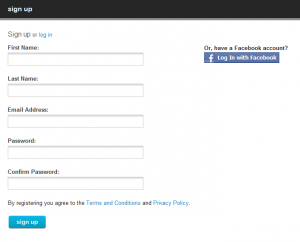
Sign up

1. Go to www.livingsocial.com

2. In the top right corner, click “sign up”

3. Add your name, e-mail address, and password with confirmation

Photograph Credit: LivingSocial

4. Click “sign up”

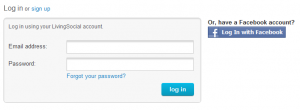
Log In

1. Back on the Home page (click on the LivingSocial logo), select “log in” in the top right corner

Photograph Credit: LivingSocial

2. Enter your e-mail and password

3. Click “log in”

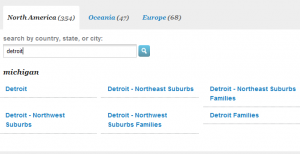
Change the Deal City

1. On the left sidebar, select the bottom option, “more cities”

Photograph Credit: LivingSocial

2. In the search box, enter your location and click enter (i.e., Detroit, Michigan)

Photograph Credit: LivingSocial

3. Click on the location of your choice (i.e., Detroit – Northeast suburbs)

4. The deal of the day changes to that location’s offer

Subscribe to your City’s Daily Deal

In using time wisely, refrain from from visiting LivingSocial’s web site each day. Just have the deals delivered to your e-mail inbox. The subscription process is very simple.

1. In the top right hand corner under your name, select “subscribe”

2. Confirmation of your subscription is “subscription successful”

You will now get an e-mail each day from LivingSocial with the daily deal. You can then choose to purchase or by-pass the deal without visiting the web site. (Love these options to help me save money, energy, and time.)

To use LivingSocial in stretching your dollars, you need to sign up, log in, change to your local city, and subscribe to your city’s daily deal. You will then be on your way to finding great local deals.

Our family enjoys trying new activities. By saving at least 50% on these adventures, I can plan more activities without breaking the bank. Next week, I will cover how to purchase a deal, locate your voucher, and redeem your voucher. In the meantime, keep using time wisely as you stretch your dollars!

Question: What is your favorite daily deal site? Please add your answer to the comments.
Filed Under: Daily Deals, LivingSocial, Stretching Your Dollars Tagged With: LivingSocial

Lowe’s Build and Grow: Police Car

September 9, 2011 by Tracy

Photograph Credit: Lowe's

The second Saturday of the month is just around the corner which means Lowe’s will be hosting this Build and Grow clinic:

What: Build a free police car with flashing light

When: Saturday, September 10, 2011

Where: Your local Lowe’s home improvement store

Time: 10:00 a.m. to 11:00 a.m.

These clinics fill up quickly. Be sure to register your attendance at your local Lowe’s and arrive no later than 10:15 a.m. to the event. For other tips and details on the Lowe’s Build and Grow clinics, refer to my detailed post here.

Photograph Credit: Lowe's

After this Saturday’s event, the next Lowe’s Build and Grow project will be on Saturday, September 24, 2011, building a fire truck with siren. You can register for both the September 10 and 24 events through Lowe’s web site.

Wishing you a cool, restful, family-filled weekend with a little football for flavor!

Filed Under: Going Out, Free Outings, Family Activities Tagged With: Lowe's

Grocery Shopping: Creating your Grocery Lists – Part 2c of 3

September 8, 2011 by Tracy

Photograph Credit: Stock.xchng (Christy Thompson)

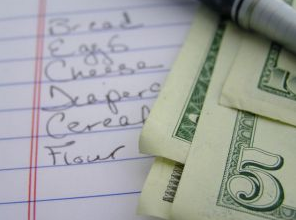
How are the grocery sales going in your area? Last week was very unusual in that I spent almost $150 in groceries due to some fantastic sales. Yes, this amount is almost my budget for 2 grocery weeks. However, I am now stocked with meat, cheese, snacks, sides, and vegetables.

When I shopped this week’s sales yesterday, I spent $5 at Publix and by-passed the sales at Bi-Lo. For these two weeks, I am still within my budget. Yeah! The timing determines my savings. Thankfully, I was using time wisely when the items were on sale.

In working through the “creating your grocery lists” series, we have considered Steps 1-2 in Part 1 and Steps 3-4 in Part 2. Now, let’s consider Steps 5 and 6 in Part 3 as we complete our shopping lists.

Step 5: Print Grocery List

Once I have the needed items that are on sale and the BOGOF options, I will print this list. These are the items I may or may not purchase at this store.

Step 6: Repeat process for next grocery store

In my neck of the woods, I have quite a few grocery store options: Food Lion, Ingles, Publix, Bi-Lo, Whole Foods, Earth Fare, and Wal-mart (to name a few). If I tried to shop at all the stores, I would be shopping all week.

Since I would rather be using time wisely and spending time with my family, I choose to shop at 2 stores: Bi-Lo and Publix. As I create this part of my grocery list, I prepare one list for Bi-Lo and another for Publix.

This process may seem long at first. I remember it taking me all day to prepare my lists with all the normal interruptions. (Again, this system is not for everyone.) When it takes me 4 hours to prepare a grocery list where I save $50, then I am “making” $15 per hour. As I practice and continue to cut my preparation time to 1 hour, I am increasing my hourly savings to $50 an hour (when based on the same shopping trip).

Now that I know the system and have practiced it for many months, I am routinely creating these two lists in under an hour which is maximizing my savings.

My success did not occur overnight. I have made many mistakes along the way. For example, stocking up on an item when it was on sale for $1 off to find the next week the same item was a BOGOF item for $2.50 off. Sale items are great if you need the item, but I have learned not stock up on a sale item.

My stock up price is 50% off. I will purchase one item of a sale price to get me through until the next BOGOF sale on that item. Using coupons with those BOGOF sales just increases the savings. How do I know this? Because I have learned from my own mistakes. I would not be saving 50-90% on my groceries today if I had not started trying these techniques. By just implementing one or two saving strategies, you can increase your savings by 20-40% without using a single coupon. But you need to start, learn from your mistakes, and enjoy the savings.

The basic lists are now created. Next week, I will share briefly how I match coupons and finish compiling my list for each store. In using time wisely, I hope you are finding this series helpful. If so, then try a tip or two and see if your savings increase. If you are like me, once you see the savings, you won’t want to pay full price ever again. 🙂

Question: What is your favorite savings strategy thus far? Please click on Leave your Comment to add your answer.

Filed Under: Grocery Shopping, Lists, Food Tagged With: grocery shopping

Junk Facebook Account

September 7, 2011 by Tracy

If you follow any deal sites (e.g., www.Freebies4Mom.com,  www.thekrazycouponlady.com,), you probably sign up for lots of newsletters, coupons, and advertising. The junk e-mail account, from either Yahoo! or Gmail, handles all these additional items. Though you can get great printable coupons from manufacturer’s web sites, you may need to access the coupons from a Facebook account.

To keep my personal and business Facebook pages separate from coupons, sweepstakes, and freebies, I have created a parallel Facebook account for my junk e-mail account. Jenny Martin from www.southernsavers.com wrote a great post on “How to create a blank Facebook profile.” I recommend following her tutorial to create your own.

Photograph Credit: Flickr (Dan Taylor)

If you have already used your personal Facebook page for coupons and such, then I recommend the posts at www.freebies4mom.com written by Heather Hernandez on these Facebook tips: Learn to Spot the Spammy Apps, Remove Applications You’ve Allowed, and Get your Newsfeed Back.

Having a junk Facebook account removes all concern about privacy when registering and allowing web sites access to my profile. I do not keep ANY personal information on my junk Facebook profile; therefore, companies can look all they want. They will not gain any of my personal information from this account.

In using time wisely, my junk e-mail and Facebook accounts keep my personal, business, and coupons separate. Now you can differentiate yours as well.

Question: Was this helpful? What other tips would you like to see?

Filed Under: Communication, Miscellaneous Tagged With: facebook

« Previous Page
Next Page »

Welcome to Using Time Wisely!


Presenting organizational tips and tricks to save you money, energy, and time.

To access 5 Ways to Using Time Wisely Today, click "like" on my facebook page and join in on the journey of Using Time Wisely.

Looking for something?

Email Newsletter

Sign up to receive email updates and to hear what's going on with us!

Copyright © 2026 · Lifestyle Pro Theme on Genesis Framework · WordPress · Log in