
• Home
  • About Tracy
  • Contact Me

Using Time Wisely

Organized to save money, energy, and time

  • Email
  • Facebook
  • Pinterest
  • RSS
  • Twitter
  • YouTube
  • Document Organization
    • Overview
    • Box 1
      • Credit Report/Cards
        • Credit Reports
          • Credit Updates
          • Credit Scores
        • Credit Cards
      • Personal
      • Home Ownership
      • Vehicles
    • Box 2
      • Life Insurance
      • Major Medical
      • Tax-Favored Programs
      • Prescriptions
      • Dental & Vision
      • Special Health Policies
      • Short-term Disability
      • Long-term Disability
      • Personal Insurance
    • Box 3
      • Social Security Documents
      • Retirement
      • Investments
      • Estate Planning
      • Tax Records
  • Household
    • Cleaning
    • Maintaining
    • Organizing
    • Scheduling
      • Laundry
  • Event Planning
    • Assisting
    • Attending
    • Coordinating
      • Birthday Party
      • Christmas
      • Dinner Party
      • Fall Festival
      • Field Trip
      • Lemonade Stand
      • Thanksgiving
    • Learning
    • Preparing
    • Serving
  • Miscellaneous
    • Communication
      • Customer Service
      • E-mail
      • RSS Feed Reader
    • Goals
    • Organization
    • Time Management
      • To Do List
  • Food
    • Food Prep
    • Grocery Shopping
      • Lists
      • Pricing
    • Menu Planning
    • Recipes
    • Stockpile
  • Family Activities
    • Going Out
      • Free Outings
      • Inexpensive Outings
      • Summer
    • Rewards
      • Good Grades
      • Reading
      • Summer Reading
    • Staying at Home
  • Stretching Your Dollars
    • Daily Deals
      • Groupon
      • LivingSocial
    • Drugstores
      • CVS
    • Gas Prices
    • Gifts
    • On-line Shopping
    • Pictures
    • Products
    • Restaurants
    • School Items
    • Tips
You are here: Home / Archives for 2011

Archives for 2011

Free App: Kindle for PC

September 28, 2011 by Tracy

Photograph Credit: Amazon.com

With e-books all the rage, it seems that many bloggers have authored, are writing, or plan to compose an e-book in the near future (myself included). In case you are wondering, “what is an e-book?,” you are in good company. I first heard this term about 6 months ago and headed to Swagbucks to find the answer. Per Wikipedia, an e-book is defined as:

An electronic book (also e-book, ebook, electronic book, digital book) is a book-length publication in digital form, consisting of text, images, or both, and produced on, published through, and readable on computers or other electronic devices.

Many e-books originate in electronic form without a print version. Going to a bookstore to purchase an e-book would be a waste of time since the transaction would need to be electronic (via the Internet).

These books have become popular since they can be purchased and read immediately. If you have a Kindle or Kindle app for your phone, then you can download e-books for Kindle to your device.

Since I do not own a Kindle, I can still take advantage of e-books for Kindle by downloading and reading them on my computer and/or laptop with the free Kindle for PC app provided by Amazon.com. If you want to read e-books for Kindle on your computer or laptop, then you will need this app installed on each machine. Here’s how to download it:

1. Click on this link.

2. Select the “Download Now” blue button.

3. Follow the directions to run the application.

4. Your Kindle for PC will begin once it is installed.

Now when you find a free to inexpensive e-book, you can download that publication and open it in your Kindle for PC application. 🙂

Next week, I will share some free to inexpensive e-books you might find interesting. In the meantime, relax a little and enjoy your Hump Day!

Question: How many e-books have you downloaded? Please add your answer to the comments.

Filed Under: Miscellaneous Tagged With: Kindle, e-book

Event Planning: Changing my Focus

September 27, 2011 by Tracy

Photograph Credit: Flickr (Craig Jewell)

In My Upcoming 2011-2012 Events‘ post, I shared my involvement with the Kid’s Zone for our Fall Festival. Preparations are underway with the event occurring in about 3 weeks. Yikes!

As I continued working through the details, I got distracted. In making a list of all the vendors, I discovered that I also needed a supply list. As I began another list of the supplies, I realized that I needed a map to know how far away the vendors will be from the power source for extension cords, mats, etc.

By this time I had worked for about 10 minutes without finishing one list. I was no closer to a solution than when I began. Does this happen to you? My brain wanted to plan all the details, but I had no framework for those details.

I. had. to. STOP!

Before getting overwhelmed and quitting, I needed to be using time wisely by changing my focus.

Develop a Framework

Before mastering the details, I needed a framework. Therefore, I went back to my initial list of vendors and finished it. Knowing all the vendors that needed to fit in that space, I sketched an initial map. This rough draft helps me see the big picture when adjustments are needed.

Consider the Sections

With the big picture in place and a tentative map, I then considered which vendors needed power. Identifying where the power sources would be and pairing vendors together, I assigned vendors to sections of the framework.  Working through the different options within my framework keeps my momentum going with forward progress.

TIP: When I am brainstorming, I keep all my sketches. If a plan changes, I can go back to tweak a former sketch. Only when the plan is set will I discard my less-than-stellar sketches.

Work on the details

With a tentative map and sections determined, I concentrated on the details. Returning to the supply list, I then addressed where trash cans needed to be placed, the number of extension cords needed, etc.

By refocusing my scattered brain, that was working miles ahead of where I needed to start, I developed a framework, considered the sections, and worked on the details. In using time wisely, I accomplished the task at hand without frustration once I set a plan. As you can see from this example, I get overwhelmed. But by organizing my thoughts and writing down the ideas and options, I can accomplish much while using time wisely.

Question: What do you do to refocus when you get overwhelmed? Please let me know that I’m not the only one who struggles here. 🙂 Feel free to add your comments and suggestions.

Filed Under: Event Planning, Preparing Tagged With: planning

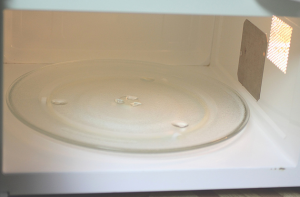
Cleaning: Microwave Oven

September 26, 2011 by Tracy

Photograph Credit: Flickr (Bella)

Keeping the microwave oven wiped down and clean is an on-going task. Knowing that 1 minute now saves 5 minutes later, I try to keep messes at bay by wiping up messes before they dry.

Though I am not the only one who uses the microwave in my home, I do, on occasion, choose to leave a mess. There are times when soothing a hurt finger or changing a diaper takes precedence over cleaning the microwave. 🙂

When I find a baked-on mess, here’s my simple solution:

1. Take a glass measuring cup and add about 2 cups of water.

2. Place the measuring cup with water into the microwave.

3. Zap the water for 5 minutes on high.

4. At the end of 5 minutes, allow the water to remain in the microwave for an additional 2 minutes.

5. Carefully, remove the hot measuring cup.

6. Using a sponge or rag, wipe down the microwave.

In using time wisely, I can put on the water while wiping down the counters and loading the dishwasher. This cleaning method not only results in a clean microwave, but it also saves me money (no cleaning solutions), energy (no scrubbing), and time (just wiping out the mess without working at it). If your microwave needs a cleaning, try heating water and wiping away the mess. The results are worth it. Happy cleaning!

Question: What is your best tip for cleaning the microwave oven? Please add your answer to the comments.
Filed Under: Cleaning, Household Tagged With: cleaning

Vehicles: Car #1 – Title or Loan Documents

September 25, 2011 by Tracy

The time has come to finish the tenth file slot in the accordion filing system. In my filing system, I keep the records for our 2 vehicles in separate file openings. This tenth file slot houses our insurance, DMV, and the following additional documents related to this vehicle:

Title or Loan Paperwork

Our original title and a copy of our title are the first two documents in this remaining set of paperwork. If I had a loan on this vehicle, I would place those documents here.

Extended Warranty Contract

Having purchased our vehicle brand new, we also included the extended warranty. This contract consists of:

1. Cover letter. This document highlights the main points of the contract.

2. Contract. The detailed four-page document which lists all the coverage and procedures for filing claims.

Alarm Documentation

Our vehicle was available without an alarm system. After purchasing our vehicle, we had an alarm installed and acquired the following documents housed in this file:

    • Receipt. Proof of purchase with the date of purchase, price, and store identified.
    • Owner’s guide. Directions for reprogramming the system.
    • Copy of owner’s guide. When a mechanic disarmed my alarm, I had to get the system reprogrammed. I kept detailed notes on this copy which I keep for future issues.

The title, extended warranty, and alarm paperwork concludes the documentation housed in my tenth file slot for this first vehicle. Your documentation will likely be different depending on your situation. Remember, your file does not need to look like mine. My goal is to help you get organized, so you can be using time wisely.

Question: What additional documents for your vehicle do you keep? Please add your answer to the comments.
Filed Under: Document Organization, Vehicles Tagged With: vehicles

Freebies4Mom.com: Finding Freebies

September 24, 2011 by Tracy

When Paul brings the mail into the house each evening, I will gravitate to my kitchen counter to peruse the day’s delivery. Besides the usual advertisement, credit card invitation, and bill, I will usually find a free sample, magazine, or coupon.

Receiving the mail is no longer a burdensome task of viewing the bills. No way! Getting the mail has become a treat to see what free items have arrived today.

Locating the Freebies

Searching the Internet for all the free items would NOT be using time wisely. Spending my valuable time searching for freebies would detract from my top priority – educating and training my little ones.

Note: As all Mommy’s and Daddy’s know, educating and training children is a 24-hour/7 days a week responsibility. Though I do not homeschool my children academically, I am still teaching and nurturing them constantly.

Since our kids are only young once, choosing to spend time with them is using time wisely – even if it is playing the same game repeatedly or answering the same question. OK . . . off my soap box and back to the post. 🙂

In using time wisely, I look for ways to maximize my money, energy, and time. If I do not want to spend the time searching for freebies but want them, I need to find a reputable source to bring those freebie opportunities to me.

Heather Hernandez of Freebies 4 Mom fits the qualifications. Heather researches and posts on www.freebies4mom.com all the current free samples, coupons, and sweepstakes. Her web site is fabulous! I love the clean, organized design. With one freebie opportunity per post, I can quickly scan the offers to find my favorites.

Finding the Freebies

Photograph Credit: Freebies 4 Mom

Once you begin requesting freebies, you will find that the “hot” ones vanish quickly. No worries, more freebies will be available soon. If you don’t get one, then keep a lookout for another. To stay on top of all the freebies, Heather offers 3 ways to subscribe to her posts:

1. RSS Feed. By now you know this my favorite choice. I subscribe to freebies4mom in my Google reader. (If you need assistance setting up a reader, check out my RSS Feed Reader series.)

2. E-mail. To encourage e-mail readership, Heather randomly gives away $400 each month to one e-mail subscriber. If you prefer one e-mail each day with all the previous day’s post, then subscribe by e-mail (located across from her title in the header of her blog’s home page).

3. Facebook. I am in awe of Heather’s Facebook page. She has customized her page and has over 100,000 followers. (Way to go, Heather!) If you prefer to see her posts via Facebook, then go “like” her page. You will not be disappointed. In addition to the RSS Feed, I am also a Facebook follower so is Using Time Wisely. (Are you a follower of Using Time Wisely? If not, come “like” our page and interact with fellow readers.)

Choosing the Freebies

When you find a post for a freebie you want, click on the purple-colored words. The words in purple indicate an embedded link in her post. The link will take you to the registration page for the freebie. As you register for these freebies, remember to use your junk e-mail account. Usually you will be signing up for newsletters or correspondence from the gifting company.

For free Facebook offers, use your junk Facebook account. The company offering the freebie will want access to your friends. The junk Facebook account is empty, so they can view your account without invading your friends or your privacy.

Keep in mind, the company has an agenda. They want more newsletter readers, followers, or comments. To incise you to help them raise their numbers, the company offers freebies. Give them what they want through your junk e-mail and Facebook accounts, and the freebie will be yours.

Receiving the Freebies

Usually after your registration is complete, you will receive confirmation that your freebie will arrive within a time frame, e.g., 4-8 weeks. Just think, one day when you are going about your business, you will be surprised to find your freebie waiting for you in your mailbox. Cool, huh?

As you request freebies consistently, your mailbox will soon become, what Heather terms, your “freebox.” By requesting samples and freebies, you can try new items and replenish existing products without spending any money. In using time wisely, you can continue stretching your dollars by requesting freebies and enjoying the surprise in your “freebox.”

Question: Where do you find freebies? Please add your answer to the comments.
Filed Under: Stretching Your Dollars Tagged With: freebies

« Previous Page
Next Page »

Welcome to Using Time Wisely!


Presenting organizational tips and tricks to save you money, energy, and time.

To access 5 Ways to Using Time Wisely Today, click "like" on my facebook page and join in on the journey of Using Time Wisely.

Looking for something?

Email Newsletter

Sign up to receive email updates and to hear what's going on with us!

Copyright © 2026 · Lifestyle Pro Theme on Genesis Framework · WordPress · Log in