• Home
  • About Tracy
  • Contact Me

Using Time Wisely

Organized to save money, energy, and time

  • Email
  • Facebook
  • Pinterest
  • RSS
  • Twitter
  • YouTube
  • Document Organization
    • Overview
    • Box 1
      • Credit Report/Cards
        • Credit Reports
          • Credit Updates
          • Credit Scores
        • Credit Cards
      • Personal
      • Home Ownership
      • Vehicles
    • Box 2
      • Life Insurance
      • Major Medical
      • Tax-Favored Programs
      • Prescriptions
      • Dental & Vision
      • Special Health Policies
      • Short-term Disability
      • Long-term Disability
      • Personal Insurance
    • Box 3
      • Social Security Documents
      • Retirement
      • Investments
      • Estate Planning
      • Tax Records
  • Household
    • Cleaning
    • Maintaining
    • Organizing
    • Scheduling
      • Laundry
  • Event Planning
    • Assisting
    • Attending
    • Coordinating
      • Birthday Party
      • Christmas
      • Dinner Party
      • Fall Festival
      • Field Trip
      • Lemonade Stand
      • Thanksgiving
    • Learning
    • Preparing
    • Serving
  • Miscellaneous
    • Communication
      • Customer Service
      • E-mail
      • RSS Feed Reader
    • Goals
    • Organization
    • Time Management
      • To Do List
  • Food
    • Food Prep
    • Grocery Shopping
      • Lists
      • Pricing
    • Menu Planning
    • Recipes
    • Stockpile
  • Family Activities
    • Going Out
      • Free Outings
      • Inexpensive Outings
      • Summer
    • Rewards
      • Good Grades
      • Reading
      • Summer Reading
    • Staying at Home
  • Stretching Your Dollars
    • Daily Deals
      • Groupon
      • LivingSocial
    • Drugstores
      • CVS
    • Gas Prices
    • Gifts
    • On-line Shopping
    • Pictures
    • Products
    • Restaurants
    • School Items
    • Tips
You are here: Home / Archives for 2011

Archives for 2011

Cleaning: Bissell PowerSteamer PowerBrush Deep Cleaner

September 12, 2011 by Tracy

Photograph Credit: Wal-mart

Most people would request a new gadget, clothing item, or service for their birthday present. Since I am far from “most people,” you might be surprised to learn that my birthday wish was a carpet cleaner. Yes, I really wanted a cleaning helper for my carpets.

With baby one and baby two, I was able to keep up with the messes they made. I would use Resolve Carpet Cleaner on the spots, and keep my carpets nice and clean. With baby three, my schedule is much busier. If I can stay on top of the laundry and meals, then I had a successful day.

The little messes on the carpet are no longer a high priority. By the time I vacuum the floors, the spots are too much for hand scrubbing. I would be exerting lots of energy and spending precious time cleaning.

Dining Room Floor - Before using the Carpet Cleaner

Desiring to have a clean, organized home and balancing home life, family activities, and blogging, I needed some added assistance with the carpets. Though hiring a carpet cleaning service would have solved the immediate issue, I still would need to keep up the spot cleaning.

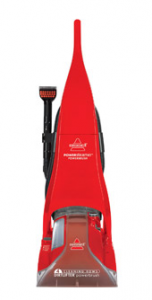
In looking for a more permanent solution, I found this Bissell PowerSteamer PowerBrush Deep Cleaner for carpets at www.walmart.com for $125. Paul and I compared some other carpet cleaners, and this model had the options we deemed necessary for our household.

With my birthday around the corner, Paul purchased this steam cleaner. We used it the weekend after it arrived, and my carpets sparkled (if that’s possible). I have been thrilled with this carpet cleaner!

Dining Room Floor - After using the Carpet Cleaner

Favorite Options

1. The Settings. This model offers normal, heavy traffic, and water rinse settings. On the first pass, Paul used the normal setting which brought up dirt, dust, and hair. After allowing the floor to dry, he then water rinsed the area to remove all the cleaning solution. The heavy traffic setting was needed on our hallway to bring the carpet back to its “normal” color. 🙂

2. The 2 in 1 Tank. Having used another carpet cleaner where the solution and water were mixed in the same container, I really like how this cleaner keeps the solution separate. The solution does not need to be refilled when the water is replaced. Having the solution in a separate compartment stretches the solution which saves money.

3. Attachment for Stairs. With little spots from sippy cups, drool, and super-saturated diapers on my stairs, I really like this attachment. Though we have not used it yet, I am thrilled to have this option. Most of the other carpet cleaners, within our price range, did not offer this attachment.

4. 25’ Cord Length. Some of the other models had shorter lengths. With the longer cord, I can complete an entire room without having to change outlets.

5. Deep Clean. This cleaner pulled up so much dirt. You could see the difference immediately. I love having clean carpets!

Possible Drawbacks

1. Type of Carpet Cleaner. Though the title is a PowerSteam, this cleaner is NOT a steam cleaner. The machine does not heat the water like a steam cleaner instead hot water, added to the container, cleans the carpet. To get the carpets clean, you need to add the hot water and then clean immediately. This option works fine for our family. We only have fish for pets, so most of my spots are food or liquids.

2. The Weight. This cleaner is heavy. It weighs over 20 lbs. The pushing and pulling to clean a large area is a lot of work. Paul was sore after cleaning all the downstairs’ carpets in one weekend. However, if you space out the cleaning, then the weight may be more tolerable.

3. Hard Floor Scrubber. My model will clean hard floors, but the attachment must be purchased separately. I have limited hard floors, so I do not need this attachment.

For me, this Bissell carpet cleaner has been a blessing! I can do a surface cleaning of a spill and wait to use the Bissell carpet cleaner at a later time. Though this model may not work for others, I have been thrilled with my birthday present resulting in clean carpets. Thanks, Babe!

Question: What is on your birthday list? Please add your answer in the comments.

Filed Under: Cleaning, Household Tagged With: Deep cleaning

Remembering September 11, 2001

September 11, 2011 by Tracy

Photograph Credit: Flickr (Ben Whitehouse)

To all First Responders:

Thank you for what you did 10 years ago and continue to do today. 

Ten years ago, do you remember where you were, and what you were doing when you heard the news? I was working alone in my office. What seemed like an ordinary day changed when the telephone rang. As I answered, I was met with “Are you all right?” The agent on the other line had been watching some news coverage while working. He needed details on a case and called to get the answers and to see if I had heard anything.

When the agent was not forthcoming about the morning’s events, he suggested I go turn on the television. After finishing our conversation, I took a stroll out of my office down to the Senator’s hallway where I discovered the news.

My first response was shock. The second plane had already hit the second tower. Knowing that I needed to get back to the office, I asked for a call if there were any other incidents.

Within the hour, our presiding judge closed our federal courthouse for the day. After a call to Paul informing him of the news, I went home. As I entered the lobby of our apartment complex, I was met by a managing agent seeking more information. After assuring her that she knew more than I did, since I had been away from the news coverage, I went home.

Once inside the apartment, I remember staying glued to the television coverage and praying for our leaders, the first responders, and victim’s families. The events stunned me so that I was numb. After days of processing that morning’s events, I found comfort and security in my Heavenly Father.

In peace I will both lie down and sleep; for you alone, O LORD, make me dwell in safety (Psalm 4:8).

Behold, the eye of the LORD is on those who fear him, on those who hope in his steadfast love, that he may deliver their soul from death and keep them alive in famine. Our soul waits for the LORD; he is our help and our shield. For our heart is glad in him, because we trust in his holy name. Let your steadfast love, O LORD, be upon us, even as we hope in you (Psalm 33:18-22).

Today, in remembrance of September 11, 2001, our security and comfort continues to come from the Lord, who made heaven and earth! May you find security, peace, and rest in God alone.

Filed Under: Uncategorized Tagged With: September 11

Vehicles: Car #1 – Insurance Documents

September 11, 2011 by Tracy

Last week, I shared the checklist of items housed in the vehicles category of our important documents. Since our family owns 2 vehicles, 0 recreational vehicles, and 0 boats, I have our documents housed in 3 file slots.

                  1. Car #1
                  2. Car #2
                  3. Miscellaneous vehicle documents

If you have numerous cars, recreational vehicles, and boats, then you might consider a slot per item or per type of item. Depending on your preference, you might need another file or larger file to hold these documents.

Whatever system you choose, be sure to label. You will then be using time wisely as you quickly retrieve your documents. 🙂

Having filled the first nine slots in our accordion filing system, I will now concentrate on the tenth file opening which houses documents for our newest vehicle. The first set of documents includes:

1. Current Insurance Receipt

In case there is a discrepancy, I keep a copy of our receipt showing payment for the current policy.

2. Current Insurance Policy

This document shows our dates of coverage and lists our limits and the premiums.

3. Current Declarations Page

My page actually consists of 4 pages. This record itemizes the coverage limits and explains what is covered under each premium section. This document will be needed if a claim needs to be made against this policy.

4. Previous Insurance Receipt

Since I pay semiannually, I choose to keep one year’s worth of documentation in my file for proof of continuous coverage.  I can also compare the renewal notice with the last two receipts to identify any changes.

5. Previous Insurance Policy

To verify that our coverage remains the same, I keep the previous 6-month notice for comparison.

6. Previous Declarations Page

Sometimes the details change at the time of renewal, so I like to have a reference of the current policy vs. the change.

7. Guaranteed Renewable Policy letter

Having been with the same insurance company for over 10 years (actually around 17 years), I have earned the following discounts:

    • A 10-year accident-free discount. This discount amounts to a 20% discount on at least one of our vehicles.
    • Guaranteed Renewable Policy. Our car insurance policy will be renewed regardless of our future accident record, and includes all vehicles insured with our insurance company (State Farm).

In case you are wondering if I have shopped around for car insurance rates. Yes, I have. Since we are insured with State Farm Mutual, we get the lowest prices on our premium. I have not found an insurance company that can offer the same coverage for the price we pay. State Farm continues to serve us well.

8. Privacy Policy Information

Each year State Farm sends a copy of their privacy policy. I keep this policy with my insurance paperwork.

All these items are paper clipped together and housed in this tenth file slot of my accordion filing system. Keeping the insurance documentation together for this vehicle allows me to quickly find the information I need.  For example, I quickly found my vehicle’s VIN (Vehicle Identification Number) when filling out the claim paperwork from hitting the pot hole.

With all my important documents together, I just need to find the correct category and slot to get the items needed. Keep using time wisely by getting these documents organized.

Question: What type of filing system is working for you? Please add your answer to the comments.

Filed Under: Document Organization, Vehicles Tagged With: vehicles

Daily Deal Site: LivingSocial – Part 1 of 2

September 10, 2011 by Tracy

Photograph Credit: LivingSocial

I love daily deal sites! As the name suggests, these types of web sites offer a fantastic deal each day at a 50-90% discount to local attractions, restaurants, performances, and more. (See why I like these sites? :-))

One of these daily deal sites is www.LivingSocial.com.

Disclosure: The LivingSocial link in this post is Using Time Wisely’s affiliate link. When you register (for free) through my link and make a purchase, then LivingSocial compensates me.

Though you can access your free registration through the LivingSocial web site, your support of Using Time Wisely is greatly appreciated. Here’s my full disclosure policy.

My LivingSocial Account

Current Vouchers

    • $12 to spend at Stevi B’s Pizza (paid $6 = 50% savings)
    • 2 tickets to a dramatic production (deal cost $16 = 50% savings)

Used Vouchers

    • Admission for 4 to a local water park – toddler was free (paid $16 = 60% savings)

We used our voucher on a day Paul was off work, our friends could join us, and everyone was well. Though the park was busy, it was a nice family activity. If the deal comes back, I will definitely purchase it again.

Getting a LivingSocial account

Want to stretch your dollars by getting vouchers at 50-90% discount? Come sign up for a free LivingSocial account. Need some help? Let me show you the way:

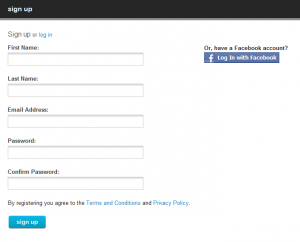
Sign up

1. Go to www.livingsocial.com

2. In the top right corner, click “sign up”

3. Add your name, e-mail address, and password with confirmation

Photograph Credit: LivingSocial

4. Click “sign up”

Log In

1. Back on the Home page (click on the LivingSocial logo), select “log in” in the top right corner

Photograph Credit: LivingSocial

2. Enter your e-mail and password

3. Click “log in”

Change the Deal City

1. On the left sidebar, select the bottom option, “more cities”

Photograph Credit: LivingSocial

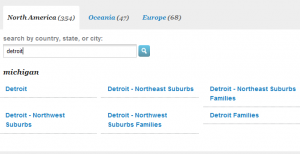
2. In the search box, enter your location and click enter (i.e., Detroit, Michigan)

Photograph Credit: LivingSocial

3. Click on the location of your choice (i.e., Detroit – Northeast suburbs)

4. The deal of the day changes to that location’s offer

Subscribe to your City’s Daily Deal

In using time wisely, refrain from from visiting LivingSocial’s web site each day. Just have the deals delivered to your e-mail inbox. The subscription process is very simple.

1. In the top right hand corner under your name, select “subscribe”

2. Confirmation of your subscription is “subscription successful”

You will now get an e-mail each day from LivingSocial with the daily deal. You can then choose to purchase or by-pass the deal without visiting the web site. (Love these options to help me save money, energy, and time.)

To use LivingSocial in stretching your dollars, you need to sign up, log in, change to your local city, and subscribe to your city’s daily deal. You will then be on your way to finding great local deals.

Our family enjoys trying new activities. By saving at least 50% on these adventures, I can plan more activities without breaking the bank. Next week, I will cover how to purchase a deal, locate your voucher, and redeem your voucher. In the meantime, keep using time wisely as you stretch your dollars!

Question: What is your favorite daily deal site? Please add your answer to the comments.

Filed Under: Daily Deals, LivingSocial, Stretching Your Dollars Tagged With: LivingSocial

Lowe’s Build and Grow: Police Car

September 9, 2011 by Tracy

Photograph Credit: Lowe's

The second Saturday of the month is just around the corner which means Lowe’s will be hosting this Build and Grow clinic:

What: Build a free police car with flashing light

When: Saturday, September 10, 2011

Where: Your local Lowe’s home improvement store

Time: 10:00 a.m. to 11:00 a.m.

These clinics fill up quickly. Be sure to register your attendance at your local Lowe’s and arrive no later than 10:15 a.m. to the event. For other tips and details on the Lowe’s Build and Grow clinics, refer to my detailed post here.

Photograph Credit: Lowe's

After this Saturday’s event, the next Lowe’s Build and Grow project will be on Saturday, September 24, 2011, building a fire truck with siren. You can register for both the September 10 and 24 events through Lowe’s web site.

Wishing you a cool, restful, family-filled weekend with a little football for flavor!

Filed Under: Going Out, Free Outings, Family Activities Tagged With: Lowe's

« Previous Page
Next Page »

Welcome to Using Time Wisely!


Presenting organizational tips and tricks to save you money, energy, and time.

To access 5 Ways to Using Time Wisely Today, click "like" on my facebook page and join in on the journey of Using Time Wisely.

Looking for something?

Email Newsletter

Sign up to receive email updates and to hear what's going on with us!

Copyright © 2026 · Lifestyle Pro Theme on Genesis Framework · WordPress · Log in