• Home
  • About Tracy
  • Contact Me

Using Time Wisely

Organized to save money, energy, and time

  • Email
  • Facebook
  • Pinterest
  • RSS
  • Twitter
  • YouTube
  • Document Organization
    • Overview
    • Box 1
      • Credit Report/Cards
        • Credit Reports
          • Credit Updates
          • Credit Scores
        • Credit Cards
      • Personal
      • Home Ownership
      • Vehicles
    • Box 2
      • Life Insurance
      • Major Medical
      • Tax-Favored Programs
      • Prescriptions
      • Dental & Vision
      • Special Health Policies
      • Short-term Disability
      • Long-term Disability
      • Personal Insurance
    • Box 3
      • Social Security Documents
      • Retirement
      • Investments
      • Estate Planning
      • Tax Records
  • Household
    • Cleaning
    • Maintaining
    • Organizing
    • Scheduling
      • Laundry
  • Event Planning
    • Assisting
    • Attending
    • Coordinating
      • Birthday Party
      • Christmas
      • Dinner Party
      • Fall Festival
      • Field Trip
      • Lemonade Stand
      • Thanksgiving
    • Learning
    • Preparing
    • Serving
  • Miscellaneous
    • Communication
      • Customer Service
      • E-mail
      • RSS Feed Reader
    • Goals
    • Organization
    • Time Management
      • To Do List
  • Food
    • Food Prep
    • Grocery Shopping
      • Lists
      • Pricing
    • Menu Planning
    • Recipes
    • Stockpile
  • Family Activities
    • Going Out
      • Free Outings
      • Inexpensive Outings
      • Summer
    • Rewards
      • Good Grades
      • Reading
      • Summer Reading
    • Staying at Home
  • Stretching Your Dollars
    • Daily Deals
      • Groupon
      • LivingSocial
    • Drugstores
      • CVS
    • Gas Prices
    • Gifts
    • On-line Shopping
    • Pictures
    • Products
    • Restaurants
    • School Items
    • Tips
You are here: Home / Archives for 2011

Archives for 2011

Vehicles: Category Overview

September 4, 2011 by Tracy

Having completed the Credit Reports and Credit Cards, Personal, and Home Ownership categories, we have reached the last category in Box 1 of our important documents.

This last category holds all the documents related to our vehicles. I use the 3 remaining file openings in Box 1 for our vehicle paperwork.

Per Suze Orman’s Protection Portfolio (the program from which I have organized my documents), these are the documents included in this category:

Vehicle Checklist

  • Automobile titles and/or leases
  • Automobile insurance policies
  • Automobile loan documents*
  • Recreational vehicles titles*
  • Recreational vehicles insurance policies*
  • Recreational vehicles loan documents*
  • Boat titles*
  • Boat insurance policies*
  • Boat loan documents*

Items with an (*) indicate items not included in my filing system.

Beginning next week, I will explain the documents I keep in my filing system. As you organize your important documents, please adjust this system to fit your needs. The goal is to have a place for each of your documents to save you money, energy, and time when retrieving your paperwork. Happy organizing!

Question: What kind of filing system are you using? If using an accordion system, do you have enough room for all your documents? To add your answer, please leave a comment.

Filed Under: Document Organization, Vehicles Tagged With: vehicles

Ped Egg: Saving $160 per year

September 3, 2011 by Tracy

Photograph Credit: Ped Egg

Do you enjoy getting a manicure, pedicure, and/or massage? These services are a great way to relax while improving your outward image. Though these treatments are enjoyable, they come with a price.

Since I choose to upkeep my own nails and depend on hubby for my foot massages, I do not spend money on these extra pampering treatments. However, I used to spend upwards of $80 every 3-6 months on foot care.

Spending $160-$320 per year

Since my feet develop deep calluses, partly from bunions, I would go through 2-3 packages of socks as well as the discomfort of snagging the hard edges on the bed sheets, carpet, and my shoes. My quarterly visit to the podiatrist to have the calluses removed and my feet smoothed was worth the $80. My feet felt soft, the socks fit better, and hubby’s foot massages were relaxing.

After seeing a paid programming commercial advertising the Ped Egg, my curiosity was aroused. I wondered if the product really worked. Rather than placing an immediate order, I waited until the Ped Egg was carried in a local store. When I found a great sale, had spare Extra Bucks, and was near going back to the podiatrist, I purchased a Ped Egg with replacement blades from CVS. After applying my Extra Bucks, I only owed tax.

Saving $160-$320 per year

I tried the Ped Egg, and it worked beautifully. I love that I can use it right after a bath or shower when my skin is already very moist. The calluses are easily removed, and my skin stays very soft. I use my Ped Egg as often as I need it without having to wait for an appointment.  This one product not only save me money, but also saves me time.

    • Making an appointment. Finding a time slot that does not interfere with nap time, school time, or activity time gets really tricky. With the Ped Egg, I don’t need a huge block of time.
    • Driving to the appointment. No visit is needed with the Ped Egg, so I save time on driving and money on gas.
    • Visiting the podiatrist. Keeping the girls occupied quietly in a waiting room takes lots of attention and patience. The Ped Egg eliminates my need to visit the podiatrist which gives me more time to play and be loud.

Though I am thankful for my podiatrist and the services he provides, I love my Ped Egg. Having used this product for over a year now, I know this product works and saves me money and time.  By purchasing the Ped Egg with replacement blades on sale and with CVS Extra Bucks, I was able to stretch our hard earned dollars and save our family a minimum of $160 a year in medical payments to the podiatrist while using time wisely.

Question: What product are you using that saves you time and money? Please share your answer in the comments.

Filed Under: Stretching Your Dollars, Products Tagged With: ped egg

Backyard Fun – A Step Away

September 2, 2011 by Tracy

School is underway, the extreme temperatures are dropping a tad, and my house is halfway clean (the upstairs is complete). My reward when I finish cleaning will be to burn my pumpkin spice candle. Oh, what motivation! I love, love, LOVE autumn. The cooler temperatures, football season (Go Gators!), and outdoor fun with my family.

After the evening dinner together, my family enjoys spending time outdoors. If you stopped by, you might find us:

Hitting Baseballs

My son, older daughter, and husband enjoy hitting, missing, and/or slamming the baseballs into our neighbor’s yard. Though the balls are plastic, they sail through the air.

This automatic pitching machine was a great investment. My son has really improved in his performance, and my kids stay active chasing down the baseballs to start again.

Digging in the Sandbox

For dessert, my youngest daughter enjoys a mouthful of blue sand. 🙂 She loves to dig, scoop, pour, and eat. Keeping it out of her mouth is a battle, but the fun had in the sandbox has been worth it.

My son is a little big for the sandbox, but he plays well with the girls. Maybe someday the girls will play well with him. 🙂

Hunting Bugs, Frogs, and Snakes . . . oh, my!

Before mowing the yard, my husband moves the down spout splash blocks out of the way. Since critters are usually hiding, he takes the bug containers to capture frogs, katydids, and grasshoppers. One evening, this little guy surprised him.

At the announcement of a snake, the kids ran to see him. Knowing that he lived under the splash block, we were able to see him one or two more times before he found another home. Then we were off to find other interesting creatures for our next Show and Tell item at school. 🙂

Riding Bikes

Between the tricycle, big wheel, bike with training wheels, big boy bike, and the scooter, my kids can spend more time getting out an item and putting it away than they do riding their vehicle of choice.

Been there?

They drive me nuts!

I get out 3 bikes. They ride up and down the sidewalk once and come back to put that bike away and get another. I have found taking walks, away from the house, deters them (a little) from this strategy. Somehow, I get roped back into it every time. Though it can be frustrating, I am thankful for healthy kids who can run, jump, and ride their bikes.

Exploring the Tent

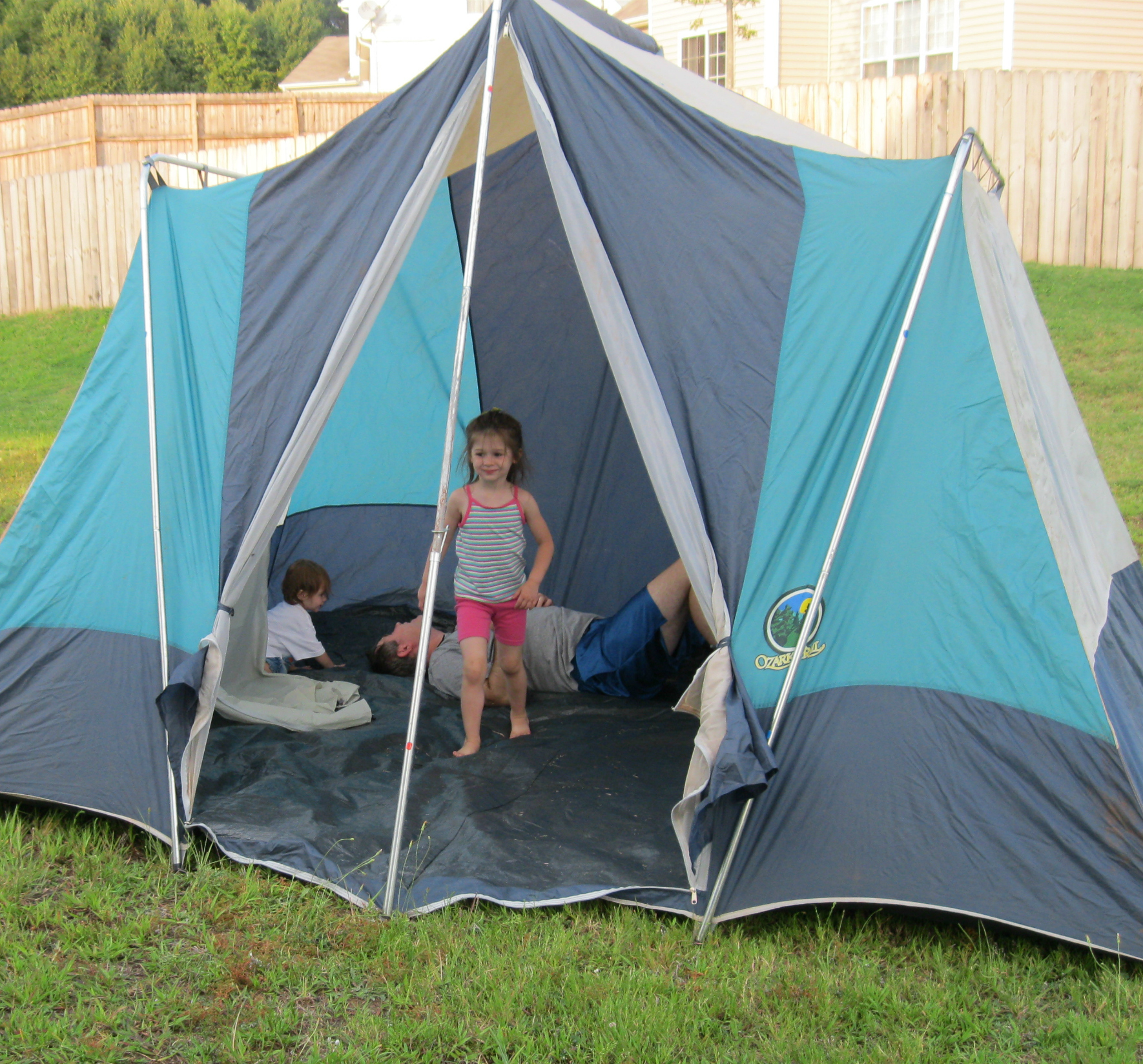
Before camping, Daddy airs out the tent in our backyard. The kids love to run around inside. This fascination is fun to watch. All of a sudden, they have a new clubhouse with a door and windows.

When the windows are unzipped, my youngest daughter hides in the coverings that hang on the floor. She is small enough to fit. Then comes the peek-a-boo game which gets her giggling, and sister and brother laughing, and then Daddy and I join the fun.

While enjoying the cooler weather this fall, our family will be using time wisely playing outside. These fun family activities burn off energy, offer lots of giggles, and give us time with each other. As you plan family outings, don’t forget about the great activities you can discover a step away in your own backyard.

Question: What fun activities does your family enjoy in the backyard? 

Filed Under: Staying at Home, Family Activities Tagged With: family activity, outdoor

Grocery Shopping: Creating your Grocery Lists – Part 2b of 3

September 1, 2011 by Tracy

Photograph Credit: Stock.Xchng (Gerla Brakkee)

Has your schedule changed in the last few weeks due to one or more children attending school? If so, I’m right there with you. My son just entered first grade which is a transition to a longer school day. As he is adapting to school, the girls and I are adjusting to him being gone, picking him up later, and finding a new routine that works for us.

Keeping all the pieces together and just rearranging them a bit is helping. For me, adjusting a plan is much easier than creating a new one. As we continue this grocery shopping series on creating your grocery lists, I hope that you can take this detailed plan and adjust it to fit your needs.

Last week in Part 2a, I covered steps 1 and 2 in a 6-step process. Today, I will continue steps 3 and 4.

Step 3: Scan the ad for items on your needed list

If I find a sale on spices and have ground mustard on my needed items list, then I will be purchasing or at least looking at spices when I shop at this store. If the web site you are using has a little box next to the item, then you can check it if you are considering purchasing this item. At the end of the list of sale items, you can create your shopping list. (This is my number one reason for loving www.southernsavers.com.)

Unfortunately, not all grocery store deal web sites have this option. If you use a web site that does not create the shopping list for you, then create your own:

    • Open a word processing program like Microsoft WORD
    • Create a NEW document
    • Go back to the deal web site, highlight the entire grocery store deal post, and copy it.
    • Back at your new document, paste that list.
    • Delete items you do not plan to purchase.

Step 4: Consider the Buy One Get One Free sale items

When you purchase items that are buy one get one free (BOGOF), you are already saving 50%. If you have coupons for these items, you can increase your savings! The number of BOGOF items I purchase depends on the answer to the following questions:

1. How many coupons I have for that product?

    • If I have 6 coupons for Hillshire Farm sausage which brings the price down to $.86 per package, then I will probably purchase all 6 packages.
    • If I have 2 coupons for Pepperidge Farm Goldfish, then I will be purchasing at least 2 packages. (My kids eat A LOT of goldfish.)

2. How much of that product my family will consume in 4-6 weeks?

    • My family does not need 6 packages of Hillshire Farm sausage, however, I will work in meals with sausage (maybe try a new recipe) for this great price.
    • Two packages of goldfish will not last more than 2 weeks at my house, so I will probably purchase more than 2 packages. Two packages will be lower in price due to the coupons, but the other packages will still be 50% off.

3. How often that product goes on sale?

    • Sausage goes on sale often, so I do not need to stock up for longer than 4-6 weeks. My family is not partial to Hillshire Farm. We will eat other brands.

TIP: If your family goes through a lot of a specific brand, then stock up at the 50% off savings when that brand is BOGOF.

I stock up when Kraft Singles and boneless pork loins go on sale since their sales are infrequent.

    • Goldfish are on sale about every 5 weeks. So, I will purchase 7-9 packages to get me through until the next sale.

4. How much money is available in my budget?

    • It is very likely that sausage for $.86 per package will be in my food budget.
    • It is also very likely that Goldfish will be in my food budget.
    • However, $15 for a whole boneless pork loin may or may not be in my food budget. If I need pork loin, then I may need to forego some of the other BOGOF sale options to stay within my budget, use money saved from previous weeks to cover the cost, or choose to stock up now and adjust my weekly budget for the remainder of the month.

By adding items your family needs and stocking up on the Buy One Get One Free items, you can create meals your family enjoys and stay within your budget. You will then have more items available to create next week’s menu plan. This process has been very helpful to me as I learn to use my time wisely, save money, and feed my family.

Guess what I’ll cover next week? There’s no fooling you. Yes, I will finish steps 5 and 6 in the second part of creating your grocery lists. Happy savings!

Question: What is your family’s monthly food budget? You can check Using Time Wisely’s Facebook page for my answer. While you are there, add your answer or leave a comment. 🙂

Filed Under: Grocery Shopping, Lists, Food Tagged With: grocery lists

Junk E-mail Account – Part 2 of 2

August 31, 2011 by Tracy

Photograph Credit: Flickr (Keri J.)

Setting up a junk e-mail account keeps my personal items separate from coupons, deals, and newsletters. Last week, I explained why I have this account and how to setup a junk e-mail account in Yahoo!. In Part 2, I walk you through setting up a junk e-mail account in Gmail, another favorite free e-mailing provider.

To setup a junk e-mail account in Gmail:

1. Type www.gmail.com into your Internet browser

2. On the right side, click “Create an Account.”

3. Register for your new account

4. Fill in your name

5. Choose an e-mail name for this account – Remember your Desired Login Name. You will need this information to log back into your account.

6. Select a password and security question and answer

7. For the recovery e-mail address, I use my personal e-mail account. If I should forget the password to this account, I can reset it from my personal e-mail account.

8. Add your personal information

9. Complete the word verification

10. Read the Terms of Service

11. Click “I accept. Create my account”

12. Gmail will then congratulate you and send you a confirmation e-mail to your recovery e-mail account.

To go to your account:

1. Click on “Show me my account”

2. The site will redirect you to your new account

3. Your 3 welcome e-mails will be in your account

To log back in to your Gmail account:

1. Type www.gmail.com into your Internet browser

2. On the right sidebar, type your username and password, and click “Sign in”

3. The site will direct you to your account

Task completed! When you need to supply an e-mail address, you can now use this account to keep your personal e-mail account clutter-free. 🙂

In using time wisely, I save lots of time by having a junk e-mail account. Keeping a clutter-free inbox is an on-going task made a little easier when the important information comes to my personal account and the other items sit in a junk account. If you prefer separate accounts, then creating a Gmail junk account might assist you in using your time wisely.

Question: What is your favorite e-mail account provider? Please add your answer by clicking the “Leave your Comment” button.

Filed Under: Communication, E-mail, Miscellaneous Tagged With: e-mail

« Previous Page
Next Page »

Welcome to Using Time Wisely!


Presenting organizational tips and tricks to save you money, energy, and time.

To access 5 Ways to Using Time Wisely Today, click "like" on my facebook page and join in on the journey of Using Time Wisely.

Looking for something?

Email Newsletter

Sign up to receive email updates and to hear what's going on with us!

Copyright © 2026 · Lifestyle Pro Theme on Genesis Framework · WordPress · Log in