
• Home
  • About Tracy
  • Contact Me

Using Time Wisely

Organized to save money, energy, and time

  • Email
  • Facebook
  • Pinterest
  • RSS
  • Twitter
  • YouTube
  • Document Organization
    • Overview
    • Box 1
      • Credit Report/Cards
        • Credit Reports
          • Credit Updates
          • Credit Scores
        • Credit Cards
      • Personal
      • Home Ownership
      • Vehicles
    • Box 2
      • Life Insurance
      • Major Medical
      • Tax-Favored Programs
      • Prescriptions
      • Dental & Vision
      • Special Health Policies
      • Short-term Disability
      • Long-term Disability
      • Personal Insurance
    • Box 3
      • Social Security Documents
      • Retirement
      • Investments
      • Estate Planning
      • Tax Records
  • Household
    • Cleaning
    • Maintaining
    • Organizing
    • Scheduling
      • Laundry
  • Event Planning
    • Assisting
    • Attending
    • Coordinating
      • Birthday Party
      • Christmas
      • Dinner Party
      • Fall Festival
      • Field Trip
      • Lemonade Stand
      • Thanksgiving
    • Learning
    • Preparing
    • Serving
  • Miscellaneous
    • Communication
      • Customer Service
      • E-mail
      • RSS Feed Reader
    • Goals
    • Organization
    • Time Management
      • To Do List
  • Food
    • Food Prep
    • Grocery Shopping
      • Lists
      • Pricing
    • Menu Planning
    • Recipes
    • Stockpile
  • Family Activities
    • Going Out
      • Free Outings
      • Inexpensive Outings
      • Summer
    • Rewards
      • Good Grades
      • Reading
      • Summer Reading
    • Staying at Home
  • Stretching Your Dollars
    • Daily Deals
      • Groupon
      • LivingSocial
    • Drugstores
      • CVS
    • Gas Prices
    • Gifts
    • On-line Shopping
    • Pictures
    • Products
    • Restaurants
    • School Items
    • Tips
You are here: Home / 2012 / Archives for April 2012

Archives for April 2012

Spring Cleaning: Removing Black Marks from a White Kitchen Sink

April 9, 2012 by Tracy

Spring has sprung! With new organized spaces after completing Project Simplify Week 1, Week 2, Week 3, and Week 4, I need to clean some key areas of my home.

Welcoming the cool breeze by opening our windows, I get motivated to spring clean. During this time, I like concentrating on specific areas that get used often, but not cleaned often enough. The first area needing some tender loving care elbow grease is my kitchen sink.

Kitchen Sink Marks

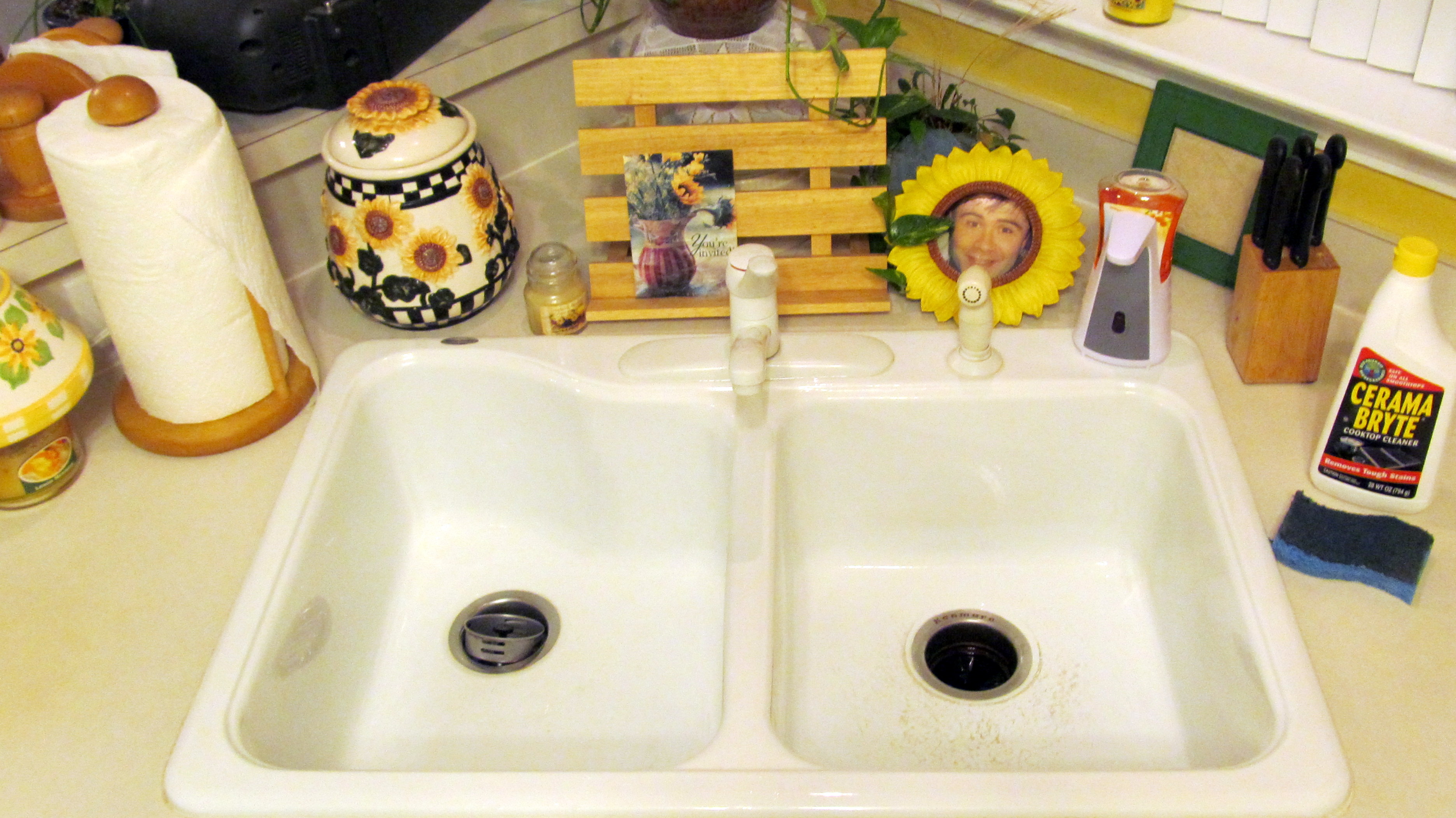
Our sink is white and shows all the dirt, grime, and metal marks from pots and pans rubbing on the white finish. Removing black marks from a white kitchen sink is easy when you know how to clean it.

Finding a Cleaning Solution

When we first moved into our home, I remember the first mark on the sink. I scrubbed with soap and water to no avail. I then tried a spray-on cleaner, like Fantastic, which only cleaned the surface and left the mark.

Without finding a quick solution, I turned to my computer to search for an answer. Surprised to find no help, I looked to the manufacturer and home improvement stores.

Finally, I discovered that the gentle cleaner for our smooth-top stove removes these marks. Yeah!

A few years later, our sink drain backed up, and Paul treated the clog with Drano. The Drano completely removed all those stubborn marks without any effort on my part.

Though the Drano worked, the fumes were strong, so I choose to clean with the smooth-top stove cleaner (any brand will do).

Cleaning our White Kitchen Sink

1. Drizzle the cleaner inside both sides

2. Use a no-scratch sponge to wipe the sides and bottom

3. Rinse with lukewarm water

4. Repeat for any stubborn marks
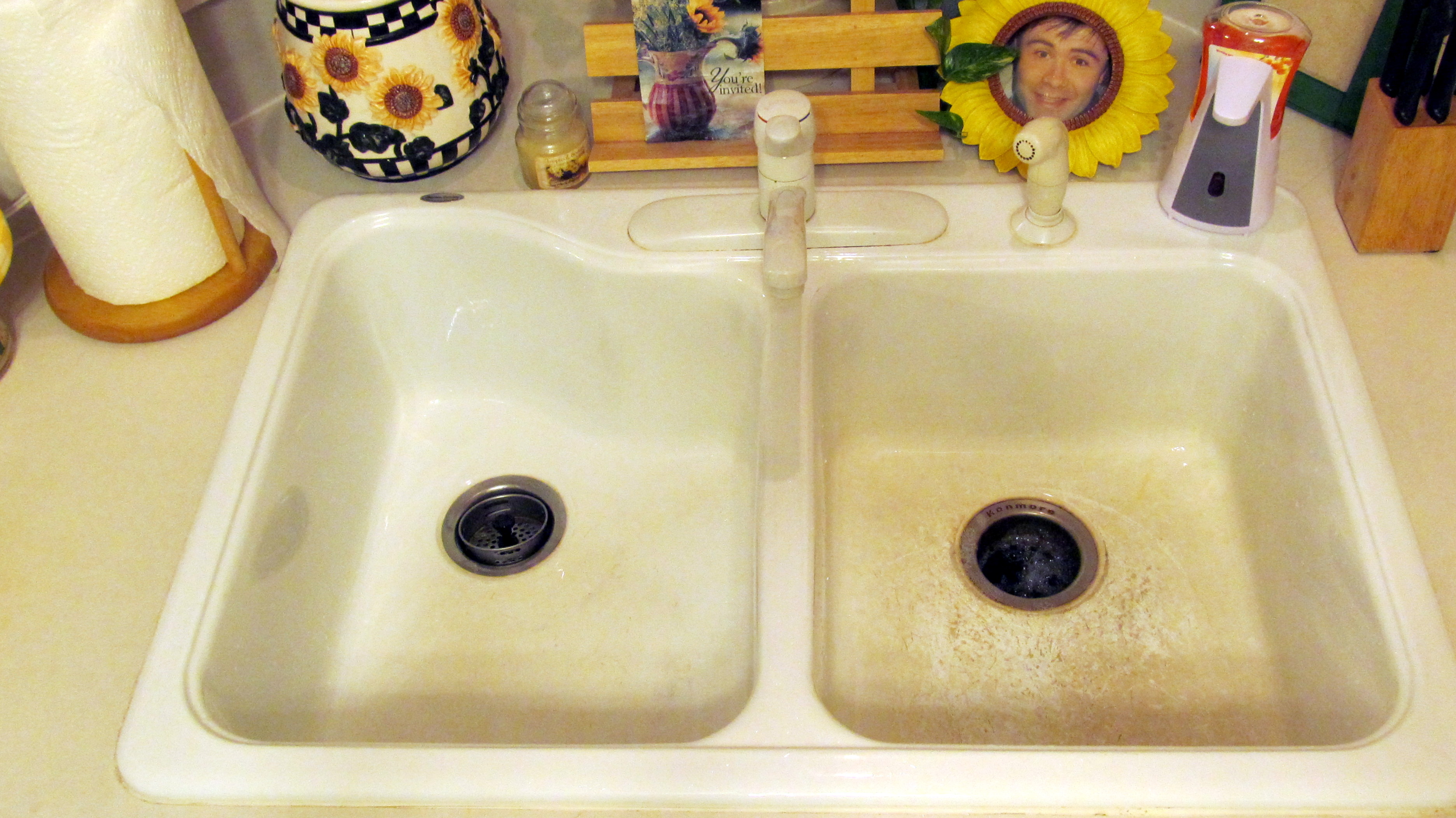
  

Before         and           After

Much better! My sink definitely needed to be clean. With just a few minutes, you can spring clean, too. Within 10 minutes I had my kitchen sink sparkling white. Knowing I accomplished this task today motivates me to choose another small task to improve our home while using time wisely. Happy spring cleaning!

Question: What item are you spring cleaning this week?

Filed Under: Cleaning, Household Tagged With: spring cleaning

Tax-Favored Programs: Medical Spending Account

April 8, 2012 by Tracy

Reaching the halfway point of the tax-favored programs, we have two more sets of documents to add before completion. 🙂 Filed in this category are the Health Savings Account and Pre-tax Group Insurance Premium. With only the spending accounts remaining, I will begin with the medical spending account.

Medical Spending Account

Defined

A Medical Spending Account allows you to pay for medical expenses with pre-tax dollars, up to $5,000 per year. For our medical spending account, we estimate our eligible medical expenses (doctor’s visits, prescriptions, glasses, contacts, etc.) for the year. The total amount chosen gets divided into equal installments that get deducted from Paul’s paycheck. The deducted amounts get paid into our account for these medical services.

For our plan, we chose the debit cards. This option allows us to pay for the medical expenses with this card. Without the debit card, I would pay out-of-pocket and then send copies of my receipts for reimbursement. As long as I pay with the debit card and the services are eligible, then I do not have to fill out any forms for reimbursement.

One benefit to this program is that the entire amount allotted for the year becomes available on the first day of the plan year. If we estimated our expenses to be $1,000 for the year and we have an emergency surgery on January 2, then we can use our debit card to pay $1,000 of that bill on January 3. The chosen amount would still get deducted from Paul’s paycheck all year, but the funds are available for use immediately.

Cost

Possible Fees

To use the Medical Spending Account, we pay a $5 annual enrollment fee, and then a $2.50 monthly administrative fee along with our $.12 pre-tax group insurance premium (since these fees get paid with pre-tax dollars).

For the year, we spend $36.44 for the benefit of using pre-tax dollars for our medical expenses. This cost is worth the savings for our family since we do not pay enough in medical expenses to claim on our taxes.

Losing your Allotment

Another cost to consider is losing the money in your account. If you estimate your medical expenses to be $2,000 and you only use $1,000 by the end of the plan year, then you lose $1,000. Ouch! To be wise stewards of our finances, we underestimate our expenses to prevent losing money.

Though our plan allows until March 31 of the next year to use those funds, we spend all the allotted money by December 31 of the plan year. If you have a medical spending account, plan wisely to maximize your savings.

Spending your Time

Other costs are your time. Due to federal regulations, I receive a monthly statement indicating all the charges on the issued debit card. To verify these charges, I must fill out a form documenting the provider, patient, dates of service, and amounts and then fax that form with itemized receipts to our medical spending account provider. Though the cost savings is worth the extra effort, you will spend time providing documentation.

With all my documents filed, this process does not take long. However, it will take more time if you do not have the proper documentation. I am not trying to dissuade you from a medical spending account because I love it and use it every year. However, I want you know the ramifications of enrolling before taking the plunge.

Documents

The paperwork I keep for our medical spending account in this file includes the following:

    1. Notice of our enrollment with amounts chosen

2. Benefits guide explaining the program with instructions for submitting forms

3. Photocopies of the front and back of our debit cards

4. Correspondence from provider

Other items already in the file from other programs:

      • The brochure explaining the tax-favored programs
      • Privacy policies of provider

These documents stay together in this sixth file opening with our tax-favored program paperwork. The receipts and forms for this account are kept in our insurance files. These files are separate from our important documents system. My current important documents filing system could not hold the annual paperwork of our medical spending account. So, to keep the insurance documentation separate from the receipts, reports, and prescriptions, I keep different files.

As you continue using time wisely to organize your important documents, remember that your file may or may not have these similar types of insurance. Just adjust your file to your needs. I am not a financial planner, doctor, lawyer, or advisor. I am a mom, who researches and helps choose options that will benefit my family while using time wisely. Happy organizing after celebrating this joyous Easter Day!

Question: Do you have a medical spending account option?

Filed Under: Tax-Favored Programs, Document Organization, Box 2 Tagged With: Tax-favored programs

2012: Happy Easter!

April 8, 2012 by Tracy

Photograph Credit: Flickr (James Emery)

The Triumph of Christ over Death

The Death of Jesus

And when the sixth hour had come, there was darkness over the whole land until the ninth hour. And at the ninth hour Jesus cried with a loud voice, “Eloi, Eloi, lema sabachthani?” which means, “My God, my God, why have you forsaken me?” And some of the bystanders hearing it said, “Behold, he is calling Elijah.” And someone ran and filled a sponge with sour wine, put it on a reed and gave it to him to drink, saying, “Wait, let us see whether Elijah will come to take him down.” And Jesus uttered a loud cry and breathed his last. And the curtain of the temple was torn in two, from top to bottom. And when the centurion, who stood facing him, saw that in this way he breathed his last, he said, “Truly this man was the Son of God!”

There were also women looking on from a distance, among whom were Mary Magdalene, and Mary the mother of James the younger and of Joses, and Salome. When he was in Galilee, they followed him and ministered to him, and there were also many other women who came up with him to Jerusalem.

Jesus Is Buried

And when evening had come, since it was the day of Preparation, that is, the day before the Sabbath, Joseph of Arimathea, a respected member of the council, who was also himself looking for the kingdom of God, took courage and went to Pilate and asked for the body of Jesus. Pilate was surprised to hear that he should have already died. And summoning the centurion, he asked him whether he was already dead. And when he learned from the centurion that he was dead, he granted the corpse to Joseph. And Joseph bought a linen shroud, and taking him down, wrapped him in the linen shroud and laid him in a tomb that had been cut out of the rock. And he rolled a stone against the entrance of the tomb. Mary Magdalene and Mary the mother of Joses saw where he was laid.

The Resurrection

When the Sabbath was past, Mary Magdalene, Mary the mother of James, and Salome bought spices, so that they might go and anoint him. And very early on the first day of the week, when the sun had risen, they went to the tomb. And they were saying to one another, “Who will roll away the stone for us from the entrance of the tomb?” And looking up, they saw that the stone had been rolled back— it was very large. And entering the tomb, they saw a young man sitting on the right side, dressed in a white robe, and they were alarmed. And he said to them, “Do not be alarmed. You seek Jesus of Nazareth, who was crucified. He has risen; he is not here (Mark 15:33-16:6).

He is Risen . . . He is Risen, Indeed!

Happy Easter!

Filed Under: Uncategorized Tagged With: Easter

Free Federal Tax Preparation: 5 Steps to Filing your Tax Return

April 7, 2012 by Tracy

The following information is not professional tax advice. I am sharing how our family files our taxes without paying a professional hundreds of dollars for tax preparation. Our taxes are not complicated, and we choose to use an on-line service while using time wisely.

Photograph Credit: Flickr (MoneyBlogNewz)

Filing our taxes last weekend took longer than I anticipated. Most years the filing takes between 1-2 hours total. This year was different since I needed to research the filing of Using Time Wisely along with our personal taxes.

After about 4-6 hours, I authorized the electronic filing and celebrated with a warm bath and Facebook time. 🙂

If you choose to file your own taxes but want the help of a tax service, then here’s my 5-step plan to go from pile of paperwork to filed taxes.

STEP ONE: Gather your Documents

Throughout the year, I toss all tax documents inside a labeled file folder. At tax time, I get the folder and begin. If you do not have a file or are not sure what documents you need, then use my list of documents I gather to start:

Income

    1. W-2 forms (from employers)
    2. IRS notices (1098, 1099R, etc.)
    3. Refund from 2010 state taxes
    4. Retirement documentation (income from conversions of a qualifying retirement account)
    5. Business accounting documentation

Deductions

    1. Mortgage interest forms
    2. Line of Credit interest forms
    3. Property tax receipts (vehicles, home, etc.)
    4. Charitable donations

 Other

    1. Use tax receipts (items purchased via Internet without paying sales tax)
    2. Copy of 2010 federal tax return

These are the documents I gather. You may need more documentation (i.e., medical receipts, childcare expenses, tax preparation fees, etc.) to file your 2011 taxes.

STEP TWO: Choose a Tax Service

In an effort to save my family money, I choose to prepare our taxes. Up until last year, I filed our taxes by hand. Last year, I tried TaxAct and loved it! The federal filing for us was free, and I paid $14.95 for our state filing.

Paying less than $20 for the same tax preparations that a professional would charge $250 was beneficial to our family while stretching our dollars.

This year, TaxAct sent me a promotion for the deluxe package which included the federal and state tax filing for $13.95 which I purchased. Having used the on-line service last year, I was familiar with the steps, and some of our information transferred to our 2011 return. Yeah! This service continues to save me money, energy, and time!

If you are looking for an on-line service, you may qualify for free federal tax preparation through these available companies. Though the federal filing is free, these companies charge a fee for the state filing.

STEP THREE: Search for Promotional Codes

Once you decide which company you prefer, search for a promotional code through your favorite search engine (e.g., Swagbucks, Google, etc.). To search, type the “[name of the business] promotional code” (e.g., “TaxAct promotional code”) into the search box.

If you find none, try the company’s web site, scan the banners and advertisements on the home page, and check the pricing page.  You might be surprised at the savings found with a quick search.

STEP FOUR: Register at your Chosen Company

If you are filing with a new-to-you company, you will need to set up your account. This process takes a few minutes.

Note: Remember to record your user name and password to get access to your account after periods of inactivity and next year.

TaxAct timed out 3-4 times during my preparation while I researched, added our receipts, and checked forms.

STEP FIVE: Add Amounts, Review, and File

Add Amounts

Once you register, you are ready to begin. The service will ask you questions and offer blocks for you to add the amounts from your documentation. With your documents gathered, this process goes quickly.

Review

When all information gets entered, review and run the alerts. The service will alert you to any inconsistencies, missing information, or problems.

File

Once you have reviewed your federal return and verified the information, you can choose to e-file or mail your return. You will want to save a copy of your return. I choose to save it to my computer and print a hardcopy for our records.

Once filed, you should receive a confirmation notice. I print this notice for our records.

State Tax Filing

For our state return, TaxAct transferred our federal return information to our state forms. Within 15 minutes, I added two other amounts, reviewed, and filed our state taxes. (Insert happy dance!)

Though there are tons of other things you would rather do than file taxes, you can gather your documents, choose a tax service, search for promotional codes, register your account, and add amounts, review, and file your taxes while using time wisely.

You still have a little over a week, but why wait. Knock out those taxes, cross another item off your to-do list, and save your family $200 or more by filing your taxes through a reputable tax service. You can do it! Just start at step one.  Happy savings!

Question: How do you file your taxes?

Filed Under: Stretching Your Dollars, Products Tagged With: taxes

Home Depot: Window Bird Feeder

April 6, 2012 by Tracy

Photograph Credit: The Home Depot

Not sure how I feel about inviting birds to our yard. Sometime today, one or more birds have swiped the strawberries out of our garden.

At this moment, my 4-year-old daughter is NOT happy with them. If she decides to be kind and we attend this event, then we will place our bird feeders in the front yard away from our backyard garden.

If you want to welcome birds into your space, then the Home Depot Kids’ Workshop project may offer enjoyment.

April’s Workshop

Saturday, April 7, 2012

9:00 a.m. to 12:00 p.m.

Home Depot

Kids’ Workshop making a window bird feeder

    • Children can build a window bird feeder to observe wildlife.
    • This FREE family activity, designed for children ages 5-12, instills confidence and a sense of achievement.
    • All children will get to keep their craft and receive a FREE Kids’ Workshop Apron, commemorative pin and certificate of achievement.

Hope you all have a great weekend! If birds are not welcome on your property, then check out other upcoming events on Using Time Wisely’s Facebook page. As you continue using time wisely this weekend, enjoy those around you!

Filed Under: Going Out, Free Outings, Family Activities Tagged With: Home Depot

« Previous Page
Next Page »

Welcome to Using Time Wisely!


Presenting organizational tips and tricks to save you money, energy, and time.

To access 5 Ways to Using Time Wisely Today, click "like" on my facebook page and join in on the journey of Using Time Wisely.

Looking for something?

Email Newsletter

Sign up to receive email updates and to hear what's going on with us!

Copyright © 2026 · Lifestyle Pro Theme on Genesis Framework · WordPress · Log in