• Home
  • About Tracy
  • Contact Me

Using Time Wisely

Organized to save money, energy, and time

  • Email
  • Facebook
  • Pinterest
  • RSS
  • Twitter
  • YouTube
  • Document Organization
    • Overview
    • Box 1
      • Credit Report/Cards
        • Credit Reports
          • Credit Updates
          • Credit Scores
        • Credit Cards
      • Personal
      • Home Ownership
      • Vehicles
    • Box 2
      • Life Insurance
      • Major Medical
      • Tax-Favored Programs
      • Prescriptions
      • Dental & Vision
      • Special Health Policies
      • Short-term Disability
      • Long-term Disability
      • Personal Insurance
    • Box 3
      • Social Security Documents
      • Retirement
      • Investments
      • Estate Planning
      • Tax Records
  • Household
    • Cleaning
    • Maintaining
    • Organizing
    • Scheduling
      • Laundry
  • Event Planning
    • Assisting
    • Attending
    • Coordinating
      • Birthday Party
      • Christmas
      • Dinner Party
      • Fall Festival
      • Field Trip
      • Lemonade Stand
      • Thanksgiving
    • Learning
    • Preparing
    • Serving
  • Miscellaneous
    • Communication
      • Customer Service
      • E-mail
      • RSS Feed Reader
    • Goals
    • Organization
    • Time Management
      • To Do List
  • Food
    • Food Prep
    • Grocery Shopping
      • Lists
      • Pricing
    • Menu Planning
    • Recipes
    • Stockpile
  • Family Activities
    • Going Out
      • Free Outings
      • Inexpensive Outings
      • Summer
    • Rewards
      • Good Grades
      • Reading
      • Summer Reading
    • Staying at Home
  • Stretching Your Dollars
    • Daily Deals
      • Groupon
      • LivingSocial
    • Drugstores
      • CVS
    • Gas Prices
    • Gifts
    • On-line Shopping
    • Pictures
    • Products
    • Restaurants
    • School Items
    • Tips
You are here: Home / Archives for 2012

Archives for 2012

Concluding My 2011-2012 Events

May 29, 2012 by Tracy

Photograph Credit: Microsoft Images

The 2011-2012 school year came to a close last week. The last days were bittersweet as students excitedly received recognition for their work and then tearfully said goodbye.

As with most years, we had our challenges, but overall, it was a fantastic year.

At the beginning of the school year, I shared my upcoming 2011-2012 events: Fall Festival, Christmas Program, and Spring Play.

Having posted the results of the Fall Festival and the Christmas Program, I will share some details of the last event.

Planned Events

Science Fair

Like most schools, we host a science fair and a history fair for the students. The science fair includes stations where the students display their experiments.

During a time of exploration, students share with those who visit their display how they used the scientific method to come to their conclusion.  This event gets organized by a science teacher and occurs during one school day morning.

History Fair

In past years, our history fair was also a morning program. Based on a theme (i.e., architecture, food, etc.), the students work together as a class to create a display and short presentation.

Usually coordinated by a teacher, the history fair program included a formal time for the class presentations and then time to investigate each station with friends.

Event Change

To broaden the students’ experiences with the history fair, the school officials chose to substitute a live history fair for the spring play this year. This decision occurred before investing money, energy, and time into the spring play. Honored to be part of the planning, I stepped in to coordinate.

Upon volunteering to change from directing a spring play to coordinating a live history fair, I had to get a grasp of the concept. In next week’s post, I will begin sharing my journey through learning, gathering, organizing, delegating, presenting, and executing our live history fair. Until next week, happy planning!

Question: What events have you executed this year?

Filed Under: History Fair, Event Planning, Coordinating Tagged With: History Fair

2012: Happy Memorial Day!

May 28, 2012 by Tracy

Photograph Credit: Microsoft Images

To all our former and current military warriors:

Thank you for sacrificing your time and energy to serve my family and the citizens of the United States at home and abroad. Thank you for protecting our freedoms and giving of yourself.

To all former and current military families:

Thank you for your sacrifice through deployments and moves. Your loyalty and unselfishness granted your soldier the freedom to defend our country.

Thank you to all those families whose soldier made the ultimate sacrifice leaving behind heartache and pain. Thank you for loving your soldier while he or she defended the freedoms my family has today.

Saluting all military families on this day of honor and remembrance.

Happy Memorial Day!


Filed Under: Holidays, Uncategorized Tagged With: Memorial Day

2012: Spring Yard Work – Part 2 of 3

May 28, 2012 by Tracy

Our yard work is underway. Last week, I shared how Paul cleaned out all the weeds, grass, and old mulch from our 4 beds in the front yard. Starting with a clean bed, we chose to prepare and treat the beds before adding the mulch.

Prepare the Beds

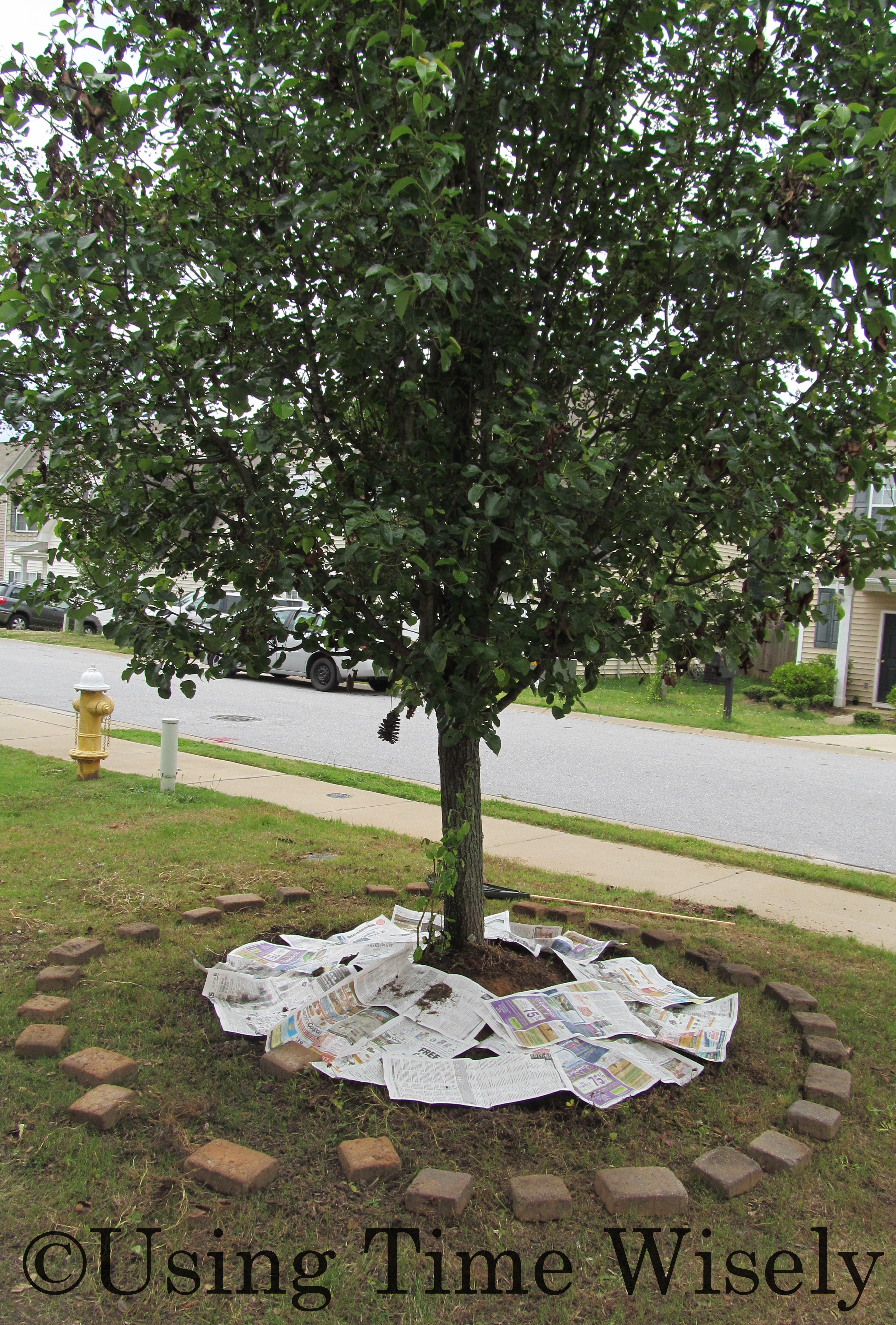
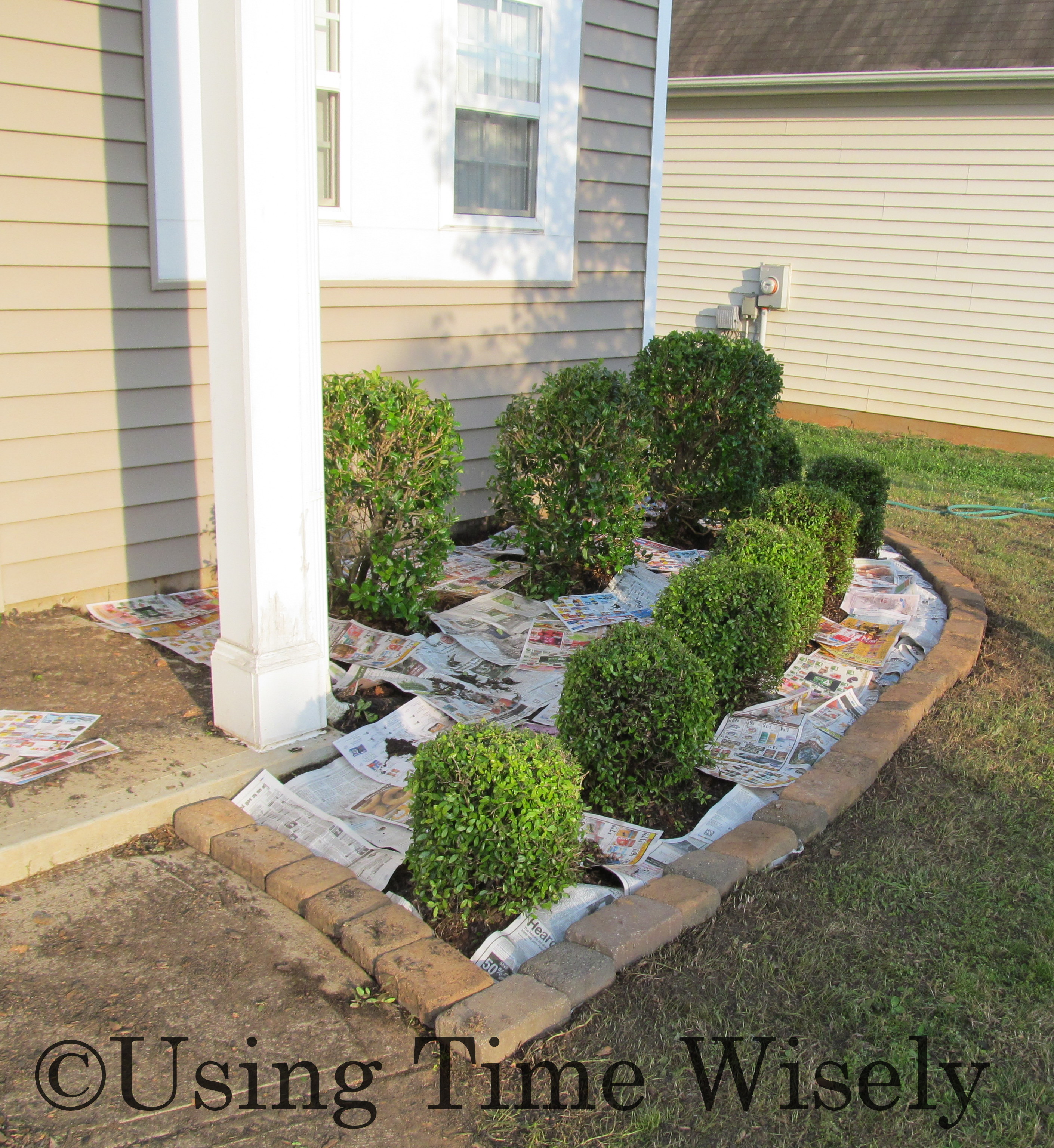
After removing all the debris, Paul laid down a thick layer of newspaper on top of the dirt bed. The newspaper helps prevent weeds and grass from seeping up through the mulch and edgers.

To keep the newspaper in place, Paul laid the edgers on the newspaper at the edge of the bed. Hopefully, the newspaper will keep the weeds from popping up between the stones.

Treat the Beds

With a liquid mixture, Paul attached the bottle to the hose and sprayed weed killer over the beds, including the newspaper. With the double protection of the newspaper and weed killer, we hope to lessen the amount of work needed in our yard this summer and fall. 🙂

To get our yard looking presentable again after removing the weeds and former mulch, we prepared and treated our beds to deter the weeds. Our yard is looking better after some tender loving care. Next week, I will end this series with pictures of the finished product. Stay tuned . . .

Question: What yard projects keep you busy?

Filed Under: Household, Maintaining Tagged With: yard work

Dental & Vision Insurance: Vision Documents

May 27, 2012 by Tracy

With many little categories in this insurance filing system, I hope you are making lots of headway on getting your paperwork organized.

Last week, I started the dental and vision insurance category with the dental documents, and today is the last post dedicated to this sixth category.

Vision Insurance Documents

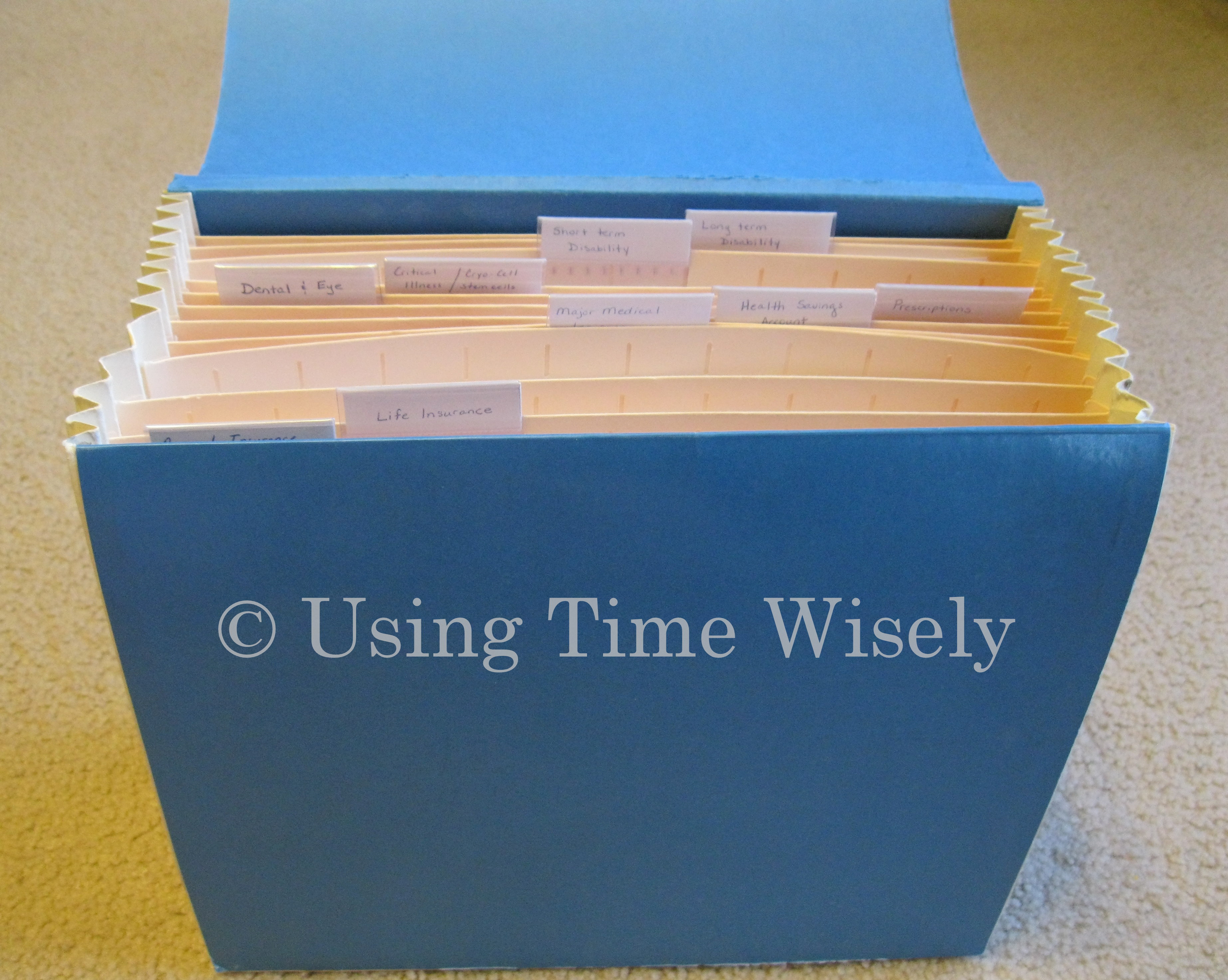
The information about our vision coverage, eligibility, and cost resides in our 2012 Insurance Benefits Guide, housed in our major medical category. The documents held in this eighth file opening include:

1. Insurance cards (since I can print more cards by accessing our account via the Internet, I do not keep copies of these cards in the file.)

2. Savings summary from our provider

3. Provider’s privacy practices

4. Correspondence from provider confirming activation of coverage

Since all these items came together in one mailing, I stapled these documents together. Keeping these documents in the same opening as our dental documents, I placed them behind the paper clipped group of dental paperwork.

Some of these file openings contain a few pages, and I find having the sections separated and labeled saves time and energy when needing the information contained within. As changes or other documents reach our home, I only need a few minutes to file those documents into the filing system.

Taking time to get the paperwork organized saves you time and energy for the long haul. In using time wisely, keep working. You will be glad you did. Happy organizing!

Question: How is your organizational system coming along?

Filed Under: Dental & Vision, Document Organization, Box 2 Tagged With: vision

How to Address Pricing Discrepancies – Part 2 of 2

May 26, 2012 by Tracy

Photograph Credit: Flickr (James Brooks)

No matter where I shop, I always check the receipt for pricing discrepancies. My mom taught me to live frugally, and she always checks the receipts.

Following in her footsteps, I usually check the receipt before leaving the store. However, there are times when I have my hands full and need to take a look at another time.

Last week in part 1, I shared how I address pricing discrepancies before leaving the store. This week, I will continue with addressing pricing discrepancies after leaving the store.

To illustrate how I handle these pricing errors, I will share two examples: one when I found the error after leaving the store, and the other when I addressed the issue at the store and had to contact the corporate office.

Finding the Error after Leaving the Store

On one of my trips to Papa Murphy’s Pizza, our family’s favorite pizza place, I paid, picked up our order, and left. I had used a coupon and assumed I received the standard 2 for $6 deal on the side items. When I entered the receipt into my spreadsheet, I noticed that I was over charged for the sides.

Addressing the Error

After identifying the error, I called Papa Murphy’s Pizza and spoke to an assistant manager. Upon explaining my order, she apologized and gave me two options:

1. Refund the difference, or

2. Give a free side item.

Choosing the Solution

The savings snob within me weighed the options – the refund of $1.98 or the free side valued at $3.99. I chose the free side item – the better savings. Though I have not picked up the free side yet, I know that this Papa Murphy’s Pizza location appreciates my business and cares enough about me as a customer to correct this error.

By addressing the pricing discrepancy, I became a more loyal customer to Papa Murphy’s Pizza by their response to the error.

Addressing the Pricing Discrepancies after Leaving the Store

Before I share the next example, I want to say that I love CVS. My CVS store is awesome, and any problem I catch gets solved immediately and professionally which is why I shop at my CVS.

On the day of this incident, I stopped at another CVS. I had a short list and a few minutes between appointments, so this CVS example is not a typical experience for me.

On that morning, I shopped with my list, coupons, and Extra Bucks. The girls and I gathered the items and checked out. The employee requested all my coupons at once. I indicated that I may not need to use all my Extra Bucks, but he took them all anyway.

Addressing the Problem at the Store

I had the coupons in order, and he rearranged them taking the Extra Bucks off before the manufacturer coupons. As he ended the transaction, he rounded down a manufacturer’s coupon resulting in a total of $0.

Instead of being excited, I was upset. I had lost almost $2 in savings because he took the Extra Bucks (store credit) before the manufacturer’s coupons. I immediately addressed this discrepancy which he agreed to void and re-ring.

But when he re-rang the merchandise and took the coupons and all the Extra Bucks, the remaining balance was over $1. I indicated that something was wrong and referred to the previous transaction. By this time he did not care. I was not happy, so I asked to speak to the manager. Well, he was the manager, so I left.

Addressing the Problem with the Corporate Office

After cooling down since my blood was boiling over the incident, I went home and contacted customer service via telephone. I explained the incident, and my complaint escalated to the district manager. Within a day, the district manager called me back. He was extremely polite and apologetic.

Realizing that I was a loyal CVS customer, the district manager asked me to return to that store (which I. did. not. want. to. do.), where the store manager would apologize and give me a $10 CVS gift card for the lack of customer service.

Accepting the Offered Solution

After a few hours of stalling, I went back. The store manager was the same manager. Staying calm, I told him that I was there on the district manager’s request. Though I did not get an apology, I received a $10 gift card which I used at my favorite CVS store.

By addressing the pricing discrepancy, I received a gift card, but that CVS lost my business permanently.

Whether you find the pricing error later or address the error after attempting a resolution, you can get the issue solved after leaving the store. Sometimes employees have a bad day and make mistakes.

Give the store the opportunity to correct the error. But in those situations where even the manager refuses to help, keep moving up the chain of command until you reach an acceptable resolution.

In using time wisely addressing a $2-3 pricing difference was time well-spent. In stretching your dollars, check your receipt for pricing errors. When you find them, address pricing discrepancies while staying firm, kind, and professional. Happy savings!

Question: How do you handle pricing discrepancies?

Filed Under: Stretching Your Dollars Tagged With: pricing, Papa Murphy's pizza

« Previous Page
Next Page »

Welcome to Using Time Wisely!


Presenting organizational tips and tricks to save you money, energy, and time.

To access 5 Ways to Using Time Wisely Today, click "like" on my facebook page and join in on the journey of Using Time Wisely.

Looking for something?

Email Newsletter

Sign up to receive email updates and to hear what's going on with us!

Copyright © 2026 · Lifestyle Pro Theme on Genesis Framework · WordPress · Log in