• Home
  • About Tracy
  • Contact Me

Using Time Wisely

Organized to save money, energy, and time

  • Email
  • Facebook
  • Pinterest
  • RSS
  • Twitter
  • YouTube
  • Document Organization
    • Overview
    • Box 1
      • Credit Report/Cards
        • Credit Reports
          • Credit Updates
          • Credit Scores
        • Credit Cards
      • Personal
      • Home Ownership
      • Vehicles
    • Box 2
      • Life Insurance
      • Major Medical
      • Tax-Favored Programs
      • Prescriptions
      • Dental & Vision
      • Special Health Policies
      • Short-term Disability
      • Long-term Disability
      • Personal Insurance
    • Box 3
      • Social Security Documents
      • Retirement
      • Investments
      • Estate Planning
      • Tax Records
  • Household
    • Cleaning
    • Maintaining
    • Organizing
    • Scheduling
      • Laundry
  • Event Planning
    • Assisting
    • Attending
    • Coordinating
      • Birthday Party
      • Christmas
      • Dinner Party
      • Fall Festival
      • Field Trip
      • Lemonade Stand
      • Thanksgiving
    • Learning
    • Preparing
    • Serving
  • Miscellaneous
    • Communication
      • Customer Service
      • E-mail
      • RSS Feed Reader
    • Goals
    • Organization
    • Time Management
      • To Do List
  • Food
    • Food Prep
    • Grocery Shopping
      • Lists
      • Pricing
    • Menu Planning
    • Recipes
    • Stockpile
  • Family Activities
    • Going Out
      • Free Outings
      • Inexpensive Outings
      • Summer
    • Rewards
      • Good Grades
      • Reading
      • Summer Reading
    • Staying at Home
  • Stretching Your Dollars
    • Daily Deals
      • Groupon
      • LivingSocial
    • Drugstores
      • CVS
    • Gas Prices
    • Gifts
    • On-line Shopping
    • Pictures
    • Products
    • Restaurants
    • School Items
    • Tips
You are here: Home / Archives for Document Organization

Personal Insurance: Former Severance Package

December 18, 2011 by Tracy

With so many documents housed in the important documents filing system, I forget about most of them until the day I need them.

In preparing for this post, I pulled out the Separation and Release Agreement, also known as a severance package, from Paul’s former employer. I remember that day.

I was at home with our infant son when Paul called to say he had been served these documents. Knowing it was due to cutbacks rather than his inabilities or work ethic, Paul accepted the offer without any regrets and did not look back.

You see God had already prepared a job for Paul. Months prior to the layoff, Paul applied for a position with the State. Within a week of receiving this severance package, Paul got a phone call informing him that he got the State job.

As I look at this severance package, I am reminded of God’s provision for our family. Not only did God provide a job, he also increased our benefits with retirement options, full insurance coverage, weeks of vacation, and increased salary. Though the layoff might have seemed to be devastating, God directed us from a good situation to a better one. Praise be to the Lord!

Former Severance Package

This former severance package is housed in Box 2 of our important documents. After the summary page and the annual enrollment documents, I have these documents stapled together:

  • Separation and Release Agreement (11 pages)
  • Paul’s notes from Human Resources meeting (1 page)
  • Insurance explanations (5 pages)

Housed behind the annual enrollment documents, this severance package resides. Though I have not needed these documents, I keep them for reference and as a reminder of God’s unfailing work on our behalf. What a comfort to know that God sees the big picture when only the next step is visible.

If you are struggling financially or are working through a layoff, look to your Creator for comfort, wisdom, and provision, for God is good ALL THE TIME.


Filed Under: Document Organization, Personal Insurance, Box 2 Tagged With: insurance

Personal Insurance: Annual Enrollment Reports

December 11, 2011 by Tracy

Creating a place for each document AND keeping those documents in the correct file gives you freedom from clutter. To keep the clutter at bay, I have 4 stackable trays on my desk. The top tray holds all the paperwork that needs to be processed. This 2-inch tray gets filled very quickly.

In fact, too quickly.

As the pile mounds, I choose a time to sort, schedule, file, and research these items.

With many items coming through our household, I usually keep one or two on-going tasks that need to be done in the pile. However, having a designated place for each bill, statement, important document, and insurance item makes filing day manageable.

In keeping the insurance documents manageable and off my desk, I have designated a home for them in Box 2 of my important documents filing system. Behind our summary insurance page in the first file opening, I keep our annual enrollment reports.

Most of our insurance policies are through group plans at Paul’s work. Each year, we attend an insurance meeting with a representative to select, review, and/or change our insurance selections. During odd years (i.e., 2011), we have open enrollment, where we can add, delete, or change any insurance we hold through these plans. Next year during an even year, we will have annual enrollment, where only some of the insurance policies are available for additions, subtractions, or changes.

The minimum number of documents I need to house in this first file opening of my insurance documents is two years worth. Since the open enrollment covers two years with only limited changes available the second year. However, I currently have six years worth for reference and confirmation of our choices. You do not need to keep this many. This is just my personal preference.

Annual Enrollment Reports

In this file slot, I keep these following documents:

    • Business card of representative from insurance meeting
    • Summary of new elections
    • Summary of payroll deductions
    • Summary page of each policy change
    • Copy of any new enrollments with premium charges
    • Statement of Benefits
    • My notes and calculations for future comparison
    • Insurance booklet which explains all the new changes for the current enrollment period

All these documents are then stapled together. I write the enrollment year on the front of the documents and house them in this file opening. In January, when the new premiums take effect, I will refer to these documents to verify that the payroll deduction amounts are accurate.

I will also refer to these documents during annual enrollment next year before our insurance meeting with our representative. For the most part, these documents just reside in this file until needed.

By having a designated place, I am able to keep my desk free from excess clutter and can quickly locate these documents in the file. As you organize your documents, the process may be slow, but the clutter-free office area will be a welcome reward. Keep plugging along while using time wisely. Happy organizing!

Question: Do you have open enrollment each year, or do you alternate between open and annual enrollment? Please add your answer to the comments.

Filed Under: Document Organization, Personal Insurance, Box 2 Tagged With: insurance, personal

Personal Insurance: Summary Page

December 4, 2011 by Tracy

With all our Box 1 documents filed and organized into the four categories: Credit Cards/Reports, Personal Documents, Home Ownership, and Vehicles, let’s concentrate on Box 2 which houses all the insurance documents. The first category housed in the first file opening holds our personal insurance documentation.

Personal Insurance Documentation

  • Summary Page
  • Annual Enrollment Reports
  • Former Severance Package
  • Privacy Policies and Travel Insurance
  • Medical Information Bureau (MIB) Files

Summary Page

Because this insurance file holds policies and paperwork that will be needed during possible life-changing events, I keep a one-page summary in each category of this insurance file that contains the following vital information for each policy we hold:

      • Type of policy
      • Policy number(s)
      • Name of insurance company
      • Web site address of insurance company
      • Telephone number of insurance company
      • User name, password, and security questions to access the account(s)
      • Benefit administrator’s contact information

In the event that immediate contact with these companies is needed, Paul or I can get one of these summary pages and get access to our accounts. If you, like me, are the one that registers the accounts and handles the insurance paperwork, please be sure your family has access to your passwords.

A close friend panicked for 3 days after the sudden loss of her husband because there was no record of the passwords. Besides planning a funeral, housing guests, and taking time to grieve, she was trying to access her accounts. She finally succeeded, but she exerted energy and time that could have been used elsewhere had she known or knew where to look for those passwords.

In using time wisely, I highly recommend that you write down the information, store it securely, and inform your family or a close, honest friend of the location to this information.

Having a summary page will help you access your documentation quickly if you need to increase your coverage, change your contact information, or request information.  In using time wisely, a little time now compiling this summary page will save you time, energy, and frustrations down the road. Just adding the policies you have now will be a great start. Happy organizing!

Question: How do you keep track of your passwords? I write down the information on the packet of documents for that company. The documentation is then housed in one of my filing boxes under the appropriate category. How does your system differ? Please add your answer to the comments.

Filed Under: Document Organization, Personal Insurance, Box 2 Tagged With: insurance

Show and Tell: File Box 2

November 27, 2011 by Tracy

Just as a writer sketches the outline before writing the first chapter, the organizer creates a filing framework before adding the first document. This second file box is organized similarly to the first box with separate categories. To put pictures with the words, I give you the following pictorial show-and-tell session of Box 2 of my accordion filing system.

The closed accordion file box. Just like Box 1, this file box is also missing its string. Without the string, I can quickly move these files around and gain access. When the strings were used, they got caught on other files until they finally snapped. Though these boxes are different now than when first purchased, I have adapted them to fit my needs.

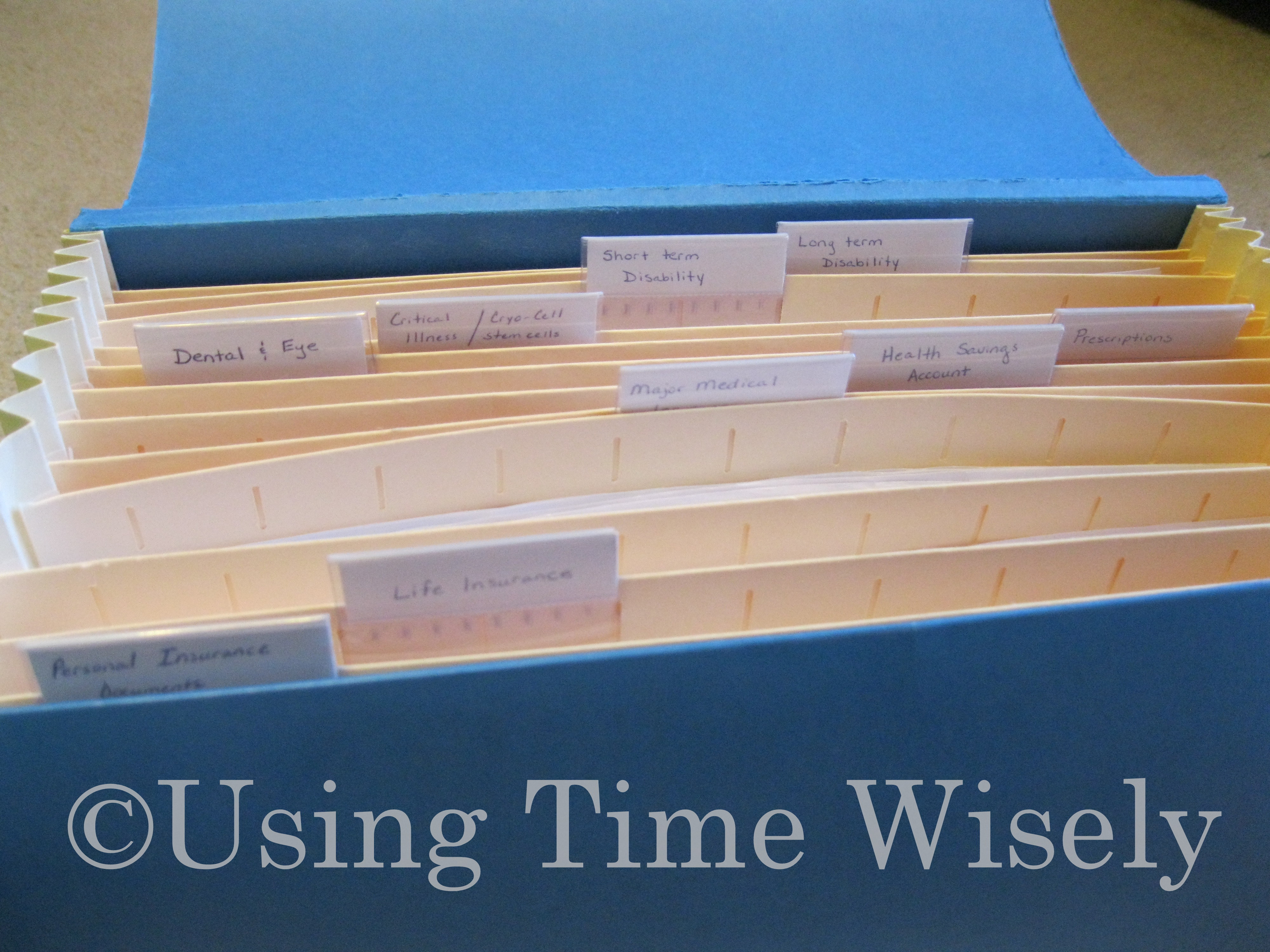
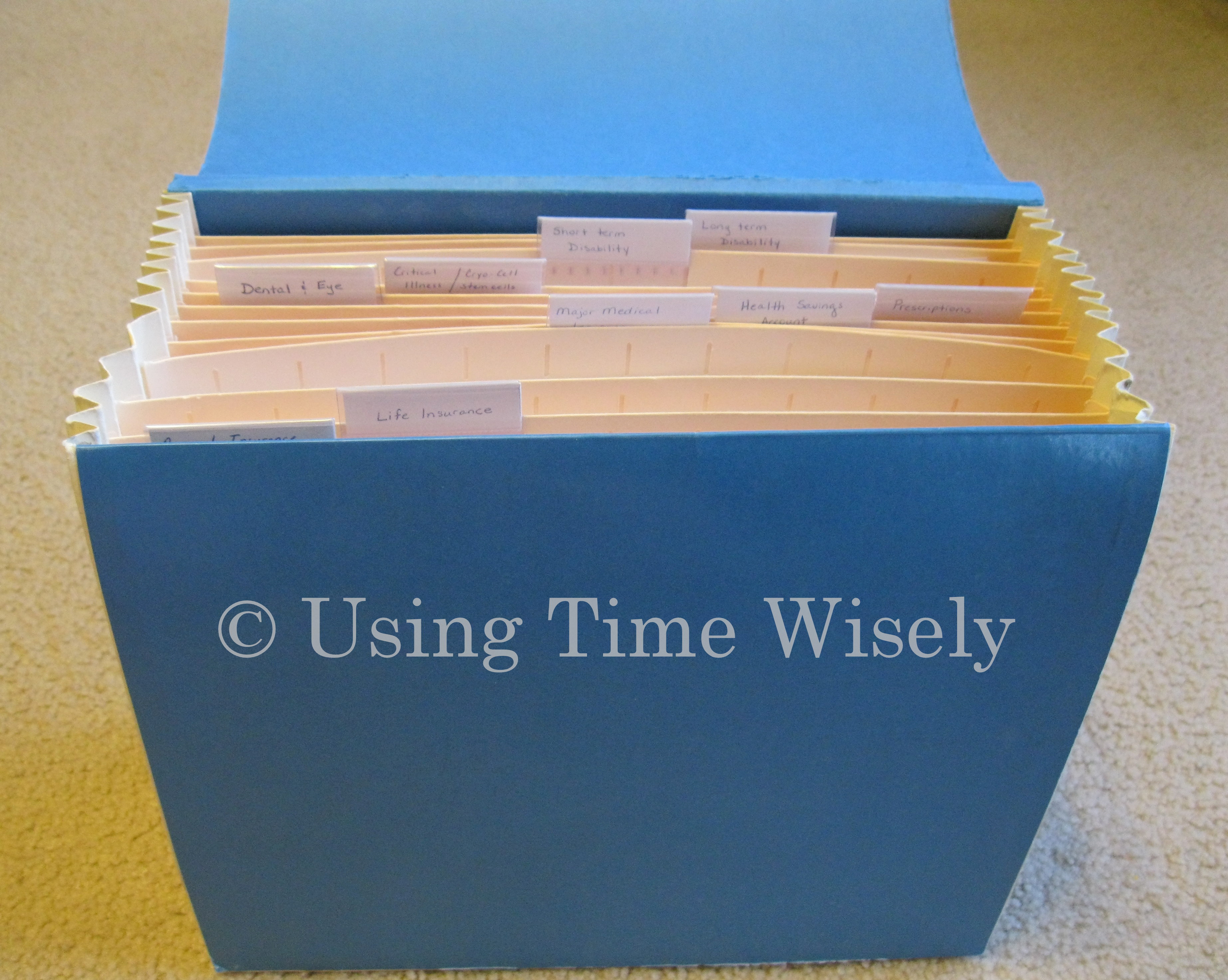
The opened accordion file box. In using time wisely, I choose not to label each of the 13 file slots. Instead, I use the plastic inserts that came with the accordion file to label each category. Some categories extend into 2 or 3 file openings while others only house one slot. If you prefer to label each slot, then adjust these guidelines to fit your needs.

Close-up look at the file tabs. In this file, I have used nine tabs to identify the nine categories in this insurance file. To make the tabs easy to read, I have placed them in a row from left to right. The nine categories identified in this box are:

  1. Personal Insurance Documents
  2. Life Insurance
  3. Major Medical Insurance
  4. Tax-Favored Programs
  5. Prescription Coverage
  6. Dental and Vision Insurance
  7. Critical Illness/Cancer/Cryo-Cell Stem Cell policies
  8. Short-Term Disability Coverage
  9. Long-Term Disability Coverage

My file may contain more or less insurance documents than you possess. I share my filing system to give you an organizational system sample to assist you in tackling your important documents. Please adjust this file to meet your needs.

As I cover each category, I will explain the insurance coverage Paul and I have chosen for our family. These are our choices. I am not a financial advisor, nor am I suggesting that you carry all these insurance documents. My goal is to assist you in organizing your important documents.

This pictorial overview is the framework for all my important insurance documents and policies. Next week, I will begin working through the file one category at a time. Come join me as we get these documents organized. Feel free to use this visual image to setup your own accordion filing system. Happy organizing!

Question: How do you currently keep your insurance policies filed? Please add your answer to the comments.

Filed Under: Document Organization, Overview Tagged With: Overview

Overview: File Box 2

November 20, 2011 by Tracy

With file box 1 complete, I hope the momentum keeps you moving forward. Getting the piles of paperwork removed from desks, counters, and coffee tables will lighten your load.

By ridding your home of clutter, you will be more organized. You will be able to concentrate on more important items without continuously shuffling paperwork around to find room for other projects.

In using time wisely to get documents organized, I use an accordion filing system. My important documents are housed in three blue accordion files. Having completed posts for each of the filing slots for box 1, I will move onto file box 2 which also contains 12 file openings.

Before beginning to explain the paperwork within the first file slot, here is an overview of the categories and the number of file openings dedicated to each category in file box 2:

  • Personal insurance (1)
  • Life insurance (3)
  • Major medical insurance (1)
  • Tax-Favored Programs (1)
  • Prescription coverage (1)
  • Dental and vision insurance (1)
  • Critical illness/cancer/stem cell paperwork (1)
  • Short term disability (1)
  • Long term disability (1)
  • Miscellaneous insurance items (1)

These categories are labeled for easy retrieval of these documents. Next week, I will post a show and tell of file box 2. If you are still plugging away at file box 1, then don’t give up. Keep using time wisely to do the next thing. Slowly and steadily you are making progress. Look back for some encouragement. You are not where you started. 🙂 Happy organizing!

Question: What kind of document organization filing system works for you? Please add your answer to the comments.

Filed Under: Document Organization, Overview Tagged With: Overview

« Previous Page
Next Page »

Welcome to Using Time Wisely!


Presenting organizational tips and tricks to save you money, energy, and time.

To access 5 Ways to Using Time Wisely Today, click "like" on my facebook page and join in on the journey of Using Time Wisely.

Looking for something?

Email Newsletter

Sign up to receive email updates and to hear what's going on with us!

Copyright © 2026 · Lifestyle Pro Theme on Genesis Framework · WordPress · Log in