
• Home
  • About Tracy
  • Contact Me

Using Time Wisely

Organized to save money, energy, and time

  • Email
  • Facebook
  • Pinterest
  • RSS
  • Twitter
  • YouTube
  • Document Organization
    • Overview
    • Box 1
      • Credit Report/Cards
        • Credit Reports
          • Credit Updates
          • Credit Scores
        • Credit Cards
      • Personal
      • Home Ownership
      • Vehicles
    • Box 2
      • Life Insurance
      • Major Medical
      • Tax-Favored Programs
      • Prescriptions
      • Dental & Vision
      • Special Health Policies
      • Short-term Disability
      • Long-term Disability
      • Personal Insurance
    • Box 3
      • Social Security Documents
      • Retirement
      • Investments
      • Estate Planning
      • Tax Records
  • Household
    • Cleaning
    • Maintaining
    • Organizing
    • Scheduling
      • Laundry
  • Event Planning
    • Assisting
    • Attending
    • Coordinating
      • Birthday Party
      • Christmas
      • Dinner Party
      • Fall Festival
      • Field Trip
      • Lemonade Stand
      • Thanksgiving
    • Learning
    • Preparing
    • Serving
  • Miscellaneous
    • Communication
      • Customer Service
      • E-mail
      • RSS Feed Reader
    • Goals
    • Organization
    • Time Management
      • To Do List
  • Food
    • Food Prep
    • Grocery Shopping
      • Lists
      • Pricing
    • Menu Planning
    • Recipes
    • Stockpile
  • Family Activities
    • Going Out
      • Free Outings
      • Inexpensive Outings
      • Summer
    • Rewards
      • Good Grades
      • Reading
      • Summer Reading
    • Staying at Home
  • Stretching Your Dollars
    • Daily Deals
      • Groupon
      • LivingSocial
    • Drugstores
      • CVS
    • Gas Prices
    • Gifts
    • On-line Shopping
    • Pictures
    • Products
    • Restaurants
    • School Items
    • Tips
You are here: Home / Archives for Stretching Your Dollars

Planning for Success: Verify Paycheck Deductions – Day 26

January 26, 2013 by Tracy

Planning for success - Day 26

Photograph Credit: iStockphoto

Knowing that a successful year will not materialize on its own, we must plan and prepare for a prosperous 2013.

Throughout the 31 days of January, I will choose one topic each day to prepare or schedule for this year.

Without preparation, I know I will forget, miss, or overlook certain items. If you desire an organized year, then join me in this adventure of Planning for Success for a prosperous 2013.

To receive a daily e-mail around 11:00 a.m. with the new posts of each day, subscribe to my free daily newsletter. In case you miss a post in this series, I will provide the link to each day as the month progresses. 🙂

  • Day 1: Select a Planning Tool
  • Day 2: Add Your Priorities
  • Day 3: Print and Display Your Menu Planner – with free printable
  • Day 4: Record Membership Expiration Dates 
  • Day 5: Mark Due Dates for Monthly Bills
  • Day 6: Insert Credit Report Schedule
  • Day 7: Schedule Your Annual Home Maintenance
  • Day 8: Set Your School and Work Activities
  • Day 9: Highlight Contract and Subscription Expiration Dates
  • Day 10: Download a Savings Tracker
  • Day 11: Note Daily Deals Expiration Dates
  • Day 12: Setup Bill Pay
  • Day 13: Secure Doctor Appointments
  • Day 14: Purchase Batteries
  • Day 15: Include Holidays
  • Day 16: Jot down Library Return Dates
  • Day 17: Track Your Family’s Favorite Meals
  • Day 18: Reserve Time for Your Priorities
  • Day 19: Post Your Payday Schedule – with free printable
  • Day 20: Prepare Your Medical Spending Record – with free printable
  • Day 21: Check Light Bulbs and Air Filters
  • Day 22: Choose Event Dates                
  • Day 23: Enter Reward Deadlines
  • Day 24: Design a Quick Meals List
  • Day 25: Document Family Holidays

Day 26: Verify Paycheck Deductions

In last week’s Planning for Success: Post Your Payday Schedule – Day 19, I shared how I indicate “payday and tithe (charitable contribution)” on my calendar for the scheduled day of our direct deposit. When paying the bills, I verify the paycheck deductions.

Taking less than a minute to confirm that the deductions are correct, I file the paycheck and move on. Three times a year, I take a little longer to check the amounts: first paycheck enforcing new deductions, first paycheck after changes or increases, and first paycheck after start of fiscal year.

1. First paycheck enforcing new deductions

For us, we have open or annual enrollment in October. Those changes take effect on January 1. The first paycheck stub we receive in January gets extra attention to confirm accurate deductions. If a problem arises, then we make contact with the payroll department.

2. First paycheck after changes or increases

The riders on Paul’s short-term disability insurance policy and our family’s critical illness and cancer protection policy increase each year during February. When I see an increase in deductions, I take a few moments to confirm the increased amounts based on the policy schedule. If I notice a discrepancy, I contact the policy providers to address my concerns.

3. First paycheck after start of fiscal year

Since my husband’s employer’s fiscal year does not begin in January, I review the paycheck stub more closely after the start of the new fiscal year. Any changes to retirement savings or raises adjust at that time. Any questions or concerns from that information are directed to the payroll department.

In planning for success, verify paycheck deductions by monitoring them each pay period. The investment of a little time twice a month saves time when doing taxes. If all the information is correct throughout the year, then no verification of the W-2 form is needed at tax time.

A few years ago, an employee did not look at her paycheck sub all year as her check was directly deposited into her bank account. At tax time, she panicked at the realization that none of her taxes had been paid the previous year. Had she verified her paycheck stub at least at the start of the year, she could have caught the error without backtracking.

After verifying Paul’s paycheck stub, I check off the payday notation in my calendar. Using this system reminds me to verify the information and check the deductions carefully preventing unnecessary problems later. Keep scheduling your paydays (as much as you can) while preparing for success and using time wisely. Happy verifying!

Question: How often do you verify paycheck stub deductions?
Filed Under: Planning for Success, Stretching Your Dollars, Uncategorized, Tips Tagged With: Planning for success

Planning for Success: Post Your Payday Schedule – Day 19

January 19, 2013 by Tracy

Planning for Success
Planning for success - Day 19

Photograph Credit: iStockphoto

Knowing that a successful year will not materialize on its own, we must plan and prepare for a prosperous 2013.

Throughout the 31 days of January, I will choose one topic each day to prepare or schedule for this year.

Without preparation, I know I will forget, miss, or overlook certain items. If you desire an organized year, then join me in this adventure of Planning for Success for a prosperous 2013.

To receive a daily e-mail around 11:00 a.m. with the new posts of each day, subscribe to my free daily newsletter. In case you miss a post in this series, I will provide the link to each day as the month progresses. 🙂

  • Day 1: Select a Planning Tool
  • Day 2: Add Your Priorities
  • Day 3: Print and Display Your Menu Planner – with free printable
  • Day 4: Record Membership Expiration Dates 
  • Day 5: Mark Due Dates for Monthly Bills
  • Day 6: Insert Credit Report Schedule
  • Day 7: Schedule Your Annual Home Maintenance
  • Day 8: Set Your School and Work Activities
  • Day 9: Highlight Contract and Subscription Expiration Dates
  • Day 10: Download a Savings Tracker
  • Day 11: Note Daily Deals Expiration Dates
  • Day 12: Setup Bill Pay
  • Day 13: Secure Doctor Appointments
  • Day 14: Purchase Batteries
  • Day 15: Include Holidays
  • Day 16: Jot down Library Return Dates
  • Day 17: Track Your Family’s Favorite Meals
  • Day 18: Reserve Time for Your Priorities

Day 19: Post Your Payday Schedule

Stretching our dollars is becoming a necessity in light of the economic changes this year. Between the squeeze on businesses with the health insurance increases due to Obamacare and the 2% increase in FICA (returning Social Security taxes to 6.2% from the tax reduction 4.2% rate in 2011 and 2012), families are feeling the crunch, mine included.

Many families are already struggling and taking more from their paychecks leaves them feeling stressed, discontent, and worried. To reign in these anxious feelings, we need to trust God for He is in control and then focus on what we can change.

Modified Monthly Budget

With the money earned, we can adjust our spending to work within the parameters of these additional tax measures. Working with a monthly budget, you can track your spending.

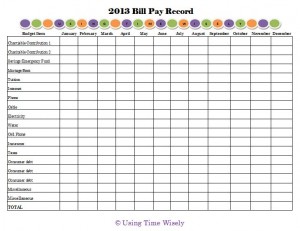
Though I do not use a dollar by dollar budget where every penny requires designation, I record our spending on my 2013 Bill Pay Record as I submit payments and then insert receipt information into our savings tracker.

FREE PRINTABLE

2013 Bill Pay Record (.pdf version)

2013 Bill Pay Record (Microsoft Excel version)

Planning for Success

You are welcome to download, customize with the Excel version, and use this free printable. To share this resource with others, please forward the link to this post rather than sending the file directly.

Thank you for protecting Using Time Wisely’s copyright.

This modified monthly budget system works for me as I see the big picture of our finances twice a month. Our family operates solely on Paul’s salary which is deposited bi-monthly. With a set time frame, I post the payday schedule within my calendar. I write, “payday” and then indicate our tithe (charitable contribution) designations.

Bill Pay Routine

Once payday arrives, I plan a time to pay, schedule, and check our bills for payment. In watching our finances twice a month, I can adjust our spending as needed to prevent dipping into our emergency fund.

For those of you without a set pay schedule, adjust as needed. I know it is especially difficult for small business owners, who depend on clients for their payday.

Work with your current situation; take initiative to schedule what you can; and get creative to stay motivated during these trying times.

In planning for success, post your payday schedule in your calendar. Since Paul’s check is automatically deposited and the pay stub is only available electronically, I need this reminder in my calendar.

Keep doing your best stretching your dollars. Some decisions are out of your hands, but you can control the spending and your attitude.

Though we are in for a rough four years complete with increased taxes due to our government’s poor planning, we have choices. In using time wisely, focus on what you can change with contentment. 🙂 Happy choosing!

Question: Have you seen a decrease in your family’s paycheck(s)? 

Filed Under: Planning for Success, Stretching Your Dollars, Uncategorized, Tips Tagged With: Planning for success

Planning for Success: Setup Bill Pay – Day 12

January 12, 2013 by Tracy

Planning for success - Day 12

Photograph Credit: iStockphoto

Knowing that a successful year will not materialize on its own, we must plan and prepare for a prosperous 2013.

Throughout the 31 days of January, I will choose one topic each day to prepare or schedule for this year.

Without preparation, I know I will forget, miss, or overlook certain items. If you desire an organized year, then join me in this adventure of Planning for Success for a prosperous 2013.

To receive a daily e-mail around 11:00 a.m. with the new posts of each day, subscribe to my free daily newsletter. In case you miss a post in this series, I will provide the link to each day as the month progresses. 🙂

  • Day 1: Select a Planning Tool
  • Day 2: Add Your Priorities
  • Day 3: Print and Display Your Menu Planner – with free printable
  • Day 4: Record Membership Expiration Dates 
  • Day 5: Mark Due Dates for Monthly Bills
  • Day 6: Insert Credit Report Schedule
  • Day 7: Schedule Your Annual Home Maintenance
  • Day 8: Set Your School and Work Activities
  • Day 9: Highlight Contract and Subscription Expiration Dates
  • Day 10: Download a Savings Tracker
  • Day 11: Note Daily Deals Expiration Dates

Day 12: Setup Bill Pay

If your calendar looks anything like mine, then it is getting full. 😉 For me, seeing a full schedule is a good thing. This means that I have jotted down what needs to occur, and I just need to follow the plan. The nice part is I don’t have to get it all done today. By assigning each task a day, I can accomplish the items scheduled for today and leave the rest for their appointed day.

In stretching our dollars, we have already marked the due dates for monthly bills on our calendar. By doing so, we can follow the schedule and pay prior to or on the due date while preventing late fees.

Bill Pay Option

To assist with recurring payments, your financial institution probably offers a free bill pay service. Think of it as writing an electronic check each month.  Instead of using paper, an envelope, and a stamp to deliver your payment, your bank electronically sends the payment per your request.

Bill Pay Setup

For me, the initial setup took some time, but then scheduling only takes seconds. If you have never used bill pay before, but are interested, here are some basic steps – though each financial institution has a slightly different system:

1. Sign up for on-line banking. Start at your financial institution’s website. If you have a login, then you are setup.

2. Login to your account.

3. Select the Bill Pay option. You might need to access your checking account to find this tab, button, or link.

4. Setup new account. For each bill you want to pay, you will need to setup a separate account, i.e., electricity, cell phone, cable, mortgage, credit card, etc.

5. Choose date to pay. I suggest paying a few days prior to the due date as the process may take a day or two to post.

Tracy’s Tip: If your budget is tight and you need to wait for a deposit before paying a bill, then don’t use the bill pay option as your payment might arrive late. Instead, choose to make the payment through the provider’s website, i.e., Verizon Wireless. The payment will post quicker.

Just be aware of your provider’s policies regarding time frames, holidays, and weekend. Some providers post immediately, like Verizon Wireless; whereas, others will not post until the next business day.

6. Indicate recurring or one-time payment. For payments that are consistently the same, like your mortgage, you can choose recurring. Then your payment is made every month per your request on the same day. You will not need to adjust the amount or timing each month. I like knowing that our mortgage gets paid because bill pay automatically transfer the money from our checking to our mortgage provider.

If the payment changes each month, e.g., your utility bill, then schedule a one-time payment entering the amount. You will need to schedule this payment once a month, but it only requires you to login to your account, choose the provider, enter the amount, select the payment date, and update.

7. Confirm your choices. This verification might be listed as set, pay, confirm, update, or something similar.

8. Adjust your payment. Once you use bill pay, check your accounts to verify payment. If you have problems, then access your bill pay setup to move the payment date, change the amount, or stop using this option.

9. Logout of your account. At the end of each session, you need to logout and close the tab or window. I always closeout the tab to verify that the Internet link between by computer and our financial institution closes. If left open, a hacker could gain access.

Though not the answer for everyone, bill pay is a great service to make payments electronically. Besides saving  paper and stamps, you can schedule your payments in advance and your financial institution will do the rest.

In using time wisely and planning for success, setup bill pay through your financial institution. I love bill pay for our recurring monthly bills that have consistent payments. This service saves me money, energy, and time.

As you consider your options for using time wisely and stretching your dollars, bill pay might be an answer. Remember, it is not all or nothing. You can setup some accounts through bill pay while paying other accounts via check, in person, or on-line through your provider. Whatever your choice, pay on time to prevent late fees. Happy savings!

Question: Do you use bill pay through your financial institution?

Filed Under: Services, Planning for Success, Stretching Your Dollars, Uncategorized Tagged With: Planning for success

Planning for Success: Mark Due Dates for Monthly Bills – Day 5

January 5, 2013 by Tracy

Planning for success - Day 5

Photograph Credit: iStockphoto

Knowing that a successful year will not materialize on its own, we must plan and prepare for a prosperous 2013.

Throughout the 31 days of January, I will choose one topic each day to prepare or schedule for this year.

Without preparation, I know I will forget, miss, or overlook certain items. If you desire an organized year, then join me in this adventure of Planning for Success for a prosperous 2013.

To receive a daily e-mail around 11:00 a.m. with the new posts of each day, subscribe to my free daily newsletter. In case you miss a post in this series, I will provide the link to each day as the month progresses. 🙂

Day 1: Select a Planning Tool

Day 2: Add Your Priorities

Day 3: Print and Display Your Menu Planner – with free printable

Day 4: Record Membership Expiration Dates 

Day 5: Mark Due Dates for Monthly Bills

One of the easiest ways to keep your hard-earned money in your pocket is to make payments on-time. Those late fees and interest rate hikes eat up your savings, damage your credit, and add stress to your life.

You don’t need these headaches, and you can avoid them by getting your monthly payments organized and scheduling them. Whether you use your bank’s bill pay option, setup automatic payments on your accounts, or use your planner, phone, or planning tool, schedule the payments prior to the due dates.

In completing this step, I added our monthly bills at least two days prior to a payment’s due date on each month of my calendar. Typical recurring monthly bills fall into these six categories:

    • Charitable contributions/tithe
    • Consumer debt: credit card(s), line of credit, car payments
    • Insurance: car, health, and life
    • Mortgage/rent
    • School tuition
    • Utilities: water, electricity, gas, phones, cable, and Internet

In stretching our dollars, I mark due dates for monthly bills on my calendar to assist me in paying our bills on time. Without paying late fees and damaging our credit, I sleep soundly at night without worrying about missing a payment.

As you continue planning for success, mark due dates for your monthly bills and pay them prior to the due date.  By listing them on your calendar one or two days prior to the due date, you provide a buffer for when life happens.

Knowing you have a little grace puts your mind at ease and prevents the additional cost of late payments. Happy sleeping! 😉

Question: Did I miss any type of recurring monthly bill?

Filed Under: Planning for Success, Stretching Your Dollars, Uncategorized, Tips Tagged With: Planning for success

Christmas Savings: Make a List and Check It Twice

December 8, 2012 by Tracy

Make a List and Check It Twice

Photograph Credit: Microsoft Images

In stretching your dollars this holiday season, you may need to think outside the box.

As you make a list and check it twice, stay within your budget. If your budget cannot accommodate your giving spirit, then don’t fret.

Turn toward free or less expensive options found in Feed It Forward, giveaways and sweepstakes, and bundles to separate.

Feed It Forward

The Feed It Forward program allows you to gift friends and family a $10 e-gift certificate for free. The limit on Facebook friends is 15 per day, while the limit on e-mail addresses is 100 per day. The daily maximum is 100 gifts per day. In using time wisely, you can gift thousands of friends this December for free with a little time invested.

Giveaways and Sweepstakes

Last year, I won a giveaway package from Southern Savers. My gift included a coffee maker, blender, and automatic wine opener. All three of these gifts arrived, and I wrapped them for a friend and family members. The recipients were so grateful, and I openly shared how their gifts were chosen for them. It was a great opportunity to share how entering giveaways and sweepstakes saves our family money.

For giveaways, I like Money Saving Mom, Freebies 4 Mom, Southern Savers, Meet Penny, Becentsable, and Simple Savings for ATL Moms. Giveaways are on-going on some websites and sporadic on others. As you see a giveaway that does not interest you, consider entering. If you win, give the item or service as a gift.

For current sweepstakes, check out Heather Hernandez’ Freebies 4 Mom. On the menu bar, you can find freebies, sweeps, and giveaways. I love how Heather categorizes the sweeps by entry type: weekly, daily, or once. Heather keeps her list current.

Bundles to Separate

When you need to purchase lots of items, look for bundles to separate into separate gifts. In previous years, I have purchased 3-count candles, package of ornaments, and jewelry sets. With the less expensive cost per unit, I can open the package and gift each item separately.

If you purchase on-line, start with E-bates or Shop at Home and find a promotional code to keep your savings within your budget.

In using time wisely and stretching your dollars, make a list and check it twice. Then look to Feed It Forward, giveaways and sweepstakes, and bundles to separate options. Though definitely not all the ways one can save, these three strategies can save you money, energy, and time.

If you still cannot afford Christmas, focus on the experiences. Creating a homemade coupon book, baking cookies, or going on an outing provides a special memory for the recipient beyond a temporal token. Happy gifting!

Question: How are you stretching your dollars this Christmas season?

Filed Under: Shopping, Gifts, On-line Shopping, Stretching Your Dollars Tagged With: Feed It Forward, Christmas

« Previous Page
Next Page »

Welcome to Using Time Wisely!


Presenting organizational tips and tricks to save you money, energy, and time.

To access 5 Ways to Using Time Wisely Today, click "like" on my facebook page and join in on the journey of Using Time Wisely.

Looking for something?

Email Newsletter

Sign up to receive email updates and to hear what's going on with us!

Copyright © 2026 · Lifestyle Pro Theme on Genesis Framework · WordPress · Log in