• Home
  • About Tracy
  • Contact Me

Using Time Wisely

Organized to save money, energy, and time

  • Email
  • Facebook
  • Pinterest
  • RSS
  • Twitter
  • YouTube
  • Document Organization
    • Overview
    • Box 1
      • Credit Report/Cards
        • Credit Reports
          • Credit Updates
          • Credit Scores
        • Credit Cards
      • Personal
      • Home Ownership
      • Vehicles
    • Box 2
      • Life Insurance
      • Major Medical
      • Tax-Favored Programs
      • Prescriptions
      • Dental & Vision
      • Special Health Policies
      • Short-term Disability
      • Long-term Disability
      • Personal Insurance
    • Box 3
      • Social Security Documents
      • Retirement
      • Investments
      • Estate Planning
      • Tax Records
  • Household
    • Cleaning
    • Maintaining
    • Organizing
    • Scheduling
      • Laundry
  • Event Planning
    • Assisting
    • Attending
    • Coordinating
      • Birthday Party
      • Christmas
      • Dinner Party
      • Fall Festival
      • Field Trip
      • Lemonade Stand
      • Thanksgiving
    • Learning
    • Preparing
    • Serving
  • Miscellaneous
    • Communication
      • Customer Service
      • E-mail
      • RSS Feed Reader
    • Goals
    • Organization
    • Time Management
      • To Do List
  • Food
    • Food Prep
    • Grocery Shopping
      • Lists
      • Pricing
    • Menu Planning
    • Recipes
    • Stockpile
  • Family Activities
    • Going Out
      • Free Outings
      • Inexpensive Outings
      • Summer
    • Rewards
      • Good Grades
      • Reading
      • Summer Reading
    • Staying at Home
  • Stretching Your Dollars
    • Daily Deals
      • Groupon
      • LivingSocial
    • Drugstores
      • CVS
    • Gas Prices
    • Gifts
    • On-line Shopping
    • Pictures
    • Products
    • Restaurants
    • School Items
    • Tips
You are here: Home / Archives for Stretching Your Dollars

Ped Egg: Saving $160 per year

September 3, 2011 by Tracy

Photograph Credit: Ped Egg

Do you enjoy getting a manicure, pedicure, and/or massage? These services are a great way to relax while improving your outward image. Though these treatments are enjoyable, they come with a price.

Since I choose to upkeep my own nails and depend on hubby for my foot massages, I do not spend money on these extra pampering treatments. However, I used to spend upwards of $80 every 3-6 months on foot care.

Spending $160-$320 per year

Since my feet develop deep calluses, partly from bunions, I would go through 2-3 packages of socks as well as the discomfort of snagging the hard edges on the bed sheets, carpet, and my shoes. My quarterly visit to the podiatrist to have the calluses removed and my feet smoothed was worth the $80. My feet felt soft, the socks fit better, and hubby’s foot massages were relaxing.

After seeing a paid programming commercial advertising the Ped Egg, my curiosity was aroused. I wondered if the product really worked. Rather than placing an immediate order, I waited until the Ped Egg was carried in a local store. When I found a great sale, had spare Extra Bucks, and was near going back to the podiatrist, I purchased a Ped Egg with replacement blades from CVS. After applying my Extra Bucks, I only owed tax.

Saving $160-$320 per year

I tried the Ped Egg, and it worked beautifully. I love that I can use it right after a bath or shower when my skin is already very moist. The calluses are easily removed, and my skin stays very soft. I use my Ped Egg as often as I need it without having to wait for an appointment.  This one product not only save me money, but also saves me time.

    • Making an appointment. Finding a time slot that does not interfere with nap time, school time, or activity time gets really tricky. With the Ped Egg, I don’t need a huge block of time.
    • Driving to the appointment. No visit is needed with the Ped Egg, so I save time on driving and money on gas.
    • Visiting the podiatrist. Keeping the girls occupied quietly in a waiting room takes lots of attention and patience. The Ped Egg eliminates my need to visit the podiatrist which gives me more time to play and be loud.

Though I am thankful for my podiatrist and the services he provides, I love my Ped Egg. Having used this product for over a year now, I know this product works and saves me money and time.  By purchasing the Ped Egg with replacement blades on sale and with CVS Extra Bucks, I was able to stretch our hard earned dollars and save our family a minimum of $160 a year in medical payments to the podiatrist while using time wisely.

Question: What product are you using that saves you time and money? Please share your answer in the comments.

Filed Under: Stretching Your Dollars, Products Tagged With: ped egg

ArtsCow.com: Photo Prints and Gifts – Part 2 of 2

August 27, 2011 by Tracy

Photograph Credit: ArtsCow.com

In Part 1 of this 2-part series, I shared my love for personalized gifts, and one solution to getting photo books without paying full price. A solution to stretching my dollars is using ArtsCow.com.

Note: This is my referral link. By registering through this link, Using Time Wisely gets compensated without any cost to you. Your support of Using Time Wisely is greatly appreciated. For more information on my affiliate links, you can read my full disclosure policy.

I shared how this company is adaptable, user-friendly, and affordable. Today, I will explain how to place an order on their web site using your free credits and discounts.

When you are ready to order your free prints and other photo gift credits:

Log in to your ArtsCow.com account

1. Go to www.artscow.com.

2. Click on MY ACCOUNT from the menu bar at the top of the page.

3. Log in to your account using your e-mail and password.

Create a new album

1. In the MEMBERS AREA on the left sidebar, choose MY ALBUM.

2. Then scroll down to the bottom of the page, and select NEW ALBUM.

3. Change the ALBUM NAME, ALBUM DESCRIPTION, and ALBUM DATE, and click CONTINUE.

Upload your photos to the album

You can choose the Basic Upload or the Quick Upload. If you only have 20-50 pictures, then the basic upload will be fine.

To use the basic upload:

1. Click CHOOSE FILE

2. Select the pictures from your computer.

      • If you want to select more than one, then click the first picture and then hold down your CTRL key and click any other pictures you want to upload.
      • If you want to select an entire folder or a series of pictures in order, then click the first one and press your SHIFT key and click on the last picture you want. All the pictures between the first and last will be highlighted.
      • When all the pictures you want in that folder are highlighted, click OPEN.

3. If you need more photographs from another folder, then click CHOOSE FILE and repeat steps 2-3.

4. When all your photographs have been chosen, then click UPLOAD PHOTOS.

Since I usually upload 100 or more pictures at time, my preference is the Quick Upload option.

To use the quick upload:

1. Click MULIT FILE UPLOADER

You will need Microsoft Silverlight program. If you do not have this program installed on your computer, ArtsCow.com will provide the link to download. (You will only need to download it once.)

2. With Microsoft Silverlight installed, select your album name or create a new one.

3. Click ADD PHOTOS.

4. Select the pictures from your computer.

      • If you want to select more than one, then click the first picture and then hold down your CTRL key and click any other pictures you want to upload.
      • If you want to select an entire folder or a series of pictures in order, then click the first one and press your SHIFT key and click on the last picture you want.
      • All the pictures between the first and last will be highlighted.

5. When all the pictures you want in that folder are highlighted, click OPEN.

6. If you need more photographs from another folder, then click CHOOSE FILE and repeat steps 2-3.

7. When all your photographs have been chosen, then click UPLOAD PHOTOS.

8. Once the photos are uploaded to ArtsCow.com, you can move them to a different folder, choose to order prints, or go to CREATE YOUR OWN STUFF on the green menu bar under the ArtsCow.com title (for photo albums, calendars, etc.).

Place the photo prints order

1. Select the photos you want to print by either clicking the box: CHECK ALL PHOTOS IN THIS ALBUM or click the box next to each photo you want to print.

2. Then ADD TO CART.

The free photo print credits will be auto applied

When you have selected all your items, choose CHECK OUT.

Enter Billing/Shipping Information

Check out by PayPal or Credit Card

TIP: Be patient for your order to arrive. This company is based in Hong Kong, so international shipping takes about 2 weeks for delivery.

The ordering process is not difficult, but it has lots of steps. In using time wisely and preparing in advance, you can snag some great photo deals without breaking the bank through ArtsCow.com. This company continues to help me in stretching our dollars with all the credits and discounts.

Question: Which type of photo gift is your favorite? Please add your answer by clicking the Leave your Comment button.

Filed Under: Pictures, Stretching Your Dollars Tagged With: Artscow.com

ArtsCow.com: Photo Prints and Gifts – Part 1 of 2

August 20, 2011 by Tracy

Photograph Credit: ArtsCow.com

With a love for personalized gifts, I struggle with the price tag of photo books. A simple book can run upwards of $20 with no bells and whistles. Having used a few different companies to print photo books, I have been extremely impressed with ArtsCow.com because they are adaptable, user-friendly, and affordable!

Adaptable features. To help stretch our hard earned dollars, I use my credits and discounts when purchasing photo prints and photo gifts for family and friends. The photo books are my favorite.  Around Father’s Day, I typically order one book for each child to give to Daddy.

ArtsCow’s photo book options are the most adaptable among Shutterfly, Winkflash, and Snapfish. I can adjust the text, add extra layout options for pictures, and move all the items around on the page. If the layout I need is not available in a template, then I can create my own. I am not limited by a standardized format.

User-Friendly web site. ArtsCow’s web site is very easy to navigate. As with all photo books, this project is time consuming. I spend 4-5 hours creating a book with upwards of 200 pictures. If you have fewer pictures, then you could probably create a book in less than an hour. A great feature is random fill-in where all your pictures are put in the book, and then you can move them around.

Affordable projects. ArtsCow.com often sends coupon codes which need to be validated. Once validated, the credits will stay in your account until either you use them or they expire.

I currently have coupons for free prints from now until August 2013. Though the prints are free, I am responsible for the shipping charges. I have been very impressed with ArtsCow.com’s affordable quality as they have printed our family calendar for the past 3 years, 10+ photo books, prints, and a memory card reader.

Registration

If you are interested in saving on your photo prints and using the services of ArtsCow.com, then register for free.

  1. Go to www.artscow.com. (Note: This is my referral link. By registering through this link, Using Time Wisely gets compensated without any cost to you. Your support of Using Time Wisely is greatly appreciated. For more information on my affiliate links, you can read my full disclosure policy.)
  2. At the top of the page, click on MY ACCOUNT.
  3. Choose REGISTER for a free account.
  4. Complete the required fields, word verification, accept the terms, and JOIN.

Credit and Discount

Once you have joined, you can check your credits.

  1. Go back to the HOME page (just click on “ARTSCOW” in the top left corner.)
  2. Go to MY ACCOUNT at the top of the page.
  3. Login with your e-mail account and password.
  4. On the left sidebar under Members Area, click on the 4th option down, CREDIT AND DISCOUNT.
  5. A list of your free credits will load. As a new member you should have a minimum of 1200 free prints and 3 8”x8” photo books. Now, these free prints will be spread out over most of the next year. Here are the details of the free print credits:
    • Please use the credits between the start time and expire time
    • If you have free print credits in your account already, the new prints credits will be added after them.
    • No more than 100 free 4×6 and 50 free 5×7 print credits can be used per month.
    • Shipping fees are not included
    • Promotion details may change at any time without notice
    • Valid on orders placed and shipped within the globe only (really . . . no shipping to Mercury or Halley’s Comet?🙂 )
    • All credits issued will not be deleted except repeated registrants
    • ArtsCow.com reserves the right to terminate this offer at any time without notice.

Coupon Codes

While you are still at the CREDIT AND DISCOUNT page, add the current coupon code for an additional 600 free prints. This coupon code expires on Monday, August 22. You do not need to order your pictures by Monday, but you must validate the coupon by Monday. The free prints will be tagged on at the end of your current 1200 free prints.

  1. In the VALIDATE BOX, enter AUG11PRTS.
  2. Click the VALIDATE button.
  3. You will receive a message stating that 600 more prints have been added to your credits.

As the credits keep coming, you will be set with free photos for a long time! ArtsCow.com sends out e-mails periodically with coupon codes. Just add the coupon codes to your Credit and Discount page and validate. You will then have the credits when you are ready to order your prints and gifts.

Using ArtsCow.com to order our photo prints and gifts with our credits and discounts has helped stretch our hard earned dollars. In using time wisely, I find ArtsCow.com adaptable, user-friendly, and affordable. In fact, I just placed an order for 3 free 8”x8” photo albums, 10 free 5”x7” prints, and 1 memory card reader discounted to $7.99 and paid a total of $23.15.

ArtsCow.com saves me money (from credits and discounts), energy (searching for promotional codes and other deals), and time (get to adjust and create my own layouts). Come back next week for Part 2 where I will walk you through the process of placing an order with ArtsCow.com. Until then, keep stretching your dollars while using time wisely!

Question: How do you stretch your dollars when purchasing photo prints and gifts?

Filed Under: Pictures, Stretching Your Dollars Tagged With: Artscow.com

Switching Utility Services

August 13, 2011 by Tracy

Photograph Credit: Ben Dodson

When our contract with our Internet and phone provider ended, we attempted to negotiate a better price. When our efforts were in vain, we decided to move our business to another provider. By doing so, we have been able to save around $50 a month off our monthly utility bill. 🙂

Though I do not use my time researching these services often, I am always looking to stretch our dollars. If we can find service for the same price or less expensively, then I will be researching those options. In making our switch, we opted for the following changes:

Moved all 3 services to 1 provider. Instead of having to pay a bill for the Internet and phone and then another payment for the satellite, we chose to bundle all 3 services with one company. This decision resulted in one payment which saves me time and energy!

Downgraded to basic cable. We had the expanded programming with our satellite and did not watch three-quarters of the available channels. Though we miss some of them, we are less distracted and are better able to use our time wisely.

Added Netflix. For some variety, we currently are subscribed to Netflix’s streaming and movie exchange. With the new pricing taking effect in September, when Netflix separates the two services, we will be evaluating our usage and options. At this time, this arrangement is working out great.

In stretching our dollars for our utility services, our family was able to adjust to these changes while saving around $50 per month. Spending some time researching these options to meet our family’s needs was using time wisely. The $50 a month savings will add up quickly toward our next financial goal!

Question: In stretching your dollars, how often do you negotiate your utility options?

Filed Under: Stretching Your Dollars, Tips Tagged With: utilities

Price Matching Back-to-School Sales

August 6, 2011 by Tracy

For those of you searching for the best back-to-school deals, I’m with you! I was excited with the southernsavers.com list of school supplies until I realized that Staples, Office Depot, and Office Max were not included. Then I found the list from yourretailhelper.com which was better. (For direct links to these deals, please visit Using Time Wisely’s Facebook page. By the way, have you liked my page yet?)

Having received our school supply list this week, I began to prepare for our school year.

Took Inventory

After printing our supply list, I read through it and consulted my rising first grader for his input. Having purchased a quality backpack and lunch container last year which are still in great condition, my son did not ask for new items this year. I was so excited that he was willing to use what he had. He did not expect new items for school. What a blessing!

Raided the Supply Cabinet

By stocking up on inexpensive school supplies from previous back-to-school sales and freebies throughout the year, I had almost half of his needed supplies. With my son’s help, we gathered the items on the list. My son enjoyed choosing the green scissors from the 5 pairs we had on hand as well as the pencils and spiral notebooks.

Searched the Sale Flyers

With my revised list of needed items, I consulted yourretailhelper.com and my local sale flyers. I noted the least expensive prices, circled the items, and selected stores close together, including a retailer that price matches.

Shopped the Stores

All three stores were in a 1-mile radius of each other which allowed me to use my time wisely and make the trip quick and easy.

Staples – purchased 4 packages of 5 tab divider inserts for $.50 each. With our tax free weekend, my total was $2.

Walgreens – bought 4 packages of pink pencil erasers (2 per pack) for $.29 each totaling $1.16. My Walgreens was out of the Crayola Markers on sale for $2 generating a $2 Register Reward (store coupon for Walgreens). Since there are no rain checks for Register Reward deals, I walked away from the $2 sale price.

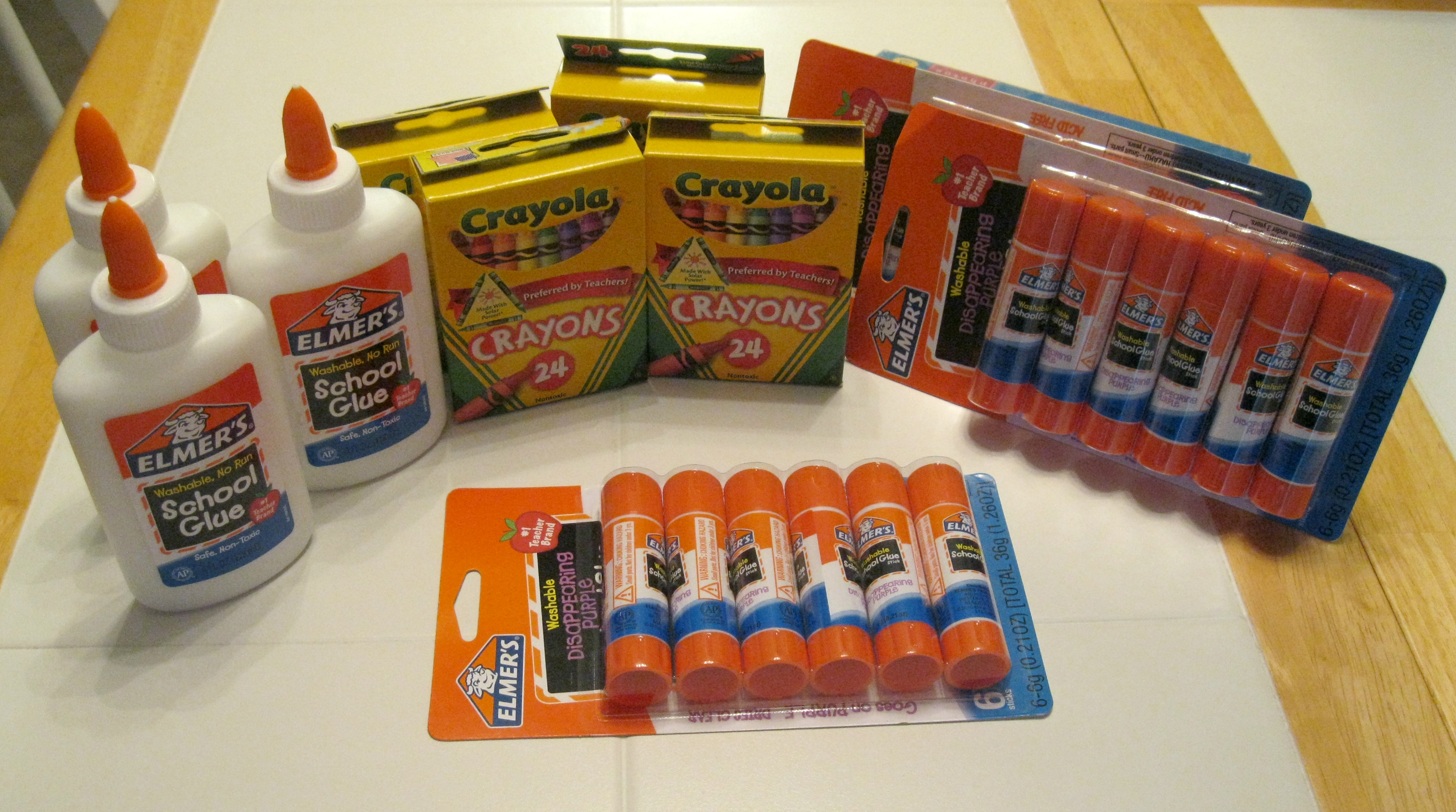
Target – snagged 3 packages of glue sticks (6 per pack) on sale for $1 each. Then to avoid running all over town for 2 other great deals, I decided to try price matching. I chose two other items: Elmer’s glue (4 oz.) and Crayola crayons (24 ct.). After gathering the items, I consulted an associate for these details.

Go to Customer Service. To price match items at my Target, I needed to checkout at customer service.

Present the FULL sale flyer. Since I only shop with the one sale page listing the sale item, I hit a little snag. Target’s policy is that they need to see the full flyer. Thankfully, each page had the sale date listed, so the associate price matched my items. Whew! Lesson learned.

Allow the Associate Time. The cashier needed to input lots of items from the flyer. I was price matching 3 bottles of Elmer’s glue from Target’s $.40 each to Publix’s 3 for $1. After completing that price match, I also used Kmart’s sale on the crayons to change the 4 boxes from $.40 each to $.24 each. These savings were not worth running across town to other stores. However, a few minutes at Target (where I planned to shop) netted the same result.

Stay Calm. Be gracious if there is a problem. (Remember you do not need to purchase an item if you disagree with the price.) Completed my checkout process, paid, and on my way.

Shared a Picture

When arriving home and realizing that my take was 18 glue sticks, 4 boxes of crayons, and 3 bottles of glue for $4.96, I took a picture. When you get a great deal, take a picture and share it with us in the comments or on Using Time Wisely’s Facebook page. Though I could leave you hanging, I will not do that to you. I will post my picture below and on Facebook. 🙂

Whether you are preparing for the new school year or just restocking your supply cabinet, you can stretch your dollars by shopping at a retailer that price matches. Saving on gas and the price of the product is a win-win option. Remember when price matching to take your full sale flyer and chose the exact same product that is advertised. Keep on stretching your dollars as you are using time wisely!

Filed Under: Stretching Your Dollars, School Items Tagged With: price matching

« Previous Page
Next Page »

Welcome to Using Time Wisely!


Presenting organizational tips and tricks to save you money, energy, and time.

To access 5 Ways to Using Time Wisely Today, click "like" on my facebook page and join in on the journey of Using Time Wisely.

Looking for something?

Email Newsletter

Sign up to receive email updates and to hear what's going on with us!

Copyright © 2026 · Lifestyle Pro Theme on Genesis Framework · WordPress · Log in