
• Home
  • About Tracy
  • Contact Me

Using Time Wisely

Organized to save money, energy, and time

  • Email
  • Facebook
  • Pinterest
  • RSS
  • Twitter
  • YouTube
  • Document Organization
    • Overview
    • Box 1
      • Credit Report/Cards
        • Credit Reports
          • Credit Updates
          • Credit Scores
        • Credit Cards
      • Personal
      • Home Ownership
      • Vehicles
    • Box 2
      • Life Insurance
      • Major Medical
      • Tax-Favored Programs
      • Prescriptions
      • Dental & Vision
      • Special Health Policies
      • Short-term Disability
      • Long-term Disability
      • Personal Insurance
    • Box 3
      • Social Security Documents
      • Retirement
      • Investments
      • Estate Planning
      • Tax Records
  • Household
    • Cleaning
    • Maintaining
    • Organizing
    • Scheduling
      • Laundry
  • Event Planning
    • Assisting
    • Attending
    • Coordinating
      • Birthday Party
      • Christmas
      • Dinner Party
      • Fall Festival
      • Field Trip
      • Lemonade Stand
      • Thanksgiving
    • Learning
    • Preparing
    • Serving
  • Miscellaneous
    • Communication
      • Customer Service
      • E-mail
      • RSS Feed Reader
    • Goals
    • Organization
    • Time Management
      • To Do List
  • Food
    • Food Prep
    • Grocery Shopping
      • Lists
      • Pricing
    • Menu Planning
    • Recipes
    • Stockpile
  • Family Activities
    • Going Out
      • Free Outings
      • Inexpensive Outings
      • Summer
    • Rewards
      • Good Grades
      • Reading
      • Summer Reading
    • Staying at Home
  • Stretching Your Dollars
    • Daily Deals
      • Groupon
      • LivingSocial
    • Drugstores
      • CVS
    • Gas Prices
    • Gifts
    • On-line Shopping
    • Pictures
    • Products
    • Restaurants
    • School Items
    • Tips
You are here: Home / Archives for Uncategorized

Planning for Success: Post Your Payday Schedule – Day 19

January 19, 2013 by Tracy

Planning for Success
Planning for success - Day 19

Photograph Credit: iStockphoto

Knowing that a successful year will not materialize on its own, we must plan and prepare for a prosperous 2013.

Throughout the 31 days of January, I will choose one topic each day to prepare or schedule for this year.

Without preparation, I know I will forget, miss, or overlook certain items. If you desire an organized year, then join me in this adventure of Planning for Success for a prosperous 2013.

To receive a daily e-mail around 11:00 a.m. with the new posts of each day, subscribe to my free daily newsletter. In case you miss a post in this series, I will provide the link to each day as the month progresses. 🙂

  • Day 1: Select a Planning Tool
  • Day 2: Add Your Priorities
  • Day 3: Print and Display Your Menu Planner – with free printable
  • Day 4: Record Membership Expiration Dates 
  • Day 5: Mark Due Dates for Monthly Bills
  • Day 6: Insert Credit Report Schedule
  • Day 7: Schedule Your Annual Home Maintenance
  • Day 8: Set Your School and Work Activities
  • Day 9: Highlight Contract and Subscription Expiration Dates
  • Day 10: Download a Savings Tracker
  • Day 11: Note Daily Deals Expiration Dates
  • Day 12: Setup Bill Pay
  • Day 13: Secure Doctor Appointments
  • Day 14: Purchase Batteries
  • Day 15: Include Holidays
  • Day 16: Jot down Library Return Dates
  • Day 17: Track Your Family’s Favorite Meals
  • Day 18: Reserve Time for Your Priorities

Day 19: Post Your Payday Schedule

Stretching our dollars is becoming a necessity in light of the economic changes this year. Between the squeeze on businesses with the health insurance increases due to Obamacare and the 2% increase in FICA (returning Social Security taxes to 6.2% from the tax reduction 4.2% rate in 2011 and 2012), families are feeling the crunch, mine included.

Many families are already struggling and taking more from their paychecks leaves them feeling stressed, discontent, and worried. To reign in these anxious feelings, we need to trust God for He is in control and then focus on what we can change.

Modified Monthly Budget

With the money earned, we can adjust our spending to work within the parameters of these additional tax measures. Working with a monthly budget, you can track your spending.

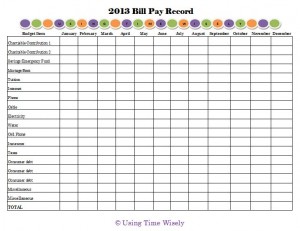
Though I do not use a dollar by dollar budget where every penny requires designation, I record our spending on my 2013 Bill Pay Record as I submit payments and then insert receipt information into our savings tracker.

FREE PRINTABLE

2013 Bill Pay Record (.pdf version)

2013 Bill Pay Record (Microsoft Excel version)

Planning for Success

You are welcome to download, customize with the Excel version, and use this free printable. To share this resource with others, please forward the link to this post rather than sending the file directly.

Thank you for protecting Using Time Wisely’s copyright.
This modified monthly budget system works for me as I see the big picture of our finances twice a month. Our family operates solely on Paul’s salary which is deposited bi-monthly. With a set time frame, I post the payday schedule within my calendar. I write, “payday” and then indicate our tithe (charitable contribution) designations.

Bill Pay Routine

Once payday arrives, I plan a time to pay, schedule, and check our bills for payment. In watching our finances twice a month, I can adjust our spending as needed to prevent dipping into our emergency fund.

For those of you without a set pay schedule, adjust as needed. I know it is especially difficult for small business owners, who depend on clients for their payday.

Work with your current situation; take initiative to schedule what you can; and get creative to stay motivated during these trying times.

In planning for success, post your payday schedule in your calendar. Since Paul’s check is automatically deposited and the pay stub is only available electronically, I need this reminder in my calendar.

Keep doing your best stretching your dollars. Some decisions are out of your hands, but you can control the spending and your attitude.

Though we are in for a rough four years complete with increased taxes due to our government’s poor planning, we have choices. In using time wisely, focus on what you can change with contentment. 🙂 Happy choosing!

Question: Have you seen a decrease in your family’s paycheck(s)? 

Filed Under: Planning for Success, Stretching Your Dollars, Uncategorized, Tips Tagged With: Planning for success

Planning for Success: Reserve Time for your Priorities – Day 18

January 18, 2013 by Tracy

Planning for success - Day 18

Photograph Credit: iStockphoto

Knowing that a successful year will not materialize on its own, we must plan and prepare for a prosperous 2013.

Throughout the 31 days of January, I will choose one topic each day to prepare or schedule for this year.

Without preparation, I know I will forget, miss, or overlook certain items. If you desire an organized year, then join me in this adventure of Planning for Success for a prosperous 2013.

To receive a daily e-mail around 11:00 a.m. with the new posts of each day, subscribe to my free daily newsletter. In case you miss a post in this series, I will provide the link to each day as the month progresses. 🙂

  • Day 1: Select a Planning Tool
  • Day 2: Add Your Priorities
  • Day 3: Print and Display Your Menu Planner – with free printable
  • Day 4: Record Membership Expiration Dates 
  • Day 5: Mark Due Dates for Monthly Bills
  • Day 6: Insert Credit Report Schedule
  • Day 7: Schedule Your Annual Home Maintenance
  • Day 8: Set Your School and Work Activities
  • Day 9: Highlight Contract and Subscription Expiration Dates
  • Day 10: Download a Savings Tracker
  • Day 11: Note Daily Deals Expiration Dates
  • Day 12: Setup Bill Pay
  • Day 13: Secure Doctor Appointments
  • Day 14: Purchase Batteries
  • Day 15: Include Holidays
  • Day 16: Jot down Library Return Dates
  • Day 17: Track Your Family’s Favorite Meals

Day 18: Reserve Time for Your Priorities

As the days go by and my calendar continues to change from blank white space to a sea of blue ink, I return to consider my priorities. Though all these other tasks on the schedule are good, I need to value my time. To accomplish my family time priority, I review my calendar focusing on very busy weeks.

In looking over those weeks, I find two or three unscheduled sections and reserve family time. Keeping my priorities in check, I need the reminder during busy seasons to hang out with my family. It may sound silly that I would need to schedule time for my family. In a way, it is silly. However, just because I am with my 2-year-old 24-hours a day, I am not always tuned into her needs and wants.

Setting aside a block of time to just be with my family keeps my schedule balanced. The family activity is not the focus, but rather the act of listening, interacting, and connecting. As I add more items to my schedule that are good and necessary, I protect those blocks of time reserved for my family.

In planning for success, reserve time for your priorities. From pillow fights to family vacations, I block time on my calendar for developing our family bond.

As you block time for your priorities, make the time slot reasonable and attainable or else the time will slip away. In using time wisely, keep scheduling while securing time for your priorities. Happy reserving!

Question: How often do you reserve time for your priorities?

Filed Under: Planning for Success, Staying at Home, Family Activities, Uncategorized Tagged With: Planning for success

Planning for Success: Track Your Family’s Favorite Meals – Day 17

January 17, 2013 by Tracy

Planning for success - Day 17

Photograph Credit: iStockphoto

Knowing that a successful year will not materialize on its own, we must plan and prepare for a prosperous 2013.

Throughout the 31 days of January, I will choose one topic each day to prepare or schedule for this year.

Without preparation, I know I will forget, miss, or overlook certain items. If you desire an organized year, then join me in this adventure of Planning for Success for a prosperous 2013.

To receive a daily e-mail around 11:00 a.m. with the new posts of each day, subscribe to my free daily newsletter. In case you miss a post in this series, I will provide the link to each day as the month progresses. 🙂

  • Day 1: Select a Planning Tool
  • Day 2: Add Your Priorities
  • Day 3: Print and Display Your Menu Planner – with free printable
  • Day 4: Record Membership Expiration Dates 
  • Day 5: Mark Due Dates for Monthly Bills
  • Day 6: Insert Credit Report Schedule
  • Day 7: Schedule Your Annual Home Maintenance
  • Day 8: Set Your School and Work Activities
  • Day 9: Highlight Contract and Subscription Expiration Dates
  • Day 10: Download a Savings Tracker
  • Day 11: Note Daily Deals Expiration Dates
  • Day 12: Setup Bill Pay
  • Day 13: Secure Doctor Appointments
  • Day 14: Purchase Batteries
  • Day 15: Include Holidays
  • Day 16: Jot down Library Return Dates

Day 17: Track Your Family’s Favorite Meals

During busy seasons, my creative inspiration in the kitchen lacks momentum. As my mind processes other issues, I want my time in the kitchen as efficient as possible. In creating menus and feeding my family, I work to keep variety, healthy choices, and multiple colors on the table at each meal.

From year to year, our family’s taste changes, so what I planned last year may not work this year. Keeping up with who likes peas, but not broccoli vs. the one who likes rice over pasta could consume my time. But in using time wisely, I track my family’s favorite meals by observing, marking, and asking.

Observing my Family

When my family’s plates return to the kitchen filled with food, then I can assume that they did not care for this meal. Sometimes the results are due to changing an existing recipe, trying something new, or failing to make the meal correctly. Whatever the reason, I won’t repeat, on purpose, that exact meal again.

On the other hand, if I notice that a meal results in mostly empty plates, I investigate further to determine if that meal is a keeper.

Marking my Menu Planner

If I find that our family enjoyed this meal and would like to have it again, then I mark it on my menu planner. By placing an (*) next to the meal, I can track my family’s favorite meals. When I need inspiration, I can review our prior menu planners for (*) and ideas.

Asking my Family

Periodically, I ask my family for their favorite meals. Though my children do not agree, I get a variety of options. At the end of the session, I have a list of at least 20 meals that the majority of our family really likes.

The following meals are included in my family’s current Top 20 favorite dinner meals’ list:

Crock Pot Dinners:

1. Chili, pigs in a blanket, corn bread, and vegetables/fruits

2. Pork chops served on toasted hamburger buns with vegetables/fruit

3. Roast beef, rice, gravy, and vegetables/fruit

Stove Top Dinners:

4. Broccoli and cheese soup with sour dough bread

5. French toast, sausage, and fruit

6. Hamburgers and homemade French fries

7. Mexican dip, tortilla chips, and vegetables/fruit

Oven Dinners:

8. Baked chicken (dipped in egg and then in crushed French fried onions), chicken or cornbread stuffing (made and then baked for 20 minutes for a little crunch), and vegetables/fruit

9. Mini meatloaves (baked in a mini muffin pan topped with shredded cheese), mashed potatoes, and vegetables/fruit

10. Papa Murphy’s Chicago-style stuffed pizza

Keeping this list updated, I can adjust my stockpile. Knowing what meals my family likes, I can watch the sales and stock up when these items are at rock bottom prices. In doing so, I feed my family, buy what we will eat, and save at the store.

In planning for success in 2013, track your family’s favorite meals by observing, marking, and asking. With a list of go-to meals, you can adjust your menu plan, watch the sales, and feed your family.

Your top 20 list will provide creative inspiration as you plan your meals, save money by stocking up at rock bottom prices, and feed your family. Continue planning for success while using time wisely. Happy tracking!

Question: What are your family’s favorite meals? 

Filed Under: Planning for Success, Menu Planning, Food, Uncategorized Tagged With: Planning for success

Planning for Success: Jot down Library Return Dates – Day 16

January 16, 2013 by Tracy

Planning for Success
Planning for success - Day 16

Photograph Credit: iStockphoto

Knowing that a successful year will not materialize on its own, we must plan and prepare for a prosperous 2013.

Throughout the 31 days of January, I will choose one topic each day to prepare or schedule for this year.

Without preparation, I know I will forget, miss, or overlook certain items. If you desire an organized year, then join me in this adventure of Planning for Success for a prosperous 2013.

To receive a daily e-mail around 11:00 a.m. with the new posts of each day, subscribe to my free daily newsletter. In case you miss a post in this series, I will provide the link to each day as the month progresses. 🙂

  • Day 1: Select a Planning Tool
  • Day 2: Add Your Priorities
  • Day 3: Print and Display Your Menu Planner – with free printable
  • Day 4: Record Membership Expiration Dates 
  • Day 5: Mark Due Dates for Monthly Bills
  • Day 6: Insert Credit Report Schedule
  • Day 7: Schedule Your Annual Home Maintenance
  • Day 8: Set Your School and Work Activities
  • Day 9: Highlight Contract and Subscription Expiration Dates
  • Day 10: Download a Savings Tracker
  • Day 11: Note Daily Deals Expiration Dates
  • Day 12: Setup Bill Pay
  • Day 13: Secure Doctor Appointments
  • Day 14: Purchase Batteries
  • Day 15: Include Holidays

Day 16: Jot down Library Return Dates

Planning for SuccessIn continuing to schedule items on my calendar, I must jot down library return dates – as I will forget. Though we occasionally borrow videos, we select mostly books.

With that said, we might borrow 25 books one week, return 15 the next, and checkout another 20 on the following visit. With our revolving system, I note the due dates on my calendar to prevent incurring fines.

Access On-line Account

With our library’s on-line account option, I login to verify the due dates and to find the order in which the books are due back. The note in my calendar reminds me to check the on-line account for the exact titles.

Set Up Alerts

In addition to checking the on-line account, I set up permanent alerts resulting in an e-mail sent 3 days prior to the due date.  The e-mail contains a list of supplies and books with the titles. 🙂

Gather Titles

When I plan a trip to the library or get an e-mail notification, I gather the books and place them in the van. With the books with us, we can drop them off on our next visit.

Going to the library is a fun activity for our family. We return supplies, play on the computers, put together puzzles, and select new supplies. Using the library service is free unless you return your borrowed items past the due date. To keep this activity free, I record the due dates on my calendar and return the items prior to that date.

In planning for success, jot down library return dates in your planning tool. Though I limited this post to the library, you can broaden this category to any borrowed item that needs returning (e.g., car rentals, video games, etc.).

By setting up reminders, you are better able to stay organized, return items on time, and prevent fines. Keep scheduling while using time wisely!

Question: Which resource does your family primarily use at the library?

Filed Under: Planning for Success, Time Management, Miscellaneous, Uncategorized Tagged With: Planning for success

Planning for Success: Include Holidays – Day 15

January 15, 2013 by Tracy

Planning for success - Day 15

Photograph Credit: iStockphoto

Knowing that a successful year will not materialize on its own, we must plan and prepare for a prosperous 2013.

Throughout the 31 days of January, I will choose one topic each day to prepare or schedule for this year.

Without preparation, I know I will forget, miss, or overlook certain items. If you desire an organized year, then join me in this adventure of Planning for Success for a prosperous 2013.

To receive a daily e-mail around 11:00 a.m. with the new posts of each day, subscribe to my free daily newsletter. In case you miss a post in this series, I will provide the link to each day as the month progresses. 🙂

  • Day 1: Select a Planning Tool
  • Day 2: Add Your Priorities
  • Day 3: Print and Display Your Menu Planner – with free printable
  • Day 4: Record Membership Expiration Dates 
  • Day 5: Mark Due Dates for Monthly Bills
  • Day 6: Insert Credit Report Schedule
  • Day 7: Schedule Your Annual Home Maintenance
  • Day 8: Set Your School and Work Activities
  • Day 9: Highlight Contract and Subscription Expiration Dates
  • Day 10: Download a Savings Tracker
  • Day 11: Note Daily Deals Expiration Dates
  • Day 12: Setup Bill Pay
  • Day 13: Secure Doctor Appointments
  • Day 14: Purchase Batteries

Day 15: Include Holidays

Our family enjoys holidays. Since I like to decorate for most of them, my girls get so excited when I begin putting away the current decorations because they know a new set is coming. For example, as I took down the Christmas trees in my children’s rooms this past weekend, my toddler asked multiple times to have her Valentine’s Day hearts put in her room. *Sigh* A mother’s work is never done. 🙂

Though most planning tools include holidays within their pages, some do not. If you create your own calendar, like me, then your planning tool is blank, and you add in the holidays. If you need to add the holiday schedule to your calendar, then Day-Finder.com includes the following lists:

American Holiday Schedule

      • January 21 – Martin Luther King Day 2013
      • February 2 – Groundhog Day 2013
      • February 14 – Valentine’s Day 2013
      • February 18 – Presidents’ Day 2013
      • March 17 – St. Patrick’s Day 2013
      • March 29 – Good Friday 2013
      • March 31 – Easter 2013
      • May 12 – Mother’s Day 2013
      • May 18 – Armed Forces Day 2013
      • May 27 – Memorial Day 2013
      • June 14 – Flag Day 2013
      • June 16 – Father’s Day 2013
      • July 4 – Fourth of July 2013
      • September 2 – Labor Day 2013
      • October 14 – Columbus Day 2013
      • October 31 – Halloween 2013
      • November 11 – Veterans Day 2013
      • November 5 – Election Day 2013
      • November 28 – Thanksgiving 2013
      • December 25 – Christmas 2013

Canadian Holiday Schedule

      • February 18 – Family Day 2013
      • May 20 – Victoria Day 2013
      • July 1 – Canada Day 2013
      • November 11 – Remembrance Day 2013

Realizing that Canadians need a few more holidays and Americans tend to celebrate everything, I included the American holiday schedule on my calendar. Knowing the dates helps in planning events, parties, and celebrations.

As you plan for success in 2013, include holidays on your calendar for which you and your family celebrate. Though there are other important dates and the above lists are not inclusive, customize your calendar with additional days, like Daylight Savings Time.

Keep using time wisely and jot down holidays and important dates to help you save time and energy. Happy planning!

Question: What additional holidays are on your calendar?

Filed Under: Holiday, Planning for Success, Event Planning, Uncategorized Tagged With: Planning for success

« Previous Page
Next Page »

Welcome to Using Time Wisely!


Presenting organizational tips and tricks to save you money, energy, and time.

To access 5 Ways to Using Time Wisely Today, click "like" on my facebook page and join in on the journey of Using Time Wisely.

Looking for something?

Email Newsletter

Sign up to receive email updates and to hear what's going on with us!

Copyright © 2026 · Lifestyle Pro Theme on Genesis Framework · WordPress · Log in