• Home
  • About Tracy
  • Contact Me

Using Time Wisely

Organized to save money, energy, and time

  • Email
  • Facebook
  • Pinterest
  • RSS
  • Twitter
  • YouTube
  • Document Organization
    • Overview
    • Box 1
      • Credit Report/Cards
        • Credit Reports
          • Credit Updates
          • Credit Scores
        • Credit Cards
      • Personal
      • Home Ownership
      • Vehicles
    • Box 2
      • Life Insurance
      • Major Medical
      • Tax-Favored Programs
      • Prescriptions
      • Dental & Vision
      • Special Health Policies
      • Short-term Disability
      • Long-term Disability
      • Personal Insurance
    • Box 3
      • Social Security Documents
      • Retirement
      • Investments
      • Estate Planning
      • Tax Records
  • Household
    • Cleaning
    • Maintaining
    • Organizing
    • Scheduling
      • Laundry
  • Event Planning
    • Assisting
    • Attending
    • Coordinating
      • Birthday Party
      • Christmas
      • Dinner Party
      • Fall Festival
      • Field Trip
      • Lemonade Stand
      • Thanksgiving
    • Learning
    • Preparing
    • Serving
  • Miscellaneous
    • Communication
      • Customer Service
      • E-mail
      • RSS Feed Reader
    • Goals
    • Organization
    • Time Management
      • To Do List
  • Food
    • Food Prep
    • Grocery Shopping
      • Lists
      • Pricing
    • Menu Planning
    • Recipes
    • Stockpile
  • Family Activities
    • Going Out
      • Free Outings
      • Inexpensive Outings
      • Summer
    • Rewards
      • Good Grades
      • Reading
      • Summer Reading
    • Staying at Home
  • Stretching Your Dollars
    • Daily Deals
      • Groupon
      • LivingSocial
    • Drugstores
      • CVS
    • Gas Prices
    • Gifts
    • On-line Shopping
    • Pictures
    • Products
    • Restaurants
    • School Items
    • Tips
You are here: Home / 2011 / Archives for June 2011

Archives for June 2011

Recipe: Chicken Salad

June 30, 2011 by Tracy

Photograph Credit: Stock.xchng (Linnell Esler)

In mentioning my homemade chicken salad earlier this week, I thought I would share this quick recipe with you. Making this chicken salad at least a day ahead helps the ingredients to mesh together for a great taste. Here are the ingredients:

                1. Chicken
                2. Mayonnaise (salad dressing, Miracle Whip, etc.)
                3. Celery
                4. Green Onions

Usually I like to have a recipe to follow when I cook. However, this recipe was given to me orally from a friend listing only the ingredients. Without a written recipe, I have tweaked it to my family’s taste. Here’s my revised recipe that now is in writing:

  1. Cook or grill 2-3 chicken breasts. Usually I will ask Paul to cook 2-3 extra pieces when he is grilling.
  2. After the chicken is cool enough to handle, break up the chicken into big chunks.
  3. Place the big chunks into a food processor and chop to a tuna consistency. (I usually chop the celery and green onions with the food processor as well.)
  4. Transfer chicken to a mixing bowl.
  5. Add 2-3 finely chopped stocks of celery.
  6. Add 2-3 finely chopped green onions.
  7. Mix in enough Miracle Whip to make it really creamy. The mayonnaise will be absorbed into the mixture, so you need enough to keep it creamy.
  8. Serve on croissant rolls, lettuce leaves, or your favorite bread.

This one batch makes about 10-14 sandwiches depending on how thick you spread the chicken salad. Enjoy!

Filed Under: Recipes, Food Tagged With: chicken salad

RSS: Feed Reader – Part 3 of 5

June 29, 2011 by Tracy

Photograph Credit: Wikipedia

In Part 1 of this series, RSS was explained. Then in Part 2, detailed instructions were given to setup your own Google Reader. Here in Part 3, I will include two different ways to ADD SUBSCRIPTIONS or web sites to your Google Reader.

If you completed the steps in Part 2, then you have a Google Reader with only 3-4 introductory posts and no current subscriptions. To begin adding subscriptions, sign in to your Google Reader.

  1. In your Internet browser (Explorer, Firefox, Chrome, etc.), type  www.google.com.
  2. At the home page, sign in with your e-mail address and password, and click SIGN IN.
  3. Your Google Reader may reappear. If it does not, then choose READER from the menu bar, i.e., mail, calendar, documents, photos, reader, etc. The menu bar is located above the words GOOGLE READER.

As you look at your Google Reader, scan the left sidebar to the bottom where SUBSCRIPTIONS is listed. At this point, this section is empty, but I will show you two ways to add subscriptions to your Reader. One is using the ADD SUBSCRIPTION button at the top of the left sidebar in your Google Reader, and the other is subscribing through the RSS feed icon on a favorite web site. Both methods work equally well, and I use both methods. If you are logged in to your Google Reader, then let’s add a subscription.

Add Subscription from Google Reader

  1. Locate and click the gray button stating ADD SUBSCRIPTION on the left sidebar of your Google Reader page.
  2. Type usingtimewisely.com in the box and click add.
  3. You have now have Using Time Wisely added to your subscriptions.

If you have other web sites where you know the URL or web site address, then you can add them here. If you are not sure of the exact web site address, then you can subscribe using the second method – through the web site.

Add Subscription from Web Site

  1. Locate your favorite web site. For this example, I will use Becentsable (a favorite site that hosts THE GROCERY GATHERING which is a list of all sales and coupon matchups organized by city and state). Since I was directed to another site when searching Becentsable.com, I found the site through the Swag Bucks search engine. (You can use Google, Yahoo, etc.) I clicked on the link and was directed to the correct web site which is Becentsable.net. (Now I can cut and paste this address into the ADD SUBSCRIPTION button in my Reader, or I can add from the site.)
  2. While on the site, I locate and click the RSS icon. On Becentsable’s site, the icon is located on the right hand side at the top of the page.
  3. I am directed to a page to choose my reader of choice. I locate and click on GOOGLE which takes me back to my reader.
  4. Back at your Google Reader page, click on SUBSCRIBE under YOU ARE NOT SUBSCRIBED YET in the center column.
  5. Once you SUBSCRIBE, then BECENTSABLE will appear below Using Time Wisely in your subscription category on your left sidebar.
  6. You can now continue to add your favorite web sites to your Google Reader. To read all the new posts, scroll down the center column.

CONGRATULATIONS! You now have subscriptions in your Google Reader. Now when you need to catch up, you can log in to your Google Reader and scroll through the posts. You are on your way to saving time and energy while staying connected. Come back next week for some customizing options to improve your reader experience.

Filed Under: Communication, RSS Feed Reader, Miscellaneous Tagged With: RSS Feed Reader

Summer Family Picnic

June 28, 2011 by Tracy

Photograph Credit: Flickr (Jeremy Noble)

Are your summer activities drawing you away from home during mealtime? Between sporting activities, outdoor concerts, zoo visits, and playground fun, our family can easily be away from home during a meal. To allow for these special events, I enjoy planning a summer family picnic.

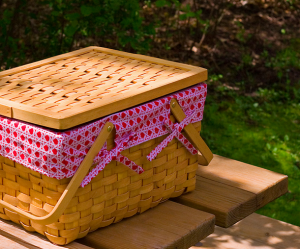
My mom gave me a great picnic basket for my birthday a few years’ back. She added a liner, cloth napkins, napkin rings, plates, cups, and silverware. I have added paper plates, paper napkins, plastic bags, and sealable bags to help make clean up quick and easy. I keep my basket stocked and ready to be loaded into the car.

When the opportunity for a summer family picnic arises, I have my basket ready, and can concentrate on the food for my family. Though I sometimes make our picnic meals at home, I am not opposed to purchasing items to help use my time wisely. Here are some meal options I choose for these special occasions:

  1. Homemade chicken salad served on crescent rolls with chips and cantaloupe;
  2. Papa John’s pizza (using a coupon, of course);
  3. Publix turkey submarine sandwiches, chips, and fruit;
  4. Bucket of fried chicken, baked beans, chips, and fruit;

For me, getting the family together with all the gear and arriving on time keeps me more than busy. If I can place side items into our picnic basket and bring drinks, then purchasing the main dish helps me to use my time wisely. In addition to the options listed above, we also consider restaurants where kids’ meals are free, e.g. Firehouse Subs, Chick-Fil-A, etc.

I recently heard about Earth Fare’s, a local grocery store, Family Dinner Night that offers up to 6 free kids’ meals with the purchase of a $5 or more adult meal. This store has a reputation for offering very healthy meals. Though I have not visited the Thursday Family Dinner Nights, I definitely would consider this option.

By choosing a picnic dinner from these meal options, I am able to use my time wisely by focusing on arriving, parking, unloading, and enjoying my family. Having picnic menu options, either written down or thought through, keeps me organized and prepared for those quick plan changes.

What additional summer picnic menu options would you add to this list?

Filed Under: Event Planning, Coordinating Tagged With: picnic, summer

Multitasking: Giving Attention and Folding Laundry

June 27, 2011 by Tracy

As my children continue through this really long phase of “Watch me,” I find myself constantly distracted from my tasks at hand. Routine chores can take twice as long due to the number of interruptions and moments spent watching my children. Realizing that my children will not be young long, I try to multitask as often as possible.

This evening while timing my loads of laundry, I gave my older kids the attention they craved while folding clothes. With the timer set for ten minutes, my son began playing his Wii game while I watched him and folded the laundry. He enjoyed explaining his player’s moves and being the center of attention. When the timer sounded, my son was off to take his shower.

My daughter’s game was then setup, and she received the attention. Of course, she needed help, but she was focusing on her game and showing me how she was winning. At the end of the time limit, my kids had been given special attention, and my load of laundry was folded.

In using my time wisely, I was able to multitask by giving my kids the attention they desired while folding a load of laundry. Though I am always looking for ways to multitask, I do not always succeed.

My goal is to use my time wisely while spending time with my family and keeping our home running as smoothly as possible. Multitasking saves me time and energy. I just need to find the components that work for me. If you have mastered a chore by multitasking, please share your success in the comments.

Filed Under: Cleaning, Household, Maintaining Tagged With: laundry

Personal: Children’s Documents

June 26, 2011 by Tracy

Are you ready to complete the second category in organizing our documents? I thought you might be ready to reach a milestone.

Thus far, we have filed our important personal documents in the accordion file slots: four, five, and six.

Today, we commence the final slot in this category . . . my children’s documents housed in the seventh opening from the front of file box 1.

Though my three children are young (all ages 6 and under), they have still acquired a few personal documents. Here are the documents contained in this file slot:

Child #1:

  • Newborn Hearing Screen Results
  • Hearing Screen Certificate
  • Born to Learn Certificate from public school system
  • Build-A-Bear Birth Certificate (received from relatives)
  • Kindergarten diploma 🙂

Child #2:

  • Newborn Hearing Screen Results
  • Hearing Screen Certificate

Child #3:

  • Newborn Hearing Screen Results
  • Hearing Screen Certificate

As I obtain other certifications, transcripts, scores, and other personal documents for my children, I will probably need to expand this file. Eventually, each child will get his or her own file slot. Until that time, I keep the documents in the order of their birth in one file slot.

Yea! The personal documents category is now complete. I’m celebrating with you as you continue this journey to organize your family’s important documents. Come back next week for a checkup. Happy organizing!

Filed Under: Document Organization, Personal Tagged With: personal documents

Next Page »

Welcome to Using Time Wisely!


Presenting organizational tips and tricks to save you money, energy, and time.

To access 5 Ways to Using Time Wisely Today, click "like" on my facebook page and join in on the journey of Using Time Wisely.

Looking for something?

Email Newsletter

Sign up to receive email updates and to hear what's going on with us!

Copyright © 2026 · Lifestyle Pro Theme on Genesis Framework · WordPress · Log in