

• Home
  • About Tracy
  • Contact Me

Using Time Wisely

Organized to save money, energy, and time

  • Email
  • Facebook
  • Pinterest
  • RSS
  • Twitter
  • YouTube
  • Document Organization
    • Overview
    • Box 1
      • Credit Report/Cards
        • Credit Reports
          • Credit Updates
          • Credit Scores
        • Credit Cards
      • Personal
      • Home Ownership
      • Vehicles
    • Box 2
      • Life Insurance
      • Major Medical
      • Tax-Favored Programs
      • Prescriptions
      • Dental & Vision
      • Special Health Policies
      • Short-term Disability
      • Long-term Disability
      • Personal Insurance
    • Box 3
      • Social Security Documents
      • Retirement
      • Investments
      • Estate Planning
      • Tax Records
  • Household
    • Cleaning
    • Maintaining
    • Organizing
    • Scheduling
      • Laundry
  • Event Planning
    • Assisting
    • Attending
    • Coordinating
      • Birthday Party
      • Christmas
      • Dinner Party
      • Fall Festival
      • Field Trip
      • Lemonade Stand
      • Thanksgiving
    • Learning
    • Preparing
    • Serving
  • Miscellaneous
    • Communication
      • Customer Service
      • E-mail
      • RSS Feed Reader
    • Goals
    • Organization
    • Time Management
      • To Do List
  • Food
    • Food Prep
    • Grocery Shopping
      • Lists
      • Pricing
    • Menu Planning
    • Recipes
    • Stockpile
  • Family Activities
    • Going Out
      • Free Outings
      • Inexpensive Outings
      • Summer
    • Rewards
      • Good Grades
      • Reading
      • Summer Reading
    • Staying at Home
  • Stretching Your Dollars
    • Daily Deals
      • Groupon
      • LivingSocial
    • Drugstores
      • CVS
    • Gas Prices
    • Gifts
    • On-line Shopping
    • Pictures
    • Products
    • Restaurants
    • School Items
    • Tips
You are here: Home / 2011 / Archives for August 2011

Archives for August 2011

Growing Pains of an Organizational System

August 22, 2011 by Tracy

Do you have an organizational system in place that is practical but has some flaws? I do. I am finding that just because an organizational system once worked does not mean that it will continue to work with my growing family.

In learning to recognize problem areas from my family’s reactions, I can better fix the problem. Consider the growing pains of my organizational system for our beach balls.

The Need for Beach Balls

My children love to play with balls. At the age of 6 months, my son took a Weeble and tossed it across the room nailing my husband. Yes, it hurt! After that incident, we substituted a beach ball for the Weebles, who were put away until our son learned not to throw them.

The beach balls have offered many hours of fun without pain or broken items. All three of our children have enjoyed rolling, kicking, tossing, hitting, serving, and bouncing these balls around our house. I love the variety of games we can play with the beach balls, but what I don’t like is how big they are to store.

The Problem with Beach Balls

In the entryway of our home, we keep all the toy balls in a large tote. However, the 3 large beach balls (one for each child) continue to roll off the pile of balls into the hallway.

Besides the frustration of having them out of place, the beach balls have become a hazard when they come to rest at the bottom of the stairs. In coming downstairs in the dark one night, my husband tripped over a beach ball. Though he did not get hurt, I had to find another solution for storing these balls.

The New Solution for Beach Balls

With limited space due to all the other toys our family has accumulated, I needed to work within the boundaries of the ball tote. Since the problem is keeping them in the tote, I have chosen to deflate 2 of the 3 beach balls.
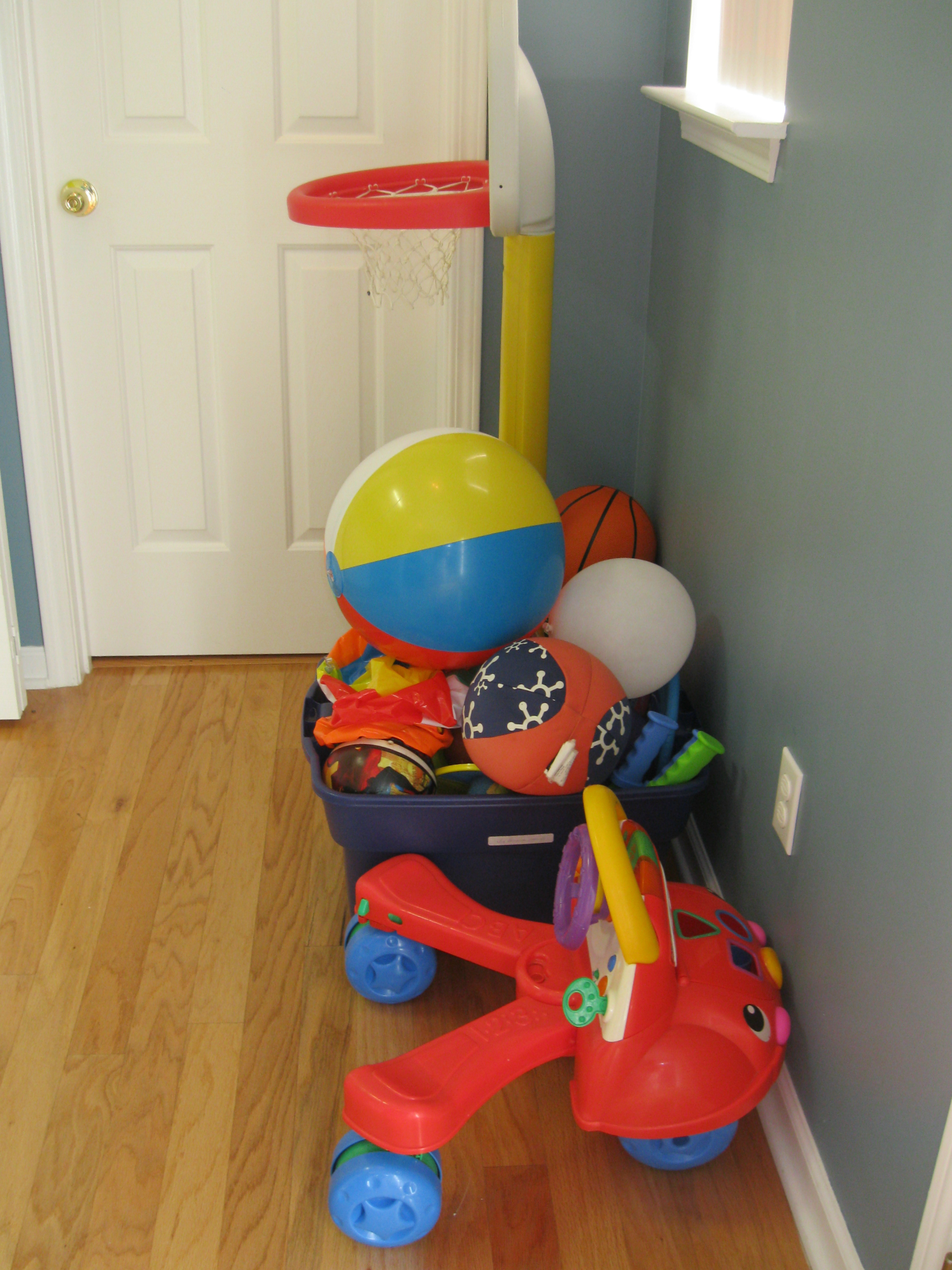
When all of my children need their ball, I can easily blow up the other 2 balls. After play, I can deflate 2 of them and place them in the ball box. There is room for one inflated beach ball, and now all the toy balls fit in the tote.
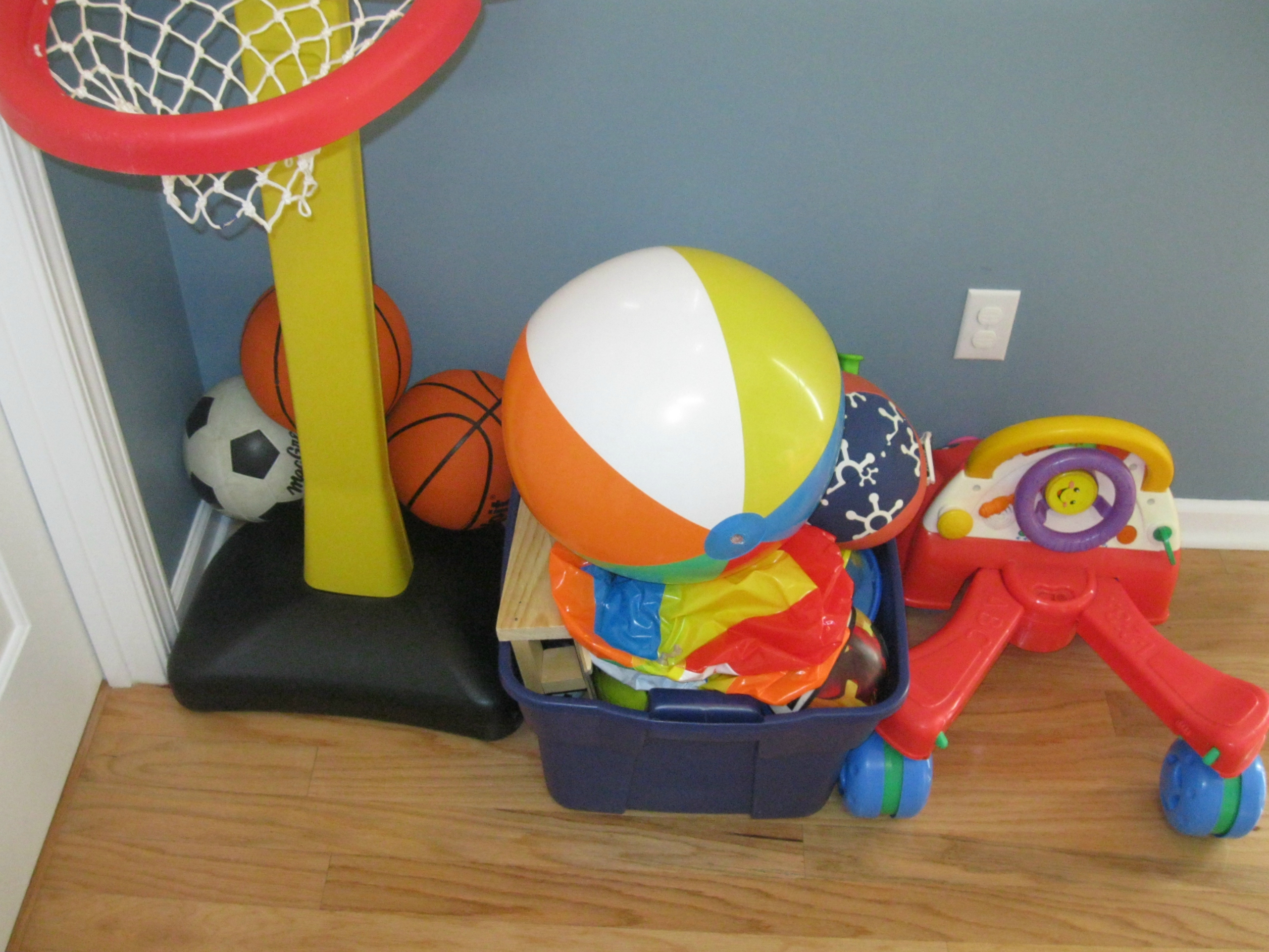
As I identify frustrating systems that are in place, I am learning to find another solution. What worked last year with two active children and an infant is not necessarily working this year with three very active children.

While on my motherhood journey, I am becoming more aware of my family’s preferences and working through the growing pains of the current organizational system to another organized system that works for us all. Whether it is reorganizing plastic food storage containers or beach balls, I hope to keep my home a clean, organized haven for lots of fun and laughter.

Question: What organizational system in your household has become a frustration rather than a help? Please click the Leave your Comment button to add your answer.


Filed Under: Household, Organizing Tagged With: organize

Home Ownership: Personal Articles Insurance Policy

August 21, 2011 by Tracy

We are making progress getting those important documents gathered, organized, and filed! Thus far, we have created a home for our credit report/credit card documents, personal documents, and now our home ownership documents.

Having filled 8 file slots, we are ready to address the ninth file opening from the front of the accordion file. My ninth file slot houses two additional sets of home ownership documents. The first set of paperwork is our personal articles insurance policy documents.

Description

If you are unfamiliar with this type of insurance and you have some valuable possessions, then consider this inexpensive type of policy. Per State Farm’s web site:

You may have more valuable possessions than you realize. Your Homeowners Policy [or Renter’s Insurance Policy] can provide some coverage, but with deductibles and limitations. A Personal Articles Policy can provide the additional coverage that you may need.

Some items the Personal Articles Policy may cover are:

  • Jewelry
  • Furs
  • Cameras
  • Musical Instruments
  • Silverware/Goldware
  • Golf Equipment
  • Fine Art (such as oriental rugs and paintings)
  • Collectibles
  • Sports Equipment
  • Computer Equipment

Coverage

Our personal articles policy was written back in 2004. We began our coverage by insuring my wedding and engagement ring set. Later, we added our cellular phones and our point-and-shoot camera. Then in 2008, State Farm cancelled all cellular phone coverage since too many individuals were losing their phones and upgrading to another model. We lost our coverage on our cellular phones, but then we purchased a video camera which we added to our policy.

Having the added insurance on these items assures a replacement if the item is lost or repairing charges if the item is damaged. Though we have not lost of any of the items, we did need to replace our first point-and-shoot camera. We took a trip by air. When we arrived at our destination, our camera case was cracked resulting in very dark pictures. When we returned home, we contacted our agent for instructions. We then did the following:

    1. Purchased a comparable model to our current broken camera. We ended up getting a better camera for less than we purchased the original because our exact model was no longer available for purchase.
    2. Took the old camera and new camera with receipt to our State Farm agent.
    3. Traded our old camera for a check in the amount of the new camera price, verified with the receipt.
    4. Removed the old camera from our personal articles policy and added the new camera.

The process was very easy, inexpensive, and worth our time and energy!

Cost

Your annual premium will depend on your insurance company’s rates and the value of the items you add to this policy. Our policy to cover my ring and our 2 cameras is $43 per year. Yeah! It’s only $43, and these items are fully insured. If we had not had this insurance when our camera broke, we would have spent much more than $43 to replace it.

In addition to saving us replacement costs for broken insured items, this policy also gives us an additional policy with State Farm. We receive premium discounts for having multiple insurance policies. For us, this policy pays for itself because our policies on our vehicles and home receive more of a discount than this policy cost.

With a very reasonable insurance policy, you can cover your valuable possessions. I highly recommend a personal articles policy for your peace of mind. Our policy continues to be worth our money, energy, and time!

Filing System

My personal articles paperwork consists of:

    • Original binder document
    • Documents indicating a change, addition, or deletion
    • Current policy
    • Receipt for the current annual premium

All of these documents are paper clipped together and housed in the ninth file slot of my accordion file under the category of home ownership documents.

If you have never heard of a personal articles policy, then I hope you have been informed from the description, coverage, cost, and filing system. Next week, I will share the second and last set of documents in this file slot which will complete the home ownership category. Keep up the document organization as you continue in using time wisely. Happy organizing! 🙂

Filed Under: Document Organization, Home Ownership Tagged With: insurance

ArtsCow.com: Photo Prints and Gifts – Part 1 of 2

August 20, 2011 by Tracy

Photograph Credit: ArtsCow.com

With a love for personalized gifts, I struggle with the price tag of photo books. A simple book can run upwards of $20 with no bells and whistles. Having used a few different companies to print photo books, I have been extremely impressed with ArtsCow.com because they are adaptable, user-friendly, and affordable!

Adaptable features. To help stretch our hard earned dollars, I use my credits and discounts when purchasing photo prints and photo gifts for family and friends. The photo books are my favorite.  Around Father’s Day, I typically order one book for each child to give to Daddy.

ArtsCow’s photo book options are the most adaptable among Shutterfly, Winkflash, and Snapfish. I can adjust the text, add extra layout options for pictures, and move all the items around on the page. If the layout I need is not available in a template, then I can create my own. I am not limited by a standardized format.

User-Friendly web site. ArtsCow’s web site is very easy to navigate. As with all photo books, this project is time consuming. I spend 4-5 hours creating a book with upwards of 200 pictures. If you have fewer pictures, then you could probably create a book in less than an hour. A great feature is random fill-in where all your pictures are put in the book, and then you can move them around.

Affordable projects. ArtsCow.com often sends coupon codes which need to be validated. Once validated, the credits will stay in your account until either you use them or they expire.

I currently have coupons for free prints from now until August 2013. Though the prints are free, I am responsible for the shipping charges. I have been very impressed with ArtsCow.com’s affordable quality as they have printed our family calendar for the past 3 years, 10+ photo books, prints, and a memory card reader.

Registration

If you are interested in saving on your photo prints and using the services of ArtsCow.com, then register for free.

  1. Go to www.artscow.com. (Note: This is my referral link. By registering through this link, Using Time Wisely gets compensated without any cost to you. Your support of Using Time Wisely is greatly appreciated. For more information on my affiliate links, you can read my full disclosure policy.)
  2. At the top of the page, click on MY ACCOUNT.
  3. Choose REGISTER for a free account.
  4. Complete the required fields, word verification, accept the terms, and JOIN.

Credit and Discount

Once you have joined, you can check your credits.

  1. Go back to the HOME page (just click on “ARTSCOW” in the top left corner.)
  2. Go to MY ACCOUNT at the top of the page.
  3. Login with your e-mail account and password.
  4. On the left sidebar under Members Area, click on the 4th option down, CREDIT AND DISCOUNT.
  5. A list of your free credits will load. As a new member you should have a minimum of 1200 free prints and 3 8”x8” photo books. Now, these free prints will be spread out over most of the next year. Here are the details of the free print credits:
    • Please use the credits between the start time and expire time
    • If you have free print credits in your account already, the new prints credits will be added after them.
    • No more than 100 free 4×6 and 50 free 5×7 print credits can be used per month.
    • Shipping fees are not included
    • Promotion details may change at any time without notice
    • Valid on orders placed and shipped within the globe only (really . . . no shipping to Mercury or Halley’s Comet?🙂 )
    • All credits issued will not be deleted except repeated registrants
    • ArtsCow.com reserves the right to terminate this offer at any time without notice.

Coupon Codes

While you are still at the CREDIT AND DISCOUNT page, add the current coupon code for an additional 600 free prints. This coupon code expires on Monday, August 22. You do not need to order your pictures by Monday, but you must validate the coupon by Monday. The free prints will be tagged on at the end of your current 1200 free prints.

  1. In the VALIDATE BOX, enter AUG11PRTS.
  2. Click the VALIDATE button.
  3. You will receive a message stating that 600 more prints have been added to your credits.

As the credits keep coming, you will be set with free photos for a long time! ArtsCow.com sends out e-mails periodically with coupon codes. Just add the coupon codes to your Credit and Discount page and validate. You will then have the credits when you are ready to order your prints and gifts.

Using ArtsCow.com to order our photo prints and gifts with our credits and discounts has helped stretch our hard earned dollars. In using time wisely, I find ArtsCow.com adaptable, user-friendly, and affordable. In fact, I just placed an order for 3 free 8”x8” photo albums, 10 free 5”x7” prints, and 1 memory card reader discounted to $7.99 and paid a total of $23.15.

ArtsCow.com saves me money (from credits and discounts), energy (searching for promotional codes and other deals), and time (get to adjust and create my own layouts). Come back next week for Part 2 where I will walk you through the process of placing an order with ArtsCow.com. Until then, keep stretching your dollars while using time wisely!

Question: How do you stretch your dollars when purchasing photo prints and gifts?

Filed Under: Pictures, Stretching Your Dollars Tagged With: Artscow.com

Chick-fil-A: Reservations for Free Breakfast Entrée

August 19, 2011 by Tracy

Looking for a family activity over breakfast? Well, Chick-fil-A is offering a free breakfast entrée during the week of September 6-10, to those who place a reservation on Monday, August 29, 2011.

My family loves Chick-fil-A, so we will be reserving our spots. To help you, I will post a reminder early Monday morning on August 29. In the meantime, here are the details:

Photograph Credit: Chick-fil-A

Filed Under: Going Out, Free Outings, Family Activities Tagged With: Chick-Fil-A

Grocery Shopping: Creating your Grocery Lists – Part 1 of 3

August 18, 2011 by Tracy

After a slight interruption last week with posting my grocery savings at Publix and Bi-Lo, I will return to my process for feeding my family. Before I step foot in the grocery store, I have already prepared to feed my family by creating a menu plan.

My Menu Planning Process

Step One: Choose a menu plan. My preference is the monthly plan, but in discovering your type of plan, I share links to other types of plans. Remember, a menu plan is a tool to help free you from the “5:00 p.m.-oh-what’s-for-dinner-tonight” quandary.

Step Two: Add meals to your plan from the food you have on hand. If you follow my system, you might not have many choices right away. You will need to build up your stockpile to have more options. When you start with the food in your house, menu planning gets easier.

For me, this second step was the hardest to accomplish. It was mind over matter. I had to re-train my thinking from choosing meals we wanted to eat to scheduling meals I could make now.

Though it took me about 2-3 months to “get it,” the savings are incredible. Using time wisely to change my thought process was time well spent.

Step Three: Continue to add meals. In creative inspiration, I shared times I am thinking about menu planning. By menu planning while putting away groceries and shopping, I can quickly make up a menu plan without much fuss. It takes lots of practice, but it is using time wisely to master menu planning. Your lowered family food budget will be a constant reminder of your success.

My Grocery Shopping Process

Step Four: Creating grocery lists. Today, I will begin a 3-part series sharing my tips for creating grocery lists:

    • Part 1: Identify needed items
    • Part 2: Select sale items
    • Part 3: Compile a list for each store

Part 1: Identify Needed Items

As I prepare to create my grocery list, I first identify my needed items. To do so, I will consult the pad of paper on the side of my refrigerator and then check my supplies for needed items.

Pad of Paper

In our household, we keep a pad of paper on the side of our refrigerator. Usually there are a number of items on this list due to the system we have in place.

When you remove the last bottle of ketchup, you write “ketchup” on this pad of paper. If you notice we are running low on butter or milk, these items also get added to the pad of paper. Other items on this paper might be snacks and lunch foods for my husband to take to work, paper products, and medications. With this system in place, I only need to check the pad of paper to see what items I need to replenish.

Supply Areas

I will then check the refrigerator, pantry, and both freezers for any items that are low in supply. I will add these items to the list on the pad of paper.

With a complete list of all the items my family needs, I am ready to select sale items for my grocery list. Come back next week for more tips on using time wisely in creating your grocery lists.

Question: How do you keep track of items needed in your household?

Filed Under: Grocery Shopping, Lists, Food Tagged With: grocery lists

« Previous Page
Next Page »

Welcome to Using Time Wisely!


Presenting organizational tips and tricks to save you money, energy, and time.

To access 5 Ways to Using Time Wisely Today, click "like" on my facebook page and join in on the journey of Using Time Wisely.

Looking for something?

Email Newsletter

Sign up to receive email updates and to hear what's going on with us!

Copyright © 2026 · Lifestyle Pro Theme on Genesis Framework · WordPress · Log in